PAGE 5
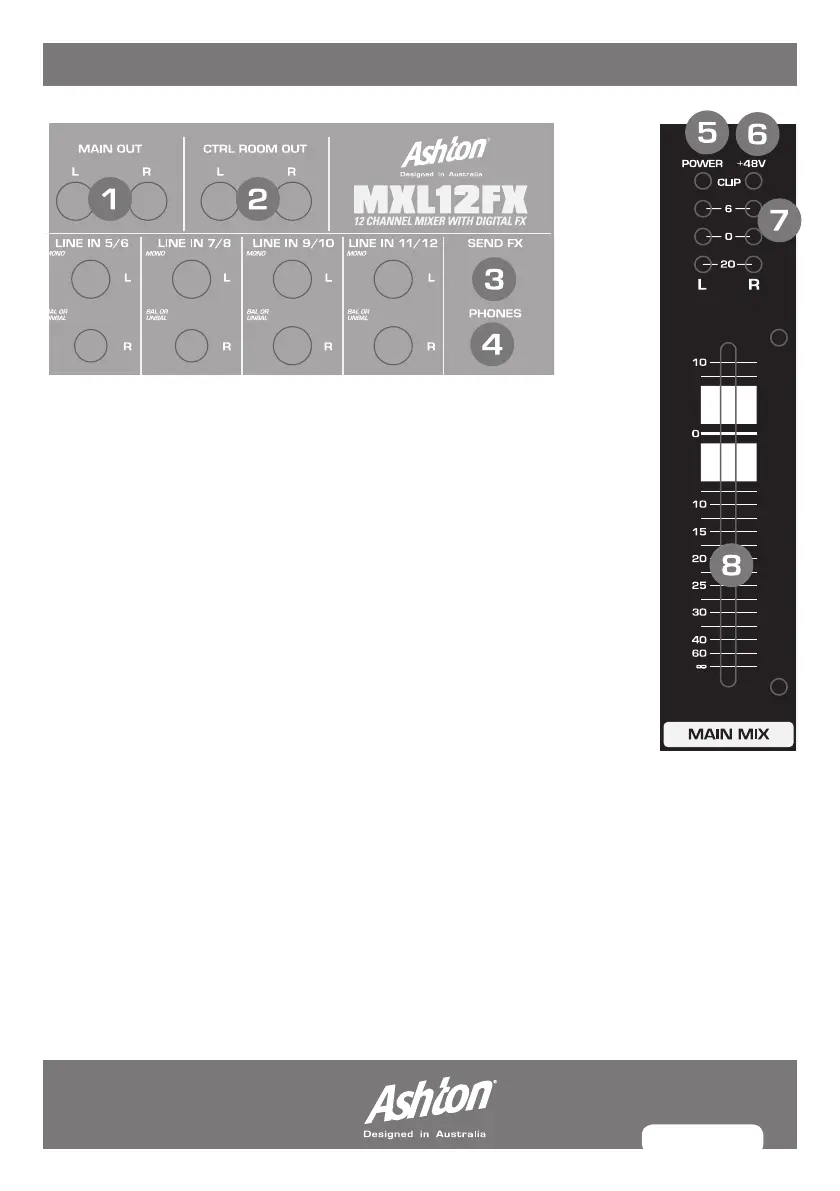
MAIn ContRoLs
1. MAIN OUT: ¼"Stereomainoutput(outputsmixersignals).
2. CTRL ROOM OUT: ¼"Stereomainoutput(outputsmixersignals).
3. FX SEND: This outputs the fx signal. You can connect this to the input
ofanexternaleffectsdeviceinordertoprocesstheFXbussignal.
Once an effects mix is created, the processed signal can then be
routed from the effects devices outputs back into a stereo input.
4. PHONES: This is where you connect your headphones.
5. POWER: Indicated that the console is powered on.
6. +48V: Indicates that the phantom power is on.
7.LEVEL INDICATOR: Displaystherelevantsignallevel.
8. MAIN MIX FADER: Adjusts the level of the entire mix which is then
sent to the main out jacks.
MX12FX_MANUAL.indd 5 8/07/10 5:20 PM



 To Next Page