PAGE 8
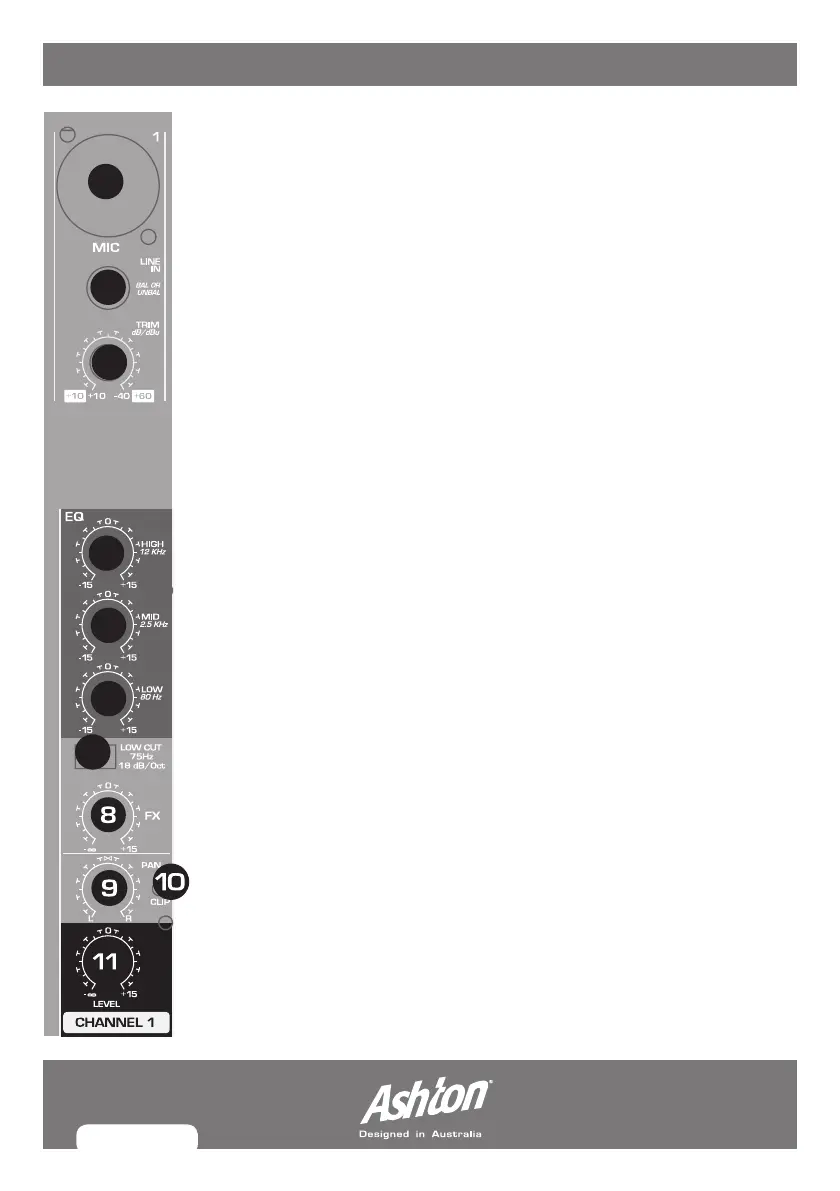
Mono CHAnneLs 1-4
1. MIC: BalancedmicrophoneinputviatheXLRconnector.
2. LINE IN: Balancedlineinputona¼"connector.Unbalanceddevices
(monojacks)canalsobeconnectedtotheseinputs.
You should not use the microphone and the line input of a channel
simultaneously.
3. TRIM: This adjusts the input gain. This control should always be turned
fullycounter-clockwisewheneveryouconnectordisconnectasignal
sourcetooneoftheinputs.Firstvaluerange(+10to+60)showsMIC
inputsignals,secondvaluerange(+10to+60)referstothelineinput.
4. EQ: HIGH:Thisadjuststhehighfrequencies(-15dBto+15dB)ofthe
inputtedsignal.Whensetto0,thefrequencyisunaffected.
5. EQ: MID:Thisadjuststhemiddlefrequencies(-15dBto+15dB)ofthe
inputtedsignal.Whensetto0,thefrequencyisunaffected.
6. EQ: LOW:Thisadjuststhelowfrequencies(-15dBto+15dB)ofthe
inputtedsignal.Whensetto0,thefrequencyisunaffected.
7. LOW CUT: Thiseliminatesunwantedlow-frequencysignals.
8. FX: This adjusts the fx level that is sent to the internal fx and also the
“send fx” jack.
9. PAN: This determines the position of channel signal within the stereo
image and how it is distributed to the left and right speakers.
10. CLIP:ThisLEDilluminateswhentheinpputsignalistoohighwhich
cancausedistortion.Usetrimcontroltoreducethelevel.
11. LEVEL:Thisdeterminesthelevel(volume)ofthechannelsignalin
the main mix.
1
2
3
4
5
6
7
MX12FX_MANUAL.indd 8 8/07/10 5:20 PM



 To Next Page