PAGE 6
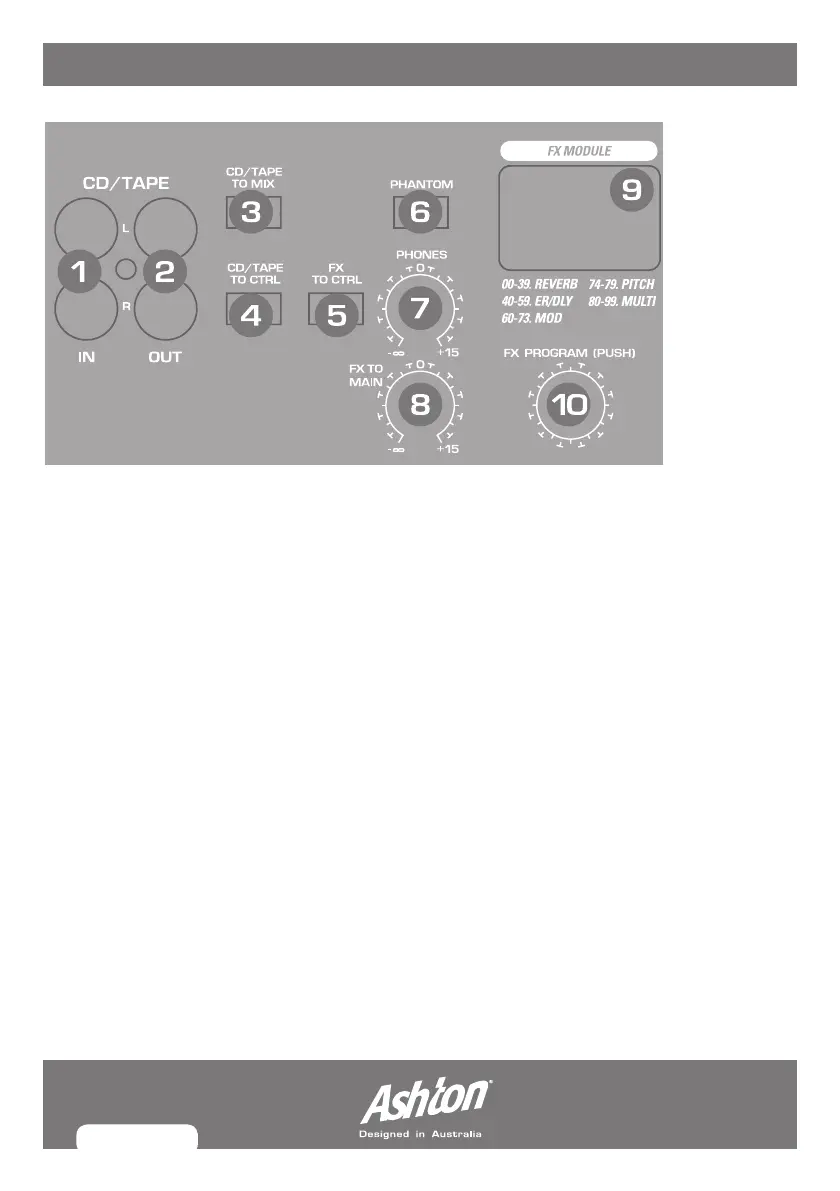
DIGItAL eFFeCts PRoCessoR
Thebuilt-indigitalstereoeffectsprocessoroffersalargenumberofstandardeffectssuch
asHall,Chorus,Flanger,Delayandvariouscombinationeffects.UsingtheFXcontrol,you
can feed signals into the effects processor.
1. CD/TAPE IN:RCAjackinputforexternalsignalsource(cd/tapeconnection)intomixer.
2. CD/TAPE OUT:FormixersoundoutputviaRCAjack.Connecttheinputsofacomputer
sound card or recorder here.
3. CD/TAPE TO MIX: WhentheTAPETOMIXbuttonispressed,the2-trackinput
isassignedtothemainmixprovidinganadditionalinputfortapemachines,MIDI
instruments or other signal sources that do not require any processing.
4. CD/TAPE TO CTRL:Presstomonitorthe2-trackinputviatheCTRLROOMOUT
outputs. This provides an easy way to monitor signals coming back from an external
source to ensure they are recording correctly.
5. FX TO CNTRL:EngagethisinordertomonitortheFXsignalthroughyourheadphones
or monitor speakers.
6. PHANTOM POWER:Thisengages/disengagesphantompowerformixercompatibility
withcondensermicrophonesanddevicesthatrequirephantompower.WhenPhantom
powerisengaged,theLEDwillbelit.
MX12FX_MANUAL.indd 6 8/07/10 5:20 PM



 To Next Page