EasyManua.ls Logo

Aspes LA25P - Wash Programme Selection; Selecting a Wash Programme; Additional Function Buttons

Aspes LA25P
Print Icon
To Next Page IconTo Next Page
To Previous Page IconTo Previous Page
Loading...
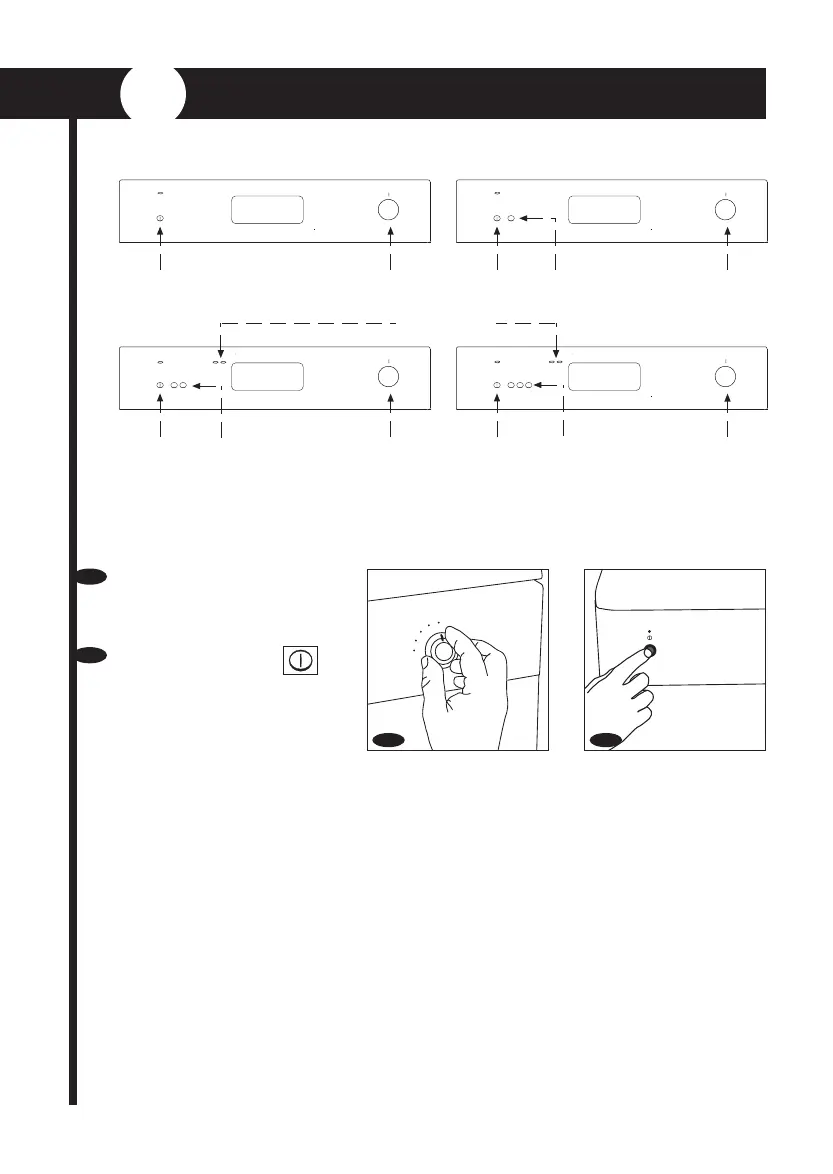
To select the wash programme proceed as follows:
3
WASH PROGRAMME SELECTION
Select programme 1
(pre-wash), without
utensils or detergent.
Press the On/Off
switch.
a
b
ADDITIONAL
BUTTONS
Additional function
buttons.
Depending on the model
you have chosen, the
dishwasher will have
additional buttons which
are pressed according to
the programme selected.
SALT AND RINSE AID
REFILL INDICATORS
There are several programme types depending on the model of dishwasher. It is very important
to select the most suitable programme in accordance with how dirty the dishes are and the
amount and type of dishes.
ADDITIONAL
BUTTONS
ADDITIONAL
BUTTONS
ADDITIONAL
BUTTONS
ADDITIONAL
BUTTONS
b
1
2
3
4
5
a
ON / OFF
PROGR
MME DIAL
ON / OFF
ON / OFF ON / OFF
PROGR
MME DIAL

Table of Contents

Related product manuals