Copyright © SARGENT Manufacturing. All rights reserved.
Reproduction in whole or in part without the express written permission of SARGENT Manufacturing is prohibited.
5
A7857A • 800-810-WIRE (9473) • www.sargentlock.com
G1-LU, G1-PK, G1-TU and G1-TP Programming (2000 Users)
Important
Profile Series v.G1.5 controllers replace v.G1 controllers. Product is still ordered as “G1-” prefix. Controllers are
labeled “G1.5”.
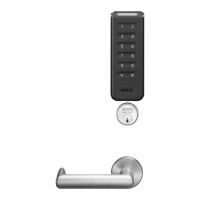
• The Keypad Lock can support 2000 users. Each user is assigned a User Number in addition to the code used
for entry.
• SofLink™ Plus applications software must be used with PA & TA (no keypad) controller for programming
• The Master Code is always User “01”. The Master Code assigns the Emergency and Supervisory Codes and is
also used for programming. Users are deleted through the Master Programming Code only.
• Emergency code is a 10 second unlock time and will override a thrown deadbolt on a mortise lock
• v.G1.5 locks allow multiple Supervisory users, the *default Supervisory Code is User “02”. Additional
Supervisory users can be entered starting with User Number "03". The Supervisory Code allows temporary
lock out of selected users, changes duration of unlock time, requests infrared interrogation output, and may
add additional User Codes
• The User Codes are entered at user number “03” or higher. User numbers do not have to be used or entered
sequentially.
Note: All User Codes must be followed by an asterisk ( * )
• The “Lock Out” user is location dependent - all users above the chosen user number location are locked out of
the keypad. To ensure that all users except Master, Supervisor, Emergency and Panic are locked out, program
this user at user number location "03".
• The “Passage” user has precedence over all users except the “Panic” user. The lock must be toggled back into
a locked state for other users to function.
To Begin Programming
The Lock Controller is preset at the factory with Master Code “1234”.
Entering 1234 * will unlock the lock allowing the lever handle to retract the latchbolt.
Note: The Master Code must be changed (i.e., "Forced Change") from the factory default “1234” prior to adding users.
Initial Set-Up Procedures
The following are typical procedures to be used when setting up your Profile Series v. G1.5 lock:
• If a mistake is made during any of the procedures, depress the “*” key several times until the yellow LED goes out
• If no keystroke is made in a 30 sec. timeframe, the programming up to that point will default and you will have
to start over
Keypad Programming Instructions for the Profile Series LK/v.G1.5 Lock
Sequence Number
• Single digit - 0-9
• Latest transaction - 0
• Oldest transaction - 9
User Number
• Three digits - 001 through 099
• User numbers assigned at time of programming
Transaction Descriptions
• Will vary
Optional Equipment
• Printer Paper (6 Rolls) - 52-0034 used for infrared
printers
• Infrared Printer - 52-2069 - used to download the
user and transaction type.
• Remote Unlocking - 52-3010 - used for remote
unlocking of Profile mortise lock. When the deadbolt
is thrown and the remote unlocking feature is used,
both the latchbolt and deadbolt can be retracted by
turning the lever handle.
To LED
location
Infrared
printer
(52-2069)
Hold an infrared printer up to the infrared
LED (as shown). An HP82240B Infrared
Printer can be used to download information
from the keypad to a printout.
3


 To Next Page
 Loading...