9
e series saltwater chlorinator Installation Manual
8
e series saltwater chlorinator Installation Manual
Section 6. Operation
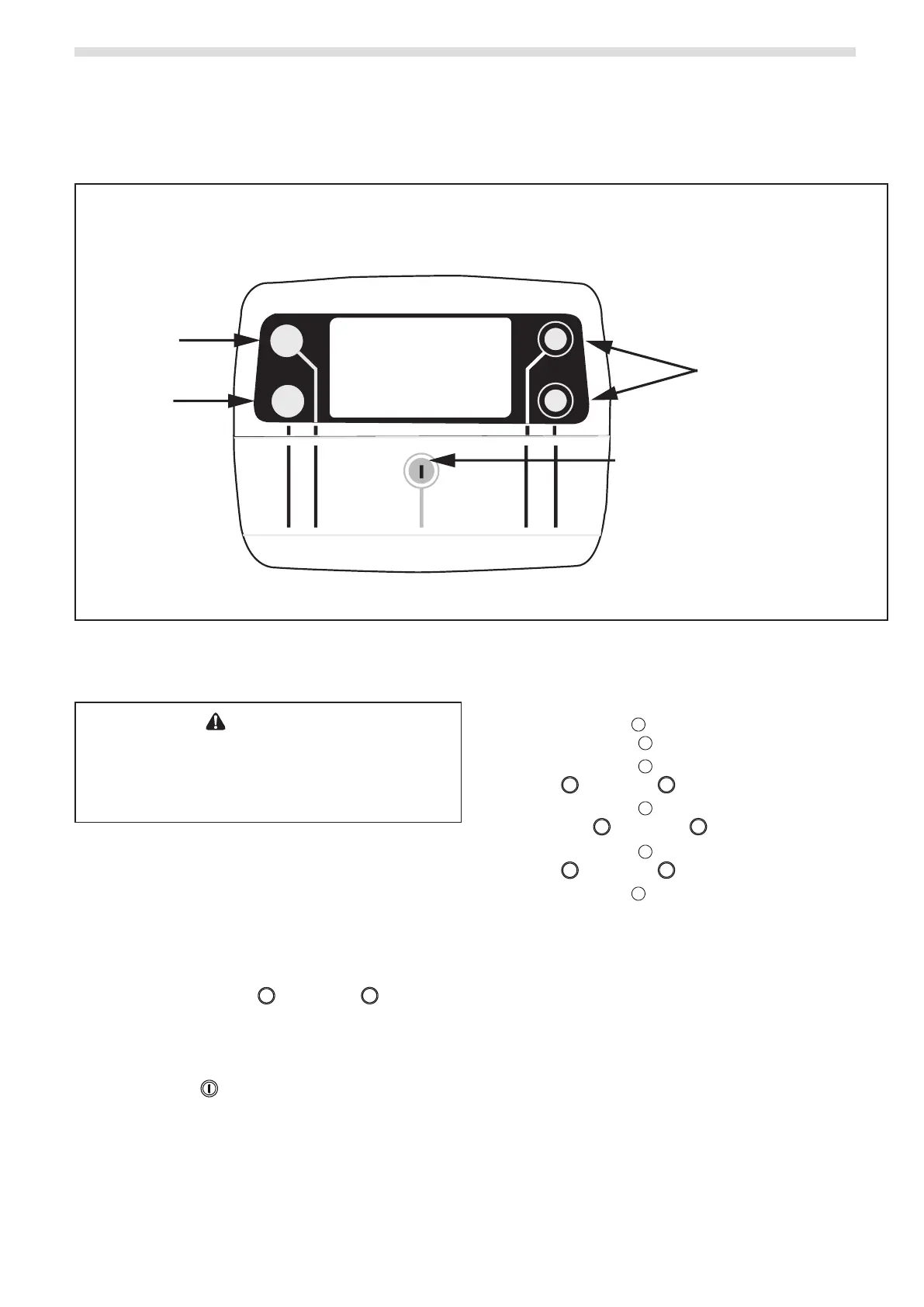
6.1 User Interface Overview
ENTER
MENU
UP
AUTO
DOWN
User Menu
Enter the
highlighted
selection
Browse current menu;
Increase or decrease
a setting
Auto - Running/Stopped
Manual - Running
Manual - Stopped
Figure 7. Controller User Interface
6.2.2 Set Clock
1. Press MENU and screen should display CLK.
Press ENTER .
2. Press ENTER and the hour digit will ash. Use
UP or DOWN to adjust.
3. Press ENTER to change to minutes and set.
Use UP or DOWN to adjust.
4. Press ENTER and select AM or PM. Use
UP or DOWN to adjust.
5. Press MENU to save.
6.2 Initial start-Up
CAUTION
To avoid risk of serious damage to the equipment,
ensure that all salt added to the pool has completely
dissolved before activating the chlorination function of
your system.
The following setting must be configured at the
initial start up of the device. Settings can be
changed or updated at a later time using the
general menu, details can be found in Section 7.
Output can be set between levels 1 to 8 (P1 to P8),
this is controlled in increments from the “main
screen” by pressing UP
or DOWN . The set
value is valid until the next modification.
6.2.1 System Power
1. Press AUTO to cycle between:
Manual - Running
Manual - Stopped
Auto
Auto – Running indicates that the chlorinator is
running within a timer period.
Auto – Stopped indicates that the chlorinator is
outside of a timer period.




 To Next Page