16
© 2017 Directed. All rights reserved.
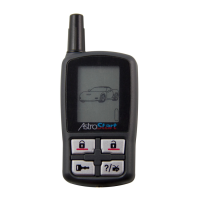
5325-TX Configuration
Operations of the 5325-TX and how it communicates messages are set in the
configuration Main Menu.
Navigating menus and options
Navigating menus and features, changing options, and exiting are performed
using the remote control buttons. The following instructions discuss how to access
and configure the settings.
Button operation
• To access menus, set options, and to perform actions that are displayed in
the text field, use the button.
• To scroll the Menu lists in the text field use the
& buttons.
• To exit configuration: use the
or buttons.
Access menu items
1. Press and hold the button for five seconds, the remote beeps once,
MENU
is displayed. (If Car 2 is on, ignore the Car Select text and beep
after three seconds).
2. Release the button to display the Main Menu item list,
SETUP
is
displayed.
3. The Main Menu has been accessed and configuring can begin.
4. Use the following process to view the Main Menu features, options
and settings in the text field. The following actions are commonly used
throughout the configuration operation.
• Press the
or buttons to change the feature or option that is
displayed in the text field.
• Press the
button to choose the feature in the text field and view its
options. Press it when the desired feature or option is in the text field
to set it as the new setting.







 To Next Page