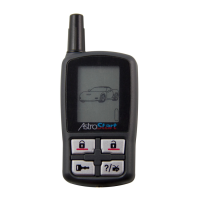
This document describes the AstroStart AF-RFS2625 and AF-RFS2615, which are 2-way/1-way SST 5-button remote starters with LED. The manual provides detailed instructions for their operation, features, and maintenance, emphasizing safety precautions and government regulations.
Function Description:
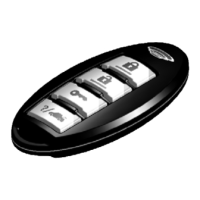
The AstroStart AF-RFS2625 (2-way) and AF-RFS2615 (1-way) are remote control engine starters designed to provide convenient control over a vehicle's engine and other functions. The primary function is remote engine starting, allowing users to start or stop their vehicle's engine from a distance. Beyond engine starting, these remotes offer basic commands such as locking and unlocking doors, and opening the trunk. Advanced features include a panic mode, two utility outputs (Utility 1 and Utility 2), and a battery check level (exclusive to the 2625-TX model). The 2-way communication of the AF-RFS2625 provides confirmation feedback from the vehicle, enhancing user experience by verifying command execution. The system also supports controlling two separate vehicles or systems independently, a feature configurable through the remote.
Important Technical Specifications:
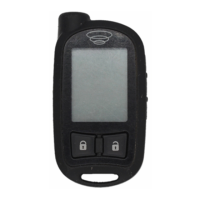
- Remote Control Types: AF-RFS2625 (2-Way SST 5-button with LED) and AF-RFS2615 (1-Way SST 5-button with LED).
- Battery: The 2625-TX remote is powered by two CR-2016 batteries. The 2615-TX remote is powered by one CR-2032 battery.
- Communication: The 2625-TX supports 2-way communication, providing command confirmation and system messages. The 2615-TX is a 1-way remote.
- LED Indicators: Each command button on the 2625-TX has an associated LED (Lock LED, Unlock LED, Remote Start LED, Trunk LED) that illuminates during related operations and provides confirmation. The 2615-TX uses a transmit LED for indications.
- FCC Compliance: The device complies with Part 15 of FCC rules, designed to operate without causing harmful interference and to accept any interference received. It is classified as a Class B digital device.
- IC Compliance: The device complies with Industry Canada Radio Standards Specification RSS 210, authorized for use on a no-interference, no-protection basis.
- RF Exposure: To satisfy FCC RF exposure compliance, the device and its antenna must maintain a separation distance of 20 cm or more from the person's body, except for hands and wrists. It is designed for hand-held operation and does not support normal transmissions when carried in pockets or holsters next to the body.
Usage Features:
- Remote Start/Stop: Press and release the remote start button to activate or deactivate the engine starter. The engine and parking lights turn ON/OFF, and the Remote Start LED illuminates/extinguishes with corresponding tones (2625-TX).
- Lock/Unlock: Press and release the lock button to lock doors and flash parking lights once. Press and release the unlock button to unlock doors and flash parking lights twice. LEDs illuminate and beeps confirm actions (2625-TX).
- Trunk Release: Press and hold the trunk button for 5 seconds to open the trunk. The Aux LED illuminates with confirmation tones (2625-TX).
- Panic Mode: Press and hold the lock button for 3 seconds to activate panic mode, sounding the horn and flashing parking lights. Press either the lock or unlock button to stop.
- Utility Outputs (Utility 1 & 2): Access by pressing the 'P' button once, then pressing the corresponding lock or unlock button. These outputs activate or deactivate specific vehicle functions.
- Battery Check Level (2625-TX only): Press the 'P' button twice, then press the trunk button to display the remote's battery level via LED indicators (e.g., three LEDs for >75%, one LED for <25%).
- Remote Features Menu: Access by pressing and holding the 'P' button for 5 seconds, then pressing the remote start button. This menu allows configuration of:
- Keypad Lock: Options include OFF (buttons always active) or AUTO (buttons lock after 10 seconds of inactivity to prevent unintentional operations).
- Remote Beeps: Options include ON (beeps confirm button presses and command responses) or OFF (mutes most beeps).
- Page Mode (2625-TX only): Options include ON (remote constantly monitors system messages), OFF (does not wake up for alarm trigger pages), or AUTO (extends battery life by turning paging OFF after one minute of inactivity).
- Car 2 Settings: Options include OFF (Car Select feature not available) or ON (enables control of a second system).
- Disabling Remote Start: A physical Toggle Switch (location to be determined by installation specialist) can disable the remote start function.
- Out of Range Alert (2625-TX only): If a command confirmation is not received, the transmit LED turns solid ON for a few seconds, and a long beep plays as an alert.
- No Remote Output (2625-TX only): Indicates the system received a command but it was incomplete or illegal (e.g., button pressed too short, RF interference). Users should repeat the command within 10 seconds.
Maintenance Features:
- Battery Replacement: The manual provides battery types for each remote (CR-2016 for 2625-TX, CR-2032 for 2615-TX). Users are alerted to low battery via several beeps after performing a command. Batteries should be replaced promptly to avoid system control failure.
- Authorized Service: Installation, upgrades, and battery installation must be performed by an authorized AstroStart dealer. Unauthorized modifications will void the warranty.
- Warranty:
- Remote Control Starters (Module): Limited lifetime warranty against defects in materials and workmanship, provided the original end-user continuously owns the vehicle and the product remains installed.
- Receiver & Transmitters (Component): Two-year warranty against defects in materials and workmanship from the date of purchase, under the same ownership and installation conditions as the module.
- Accessories (Any Other Electronic Module): Two-year warranty against defects in materials and workmanship from the date of purchase, under the same ownership and installation conditions as the module.
- Warranty Limitations: The warranty period begins on the purchase date (or manufacturer's date if purchase date cannot be verified). The warranty is void if the module/accessory is opened, the manufacturing date sticker is removed/damaged, or if the product is damaged by accident, misuse, alteration, improper installation, or inappropriate use.
- Exclusions from Warranty: Labor costs for maintenance, removal, or reinstallation; consequential damages; wires, cables, switches; batteries; remote transmitter cases or rubber button membranes due to wear or damage in use.
- Owner's Responsibilities for Warranty Returns: Customers must present themselves to an authorized Directed Electronics Canada, Inc. dealer with a clear copy of the sales receipt showing date of purchase, customer's name and address, dealer's name and address, product type, vehicle details (year, make, model, color, license number, VIN).
- Safety Precautions: Users are advised to read all safety warnings. The system should never be operated in enclosed or partially enclosed areas without ventilation. A carbon monoxide detector must be installed in living areas adjacent to vehicle storage. All doors leading to vehicle storage areas must remain closed.
- Environmental Care: The product is not designed to be water or heat-resistant. Users should keep it dry and away from heat sources, as damage from water or heat will void the warranty.

 Need help?
 General




 To Next Page