2.1.2 ASUS EZ Flash 2
TheASUSEZFlash2featureallowsyoutoupdatetheBIOSwithoutusinganOS-based
utility.
Beforeyoustartusingthisutility,downloadthelatestBIOSlefromtheASUSwebsiteat
www.asus.com.
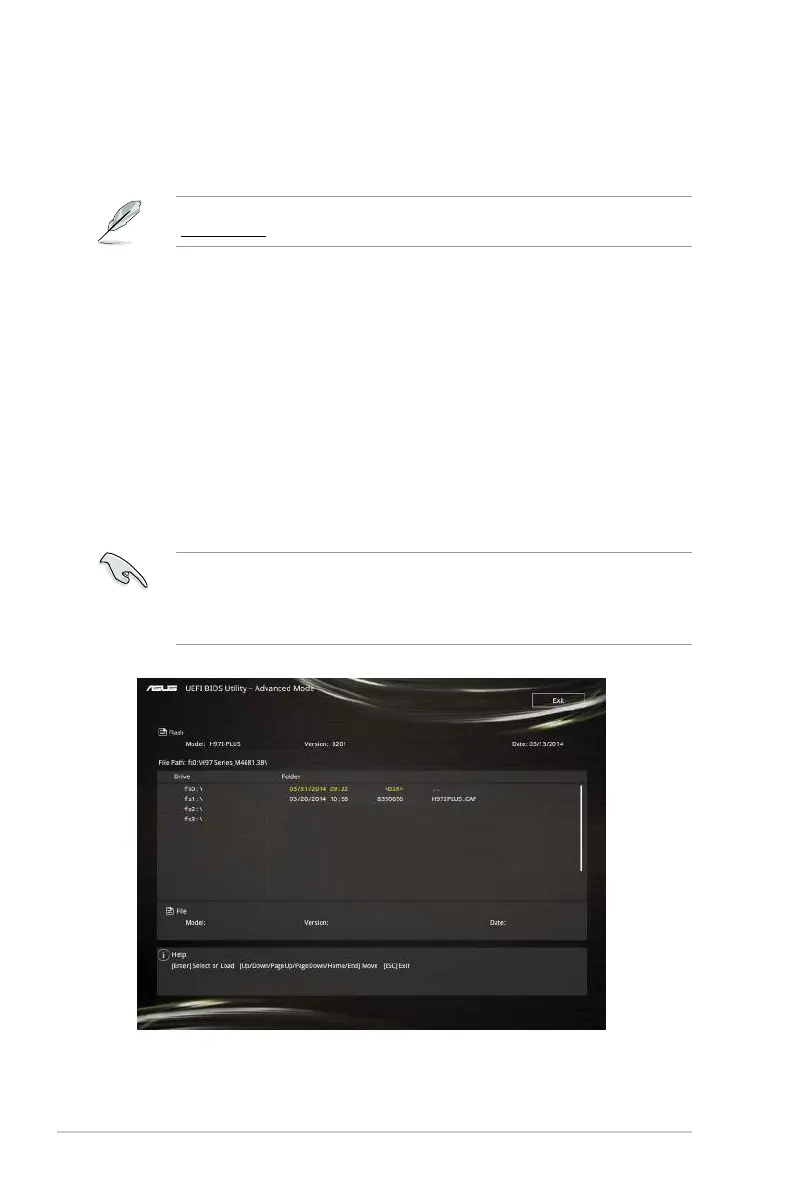
To update the BIOS using EZ Flash 2:
1. InserttheUSBashdiskthatcontainsthelatestBIOSletotheUSBport.
2. EntertheAdvanced ModeoftheBIOSsetupprogram.GototheToolmenutoselect
ASUS EZ Flash 2 Utilityandpress<Enter>toenableit.
3. PresstheLeft/RightarrowkeystoswitchtotheDriveeld.
4. PresstheUp/DownarrowkeystondtheUSBashdiskthatcontainsthelatestBIOS,
andthenpress<Enter>.
5. PresstheLeft/RightarrowkeystoswitchtotheFolder Infoeld.
6. PresstheUp/DownarrowkeystondtheBIOSle,andthenpress<Enter>toperform
theBIOSupdateprocess.Rebootthesystemwhentheupdateprocessisdone.
ThisfunctionsupportsUSBashdisksformattedusingFAT32/16onasinglepartition
only.
DONOTshutdownorresetthesystemwhileupdatingtheBIOStopreventsystem
bootfailure!
2-2 Chapter 2: Getting started


 To Next Page
 Loading...