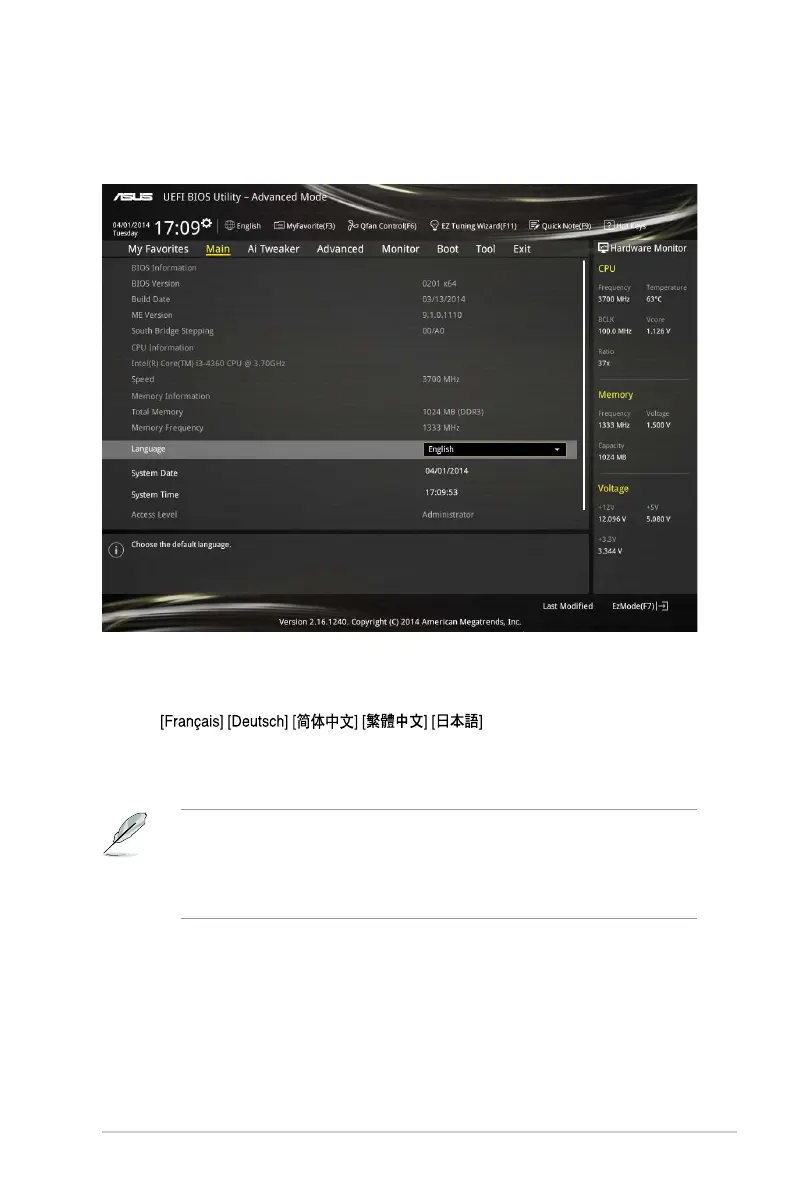
2.4 Main menu
TheMainmenuscreenappearswhenyouentertheAdvancedModeoftheBIOSSetup
program.TheMainmenuprovidesyouanoverviewofthebasicsysteminformation,and
allowsyoutosetthesystemdate,time,language,andsecuritysettings.
2.4.1 Language [English]
AllowsyoutochoosetheBIOSlanguageversionfromtheoptions.Congurationoptions:
[English]
[Español][][
狺甄勐]
2.4.2 Security
TheSecuritymenuitemsallowyoutochangethesystemsecuritysettings.
IfyouhaveforgottenyourBIOSpassword,erasetheCMOSRealTimeClock(RTC)
RAMtocleartheBIOSpassword.Seesection1.6 Headersforinformationonhowto
erasetheRTCRAM.
TheAdministrator or User Passworditemsontopofthescreenshowthedefault
Not Installed.Afteryousetapassword,theseitemsshowInstalled.
Administrator Password
Ifyouhavesetanadministratorpassword,werecommendthatyouentertheadministrator
passwordforaccessingthesystem.Otherwise,youmightbeabletoseeorchangeonly
selectedeldsintheBIOSsetupprogram.
ASUS H97I-PLUS 2-17



 To Next Page