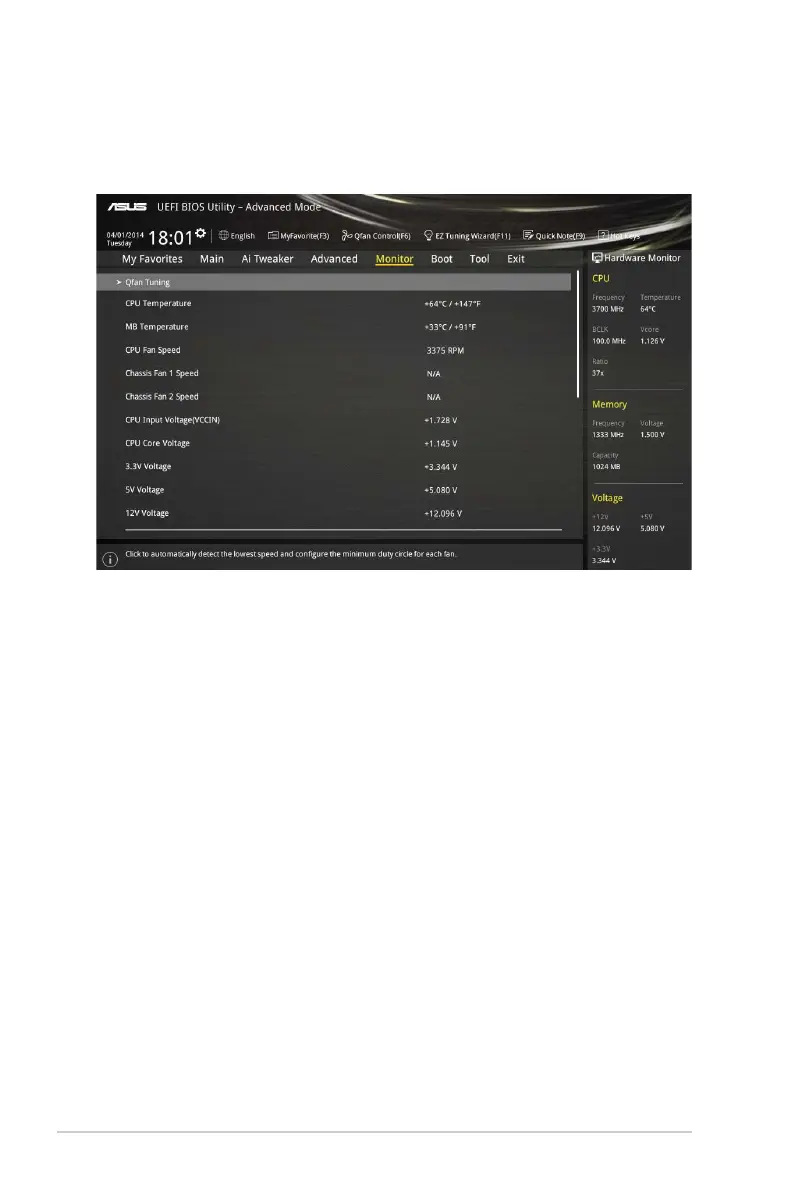
2.7 Monitor menu
TheMonitormenudisplaysthesystemtemperature/powerstatus,andallowsyoutochange
thefansettings.
2.7.1 Qfan Tuning
Clickthisitemtoautomaticallydetectthelowestspeedandconguretheminimumdutycycle
foreachfan.
2.7.2 CPU/ MB Temperature [xxxºC/xxxºF]/ [Ignore]
TheonboardhardwaremonitorautomaticallydetectsanddisplaystheCPUandmotherboard
temperatures.Select [Ignore]ifyoudonotwishtodisplaythedetectedtemperatures.
2.7.3 CPU Fan/ Chassis Fan 1/2 Speed [xxxx RPM]/ [Ignore]/
[N/A]
TheonboardhardwaremonitorautomaticallydetectsanddisplaystheCPUandchassisfan
1/2speedsinrotationsperminute(RPM).Ifthefanisnotconnectedtothemotherboard,the
eldshowsN/A.Select[Ignore]ifyoudonotwishtodisplaythedetectedspeed.
2.7.4 CPU Input Voltage (VCCIN), CPU Core Voltage, 3.3V
Voltage, 5V Voltage, 12V Voltage
Theonboardhardwaremonitorautomaticallydetectsthevoltageoutputthroughtheonboard
voltageregulators.Select[Ignore]ifyoudonotwanttodetectthisitem.
2.7.5 CPU Q-Fan Control [Enabled]
[Enabled] EnablestheCPUQ-Fancontrolfeature.
[Disabled] DisablestheCPUQ-Fancontrolfeature.
ScrolldowntodisplaytheotherBIOSitems.
2-38 Chapter 2: Getting started


 To Next Page