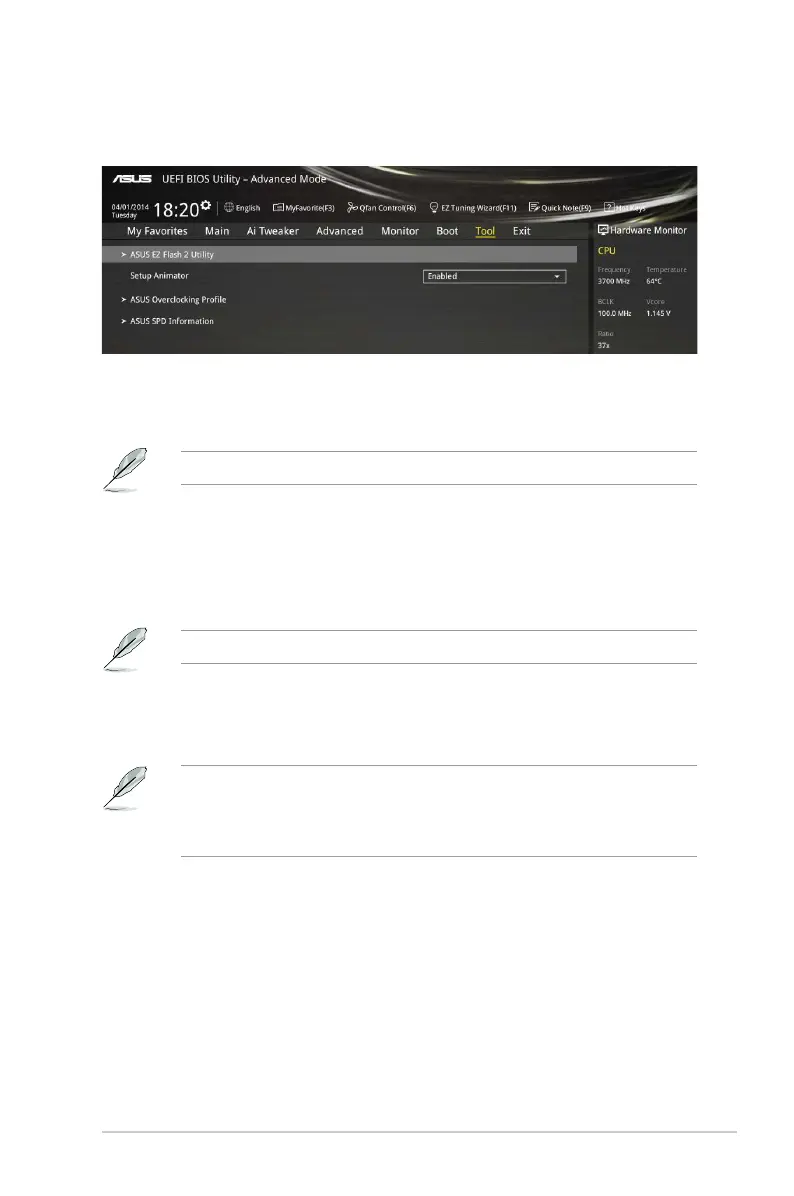
2.9 Tool menu
TheToolmenuitemsallowyoutocongureoptionsforspecialfunctions.Selectanitemthen
press<Enter>todisplaythesubmenu.
2.9.1 ASUS EZ Flash 2 Utility
AllowsyoutorunASUSEZFlash2.Press[Enter]tolaunchtheASUSEZFlash2screen.
Formoredetails,seesection 2.1.2 ASUS EZ Flash 2.
2.9.2 Setup Animator [Enabled]
EnablesordisablestheSetupanimator.Congurationoptions:[Disabled][Enabled]
2.9.3 ASUS Overclocking Profile
ThisitemallowsyoutostoreorloadmultipleBIOSsettings.
TheOverclocking Profile itemsshowNot assigned ifnoproleiscreated.
Load from Profile
AllowsyoutoloadthepreviousBIOSsettingssavedintheBIOSFlash.Keyintheprole
numberthatsavedyourCMOSsettings,press<Enter>,andthenselectYes.
DONOTshutdownorresetthesystemwhileupdatingtheBIOStopreventthe
systembootfailure!
WerecommendthatyouupdatetheBIOSleonlycomingfromthesamememory/
CPUcongurationandBIOSversion.
Profile Name
Allowsyoutocreateanamefortheproleyouwanttosave.
Save to Profile
AllowsyoutosavethecurrentBIOSsettingstotheBIOSFlash,andcreateaprole.Keyina
prolenumberfromonetoeight,press<Enter>,andthenselectYes.
Load/Save Profile from/to USB Drive
ThisitemallowsyoutoloadorsaveprolefromyourUSBdrive,loadandsaveproletoyour
USBdrive.
ASUS H97I-PLUS 2-47



 To Next Page