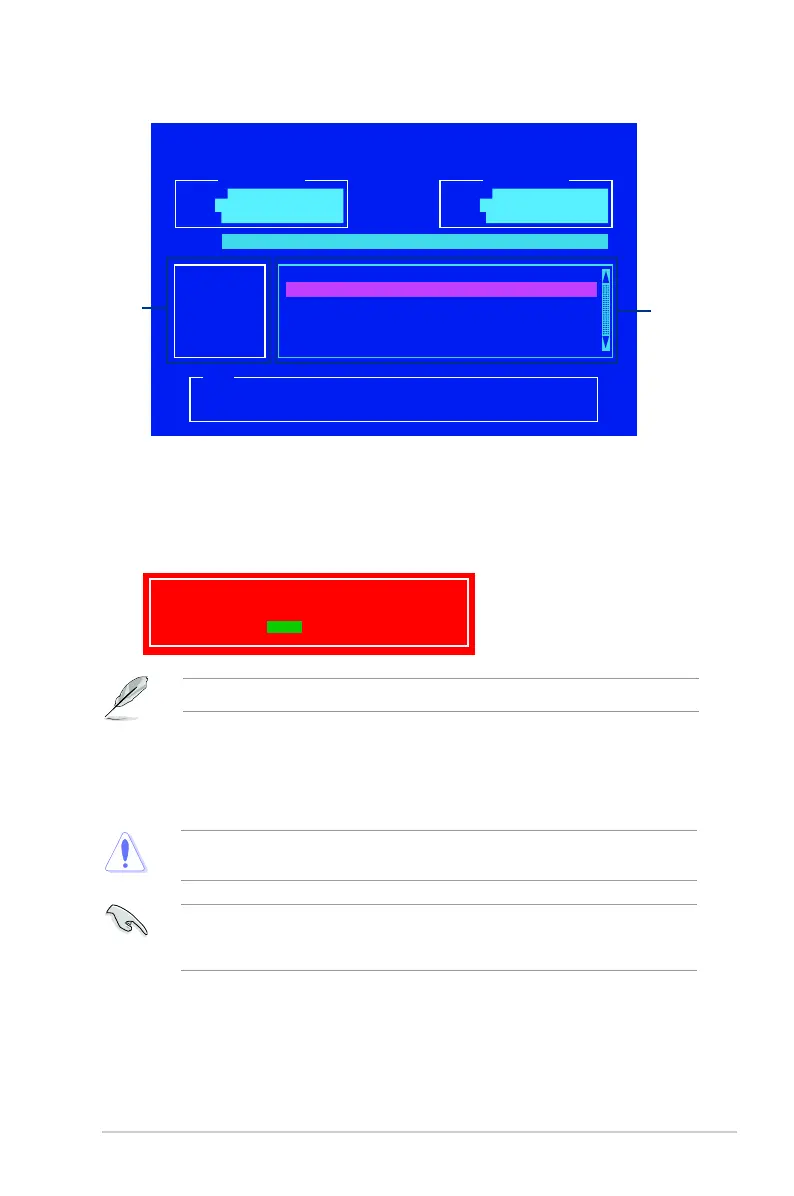
ASUSTeK BIOS Updater for DOS V1.30 [2014/01/01]
Current ROM
BOARD: H97I-PLUS
VER: 0201 (H :00 B :00)
DATE: 03/13/2014
Update ROM
BOARD: Unknown
VER: Unknown
DATE: Unknown
PATH: C:\
C:
D:
FORMAN~1 <DIR>
H97IPLUS.CAP 8390656 2014-03-13 21:14:34
Note
[Enter] Select or Load [Tab] Switch [V] Drive Info
[Up/Down/Home/End] Move [Esc] Exit
Files panel
Drives
panel
5. SelectYesthenpress<Enter>.WhenBIOSupdateisdone,press<ESC>toexitBIOS
Updater.
6. Restartyourcomputer.
DONOTshutdownorresetthesystemwhileupdatingtheBIOStopreventsystemboot
failaure.
EnsuretoloadtheBIOSdefaultsettingstoensuresystemcompatibilityandstability.Select
the Load Optimized DefaultsitemundertheExitBIOSmenu.Seesection2.10 Exit
Menufordetails.
3. Press<Tab>toswitchfromDrivespaneltoFilespanelthenpress<Up/DownorHome/
End>keystoselecttheBIOSleandpress<Enter>.
4. AftertheBIOSUpdatercheckstheselectedBIOSle,selectYestoconrmtheBIOS
update.
Are you sure you want to update the BIOS?
Yes No
TheBIOSBackupfeatureisnotsupportedduetosecurityregulations.
ASUS H97I-PLUS 2-5


 To Next Page
 Loading...