This document provides a comprehensive guide for the ASUSTOR AS1102TL NAS, covering its installation, software setup, and troubleshooting. The device is designed to be a reliable and efficient network-attached storage solution for various applications, from personal data backup to small business file sharing.
Function Description
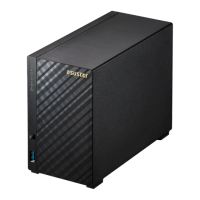
The ASUSTOR AS1102TL is a 2-bay Network Attached Storage (NAS) device, meaning it can house two hard drives to create a centralized storage solution accessible over a network. Its primary function is to provide secure and accessible storage for data, allowing users to store, share, and manage files from multiple devices. The NAS operates on ASUSTOR's ADM (ASUSTOR Data Master) operating system, which offers a user-friendly interface for configuration and management.
Key functions include:
- Data Storage and Management: The AS1102TL supports 3.5-inch SATA hard disks, allowing for significant storage capacity. It can be configured with RAID (Redundant Array of Independent Disks) functionality, which enhances data protection by mirroring data across multiple drives or distributing data with parity information, thus safeguarding against single drive failures. The system requires at least one hard disk to be initialized, with recommendations to use hard disks of the same capacity for optimal RAID performance.
- Network Connectivity: The device connects to a network via an Ethernet cable, enabling access from any connected computer, router, switch, or hub. This network integration allows for seamless file sharing and remote access capabilities.
- Power Management: The NAS includes a power button for turning the device on and off. It also features power management settings within the ADM interface, allowing users to configure how the device responds to power button presses (e.g., shut down or enter sleep mode) and to enable features like Wake on LAN (WOL) for remote power-up.
- System Status Monitoring: LED indicators on the front panel provide visual feedback on the device's operational status, including power, system status, network activity, and hard disk activity. These indicators are crucial for quickly assessing the health and activity of the NAS.
- Software Ecosystem: The AS1102TL leverages the ASUSTOR ADM operating system, which provides a rich set of features for data management, security, and application hosting. Users can install various applications (apps) from the ASUSTOR App Central to extend the functionality of the NAS, such as media servers, backup solutions, surveillance systems, and more.
Usage Features
The ASUSTOR AS1102TL is designed for ease of use, from initial setup to daily operation.
- Hardware Installation: The hardware installation process is straightforward. Users need to remove screws from the rear panel, slide off the cover, and then slide 3.5-inch SATA hard disks into the designated bays until they are firmly seated. The guide emphasizes inserting the first hard disk into the HDD 1 slot for initialization. After securing the hard disks with provided screws, the cover is replaced and fastened. A power cord bracket is included to secure the power cord, preventing accidental detachment if the NAS is moved.
- Connecting and Powering On: Connecting the NAS involves plugging it into a power supply and connecting it to a router, switch, or hub via an Ethernet cable. The device is powered on by pressing and holding the power button for 1-2 seconds until the yellow power LED illuminates. The system status LED will flash during startup and remain steadily lit once the NAS is ready, accompanied by an audible 'beep' from the system buzzer.
- Software Installation Methods: ASUSTOR offers multiple methods for software installation and initial setup:
- ASUSTOR Control Center (Windows/Mac): This desktop application automatically scans the network for ASUSTOR NAS devices. Users can select their NAS from a list and follow an installation wizard to complete the configuration, which covers appearance, time/date, security, storage volume settings, registration, and app installation.
- Web Installation: If the NAS's IP address is known, users can access the installation wizard directly through a web browser by entering the IP address. This method also guides users through the configuration process.
- Mobile Device Installation (AiMaster): The AiMaster mobile app, available on Google Play and the Apple App Store, allows for convenient setup using a smartphone or tablet. After installing the app and ensuring the mobile device is on the same local network as the NAS, users can select "Auto Discovery" to find the NAS and initiate the installation process.
- System Initialization: The initial setup, regardless of the method chosen, involves a system initialization process. This process configures essential settings and features, including the system's appearance (light or dark theme), time and date, security parameters, storage volume setup, device registration, and initial app installation. Users can choose between a "1-Click Setup" for optimized settings or a "Custom Setup" for manual configuration.
- LED Indicators for Status: The front panel LEDs provide clear status indications:
- Power LED: Green (steadily lit) for power on, Orange (flashing every 10 seconds) for LED night mode.
- System Status LED: Green (flashing) for powering on, Green (steadily lit) for system ready, Red (steadily lit) for system or hard disk abnormality, or fan/system temperature abnormality.
- Network LED: Green (steadily lit) for network port connected.
- Hard Disk LED: Green (steadily lit) for hard disk ready, Green (flashing) for data access in progress.
- Shutting Down the NAS: The power button's function can be configured in the ADM settings (Settings > Hardware > Power > Settings). Users can choose whether holding the power button for 1.5 seconds will shut down the NAS or put it into sleep mode. A "beep" from the system buzzer confirms the action.
Maintenance Features
The ASUSTOR AS1102TL incorporates features and guidelines to ensure its longevity and stable operation.
- Safety Precautions: The manual outlines critical safety precautions to prolong the life of the NAS. These include:
- Electrical Safety: Unplugging the product before cleaning, using only the bundled power adapter, and ensuring the power adapter is connected to the correct power input rating.
- Operation Safety: Placing the device on a flat, stable surface, avoiding wet locations, operating within an ambient temperature range of 0°C to 40°C, ensuring proper ventilation by not blocking air vents, and refraining from inserting objects or spilling liquids into the vents.
- Troubleshooting Guide: A dedicated troubleshooting section addresses common issues, specifically focusing on problems with detecting the NAS using ASUSTOR Control Center. The guide provides a step-by-step approach:
- Network Connection Check: Verify that the computer and NAS are on the same local area network. Check the network LED indicator on the NAS; if unlit, try a different Ethernet cable or network port.
- Firewall Disablement: Temporarily disable any firewalls on the computer and re-scan for the NAS.
- Manual IP Configuration: If detection issues persist, users are instructed to connect the NAS directly to their computer using the provided RJ-45 cable and manually configure the computer's IP settings. This involves navigating to the "Network and Sharing Center" in Windows, accessing the Ethernet adapter's properties, and setting the "Internet Protocol Version 4 (TCP/IPv4)" to a specific static IP address (e.g., 169.254.1.1 with a subnet mask of 255.255.0.0). After this, the ASUSTOR Control Center should be able to scan and find the NAS.
- Support Resources: The document encourages users to contact their local ASUSTOR dealer or ASUSTOR Customer Service if troubleshooting steps do not resolve their issues. Additionally, users are directed to the ASUSTOR Knowledgebase for further assistance and information.
- Regular Updates: While not explicitly detailed as a maintenance feature, the ADM Update option in the ASUSTOR Control Center implies that the device's operating system can be updated, which is crucial for security, performance improvements, and new features.
- Data Backup and Recovery: The initial warning about data erasure during hard disk initialization highlights the importance of backing up critical data, a fundamental aspect of NAS maintenance and data protection. The RAID functionality further contributes to data resilience.
In summary, the ASUSTOR AS1102TL is a user-friendly and robust NAS solution designed for efficient data storage and management. Its comprehensive installation guide, intuitive software, and clear troubleshooting steps ensure a smooth experience for users, while its safety guidelines and support resources contribute to long-term reliability.

 Need help?
 General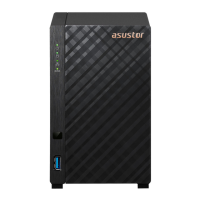

 To Next Page