Need help?
Do you have a question about the ASUSTOR AS4002T and is the answer not in the manual?
Details compliance with FCC Rules Part 15 for Class A digital devices.
Information regarding CE marking for devices without wireless LAN/Bluetooth.
Precautions for safe electrical handling and usage of the NAS power adapter.
Guidelines for safe placement, environment, ventilation, and handling of the NAS.
Lists necessary tools, including screwdrivers and compatible SATA hard disks.
Step-by-step guide for removing disk trays, mounting hard drives, and inserting trays.
Instructions on using the provided cord bracket to secure the NAS power cord.
Steps to connect NAS to power and network, and initiate power-on sequence.
Guide for installing NAS software using the provided installation CD for Windows users.
Instructions for installing NAS software on macOS using the installation CD.
Procedure for initializing the NAS through a web browser using its IP address.
Steps to install NAS software using the AiMaster mobile app on Android and iOS devices.
Instructions for installation using a direct network connection to the NAS.
Procedure for safely shutting down or putting the NAS into sleep mode.
Explains the meaning and state of various LED indicators on the NAS.
Identifies and describes the ports and buttons located on the rear panel of the NAS.
Steps to resolve issues where the ASUSTOR NAS cannot be detected by Control Center.
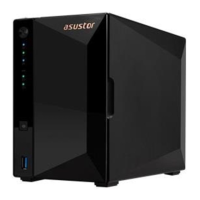
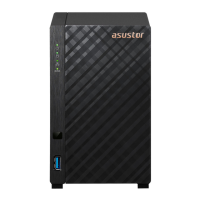
The ASUSTOR NAS (Network Attached Storage) device, available in AS4002T and AS4004T models, is designed to provide a centralized and secure storage solution for digital assets. It functions as a personal cloud server, allowing users to store, manage, and access their files from various devices across a network. The device is built with a focus on ease of installation and user-friendly operation, catering to both novice and experienced users.
The primary function of the ASUSTOR NAS is to offer robust data storage and management capabilities. It supports the installation of 2.5-inch or 3.5-inch SATA hard drives, enabling users to create a storage pool for their data. Once hard drives are installed and the system is initialized, the NAS provides a platform for file storage, backup, and sharing.
A key aspect of its functionality is its role as a central hub for digital content. Users can store a wide range of files, including documents, photos, videos, and music, making them accessible from any connected device within the local network or remotely via cloud services. This centralization simplifies data organization and ensures that important files are readily available.
The ASUSTOR NAS also supports various network protocols, facilitating seamless integration into existing network environments. It offers both 1 Gigabit and 10 Gigabit RJ45 ports, providing flexible connectivity options and high-speed data transfer capabilities, particularly beneficial for demanding tasks like large file transfers or multimedia streaming.
Beyond basic storage, the device is designed to support a range of applications and services through its operating system, ADM (ASUSTOR Data Master). This includes features for data backup, such as scheduled backups to external devices or cloud storage, and data synchronization across multiple devices. It also acts as a media server, allowing users to stream multimedia content to compatible devices like smart TVs, smartphones, or tablets.
Security is an integral part of the NAS's function. It provides mechanisms to protect data from unauthorized access, including user authentication and access control settings. The system also supports various RAID configurations, which enhance data redundancy and protect against data loss in case of a hard drive failure.
The ASUSTOR NAS is designed for straightforward setup and operation. The hardware installation process involves easily removing the front panel, pulling out disk trays, mounting hard drives, and then reinserting the trays. For 3.5-inch drives, rails are removed, the drive is placed, and rails are reinserted to secure it. For 2.5-inch drives, the rails are removed, the drive is aligned with specific holes, and then secured with screws. The disk trays slide smoothly into the disk bays and are secured with a latch that provides an audible 'click' when closed correctly. A power cord bracket is provided to secure the power cable, preventing accidental disconnections.
Connecting the NAS to a network is simple, requiring an Ethernet cable to link it to a router, switch, or hub. Powering on the device involves pressing and holding the power button for a few seconds until the blue power LED illuminates. The system status LED will flash green during power-on and remain steadily lit once the system is ready, accompanied by a 'beep' from the system buzzer.
Software installation can be performed via multiple methods. For Windows users, inserting the installation CD and selecting "Start" from the autorun menu initiates the ASUSTOR Control Center installation, which then scans the network for NAS devices. Mac users follow a similar process, selecting "Quick Install" from the CD-menu. Alternatively, users can download the latest software from the ASUSTOR website if a CD drive is unavailable.
Web installation is another convenient option, where users can access the NAS's IP address through a web browser to begin initialization. For mobile users, the AiMaster app (available on Google Play and Apple App Store) provides a streamlined installation experience. After downloading the app and ensuring the mobile device is on the same local network as the NAS, users can select "Auto Discovery" within AiMaster to locate and initialize their NAS. The app guides users through the configuration process, making it accessible even without a computer.
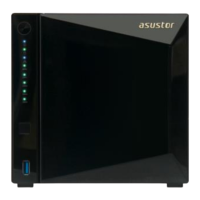
The LED indicators on the front panel provide clear visual feedback on the device's status. A blue power LED indicates the device is on, while an orange flashing light signifies LED night mode. The green system status LED indicates powering on (flashing) or system ready (steadily lit). Network LEDs show connectivity (blue for 1 Gigabit, purple for 10 Gigabit). The USB LED turns green and steadily lit when a USB device is ready for use, and flashes green during data access. Hard disk LEDs flash green during data access, remain steadily lit when the hard disk is ready, and turn red and steadily lit in case of a hard disk abnormality.
Maintaining the ASUSTOR NAS involves several aspects, primarily focusing on ensuring proper operation and addressing potential issues. The device is designed with a system fan, visible on the rear panel, which is crucial for maintaining optimal operating temperatures and preventing overheating. Users should ensure that the air vents on the case are not blocked to allow for proper ventilation.
Troubleshooting is supported through the ASUSTOR Control Center and direct connection methods. If the NAS cannot be detected by the Control Center, users are advised to check network connections, ensuring the computer and NAS are on the same local area network. Verifying that the network LED indicator is lit is an important step; if not, trying a different Ethernet cable or network port is recommended. Disabling any firewalls on the computer can also resolve detection issues.
For persistent detection problems, a direct connection method is provided. This involves connecting the NAS directly to the computer using an RJ-45 network cable and manually configuring the computer's IP settings. Specifically, users need to access the "Network and Sharing Center" in their computer's Control Panel, navigate to "Change adapter settings," and then modify the "Internet Protocol Version 4 (TCP/IPv4)" properties. The IP address should be set to 169.254.1.1 and the Subnet mask to 255.255.0.0. After these changes, the ASUSTOR Control Center can be used to scan for the NAS.
Regular software updates are an important maintenance aspect, ensuring the NAS benefits from the latest features, security patches, and performance improvements. The ADM Update service, accessible through the Control Center, facilitates this process.
Shutting down the NAS is a simple maintenance action. Holding the power button for 1.5 seconds will trigger a 'beep' from the system buzzer, and the NAS will either shut down or enter sleep mode, depending on the user's configuration. This ensures a safe power-off, preventing data corruption.
For further assistance, ASUSTOR provides customer support through their website and a knowledge base, offering resources for users to resolve issues and learn more about their device. This comprehensive support system aims to empower users to maintain their NAS effectively.
 General
| RAID levels | 0, 1, JBOD |
|---|---|
| RAID support | Yes |
| Storage drive size | 2.5/3.5 \ |
| Storage drive capacity | 0 GB |
| Supported file systems | BTRFS, FAT32, HFS+, NTFS, exFAT, ext3, ext4 |
| Storage drive interface | Serial ATA III |
| Storage drives installed | No |
| Storage drive sizes supported | 2.5, 3.5 \ |
| Supported storage drive types | HDD & SSD |
| Total installed storage capacity | 0 TB |
| Maximum supported storage capacity | 140 TB |
| Number of storage drives installed | 0 |
| Number of storage drives supported | 10 |
| Processor cores | 2 |
| Processor model | Armada 7020 |
| Processor family | Marvell |
| Processor frequency | 1.6 GHz |
| Flash memory | 512 MB |
| Internal memory | 2 GB |
| Memory clock speed | 2400 MHz |
| Internal memory type | DDR4 |
| Certification | FCC, CE, VCCI, BSMI, C-TICK |
| Chassis type | Compact |
| Cooling type | Active |
| Fan diameter | 70 mm |
| Product color | Black |
| Number of fans | 1 fan(s) |
| Ethernet LAN data rates | 100, 1000, 10000 Mbit/s |
| Supported network protocols | CIFS / SMB, SMB 2.0 / 3.0, AFP, NFS, FTP (Unicode Supported), TFTP, WebDAV, Rsync, SSH, SFTP, iSCSI/IP-SAN, HTTP, HTTPS, Proxy, SNMP, Syslog |
| Ethernet LAN data rate supported (max) | 10000 Mbit/s |
| Type | NAS |
| Noise level | 18.6 dB |
| Device class | Small & Medium Business |
| Share folder | 512 |
| Backup features | Cloud, USB drive |
| Number of users | 4096 user(s) |
| Browser supported | Internet Explore 11 Onwards, FireFox, Chrome, Safari, Microsoft Edge |
| Security algorithms | 256-bit AES, HTTPS, SSH, SSL/TLS |
| Operating temperature (T-T) | 5 - 35 °C |
| Operating relative humidity (H-H) | 5 - 95 % |
| AC input voltage | 100 - 240 V |
| Power consumption (typical) | 19.5 W |
| Power consumption (HDD standby) | 12.7 W |
| Operating system version | 3.1 |
| Operating system installed | ADM |
| Mac operating systems supported | Mac OS X 10.10 Yosemite, Mac OS X 10.11 El Capitan, Mac OS X 10.12 Sierra, Mac OS X 10.13 High Sierra, Mac OS X 10.14 Mojave, Mac OS X 10.6 Snow Leopard, Mac OS X 10.7 Lion, Mac OS X 10.8 Mountain Lion, Mac OS X 10.9 Mavericks |
| Server operating systems supported | Windows Server 2003, Windows Server 2008, Windows Server 2012 |
| Windows operating systems supported | Windows 10, Windows 10 Education, Windows 10 Education x64, Windows 10 Enterprise, Windows 10 Enterprise x64, Windows 10 Home, Windows 10 Home x64, Windows 10 IOT Core, Windows 10 Pro, Windows 10 Pro x64, Windows 10 x64, Windows 7, Windows 7 Enterprise, Windows 7 Enterprise x64, Windows 7 Home Basic, Windows 7 Home Basic x64, Windows 7 Home Premium, Windows 7 Home Premium x64, Windows 7 Professional, Windows 7 Professional x64, Windows 7 Starter, Windows 7 Starter x64, Windows 7 Ultimate, Windows 7 Ultimate x64, Windows 7 x64, Windows 8, Windows 8 Enterprise, Windows 8 Enterprise x64, Windows 8 Pro, Windows 8 Pro x64, Windows 8 x64, Windows 8.1, Windows 8.1 Enterprise, Windows 8.1 Enterprise x64, Windows 8.1 Pro, Windows 8.1 Pro x64, Windows 8.1 x64, Windows Vista, Windows Vista Business, Windows Vista Business x64, Windows Vista Enterprise, Windows Vista Enterprise x64, Windows Vista Home Basic, Windows Vista Home Basic x64, Windows Vista Home Premium, Windows Vista Home Premium x64, Windows Vista Ultimate, Windows Vista Ultimate x64, Windows Vista x64, Windows XP, Windows XP Home, Windows XP Home x64, Windows XP Professional, Windows XP Professional x64 |
| USB 2.0 ports quantity | USB 2.0 ports have a data transmission speed of 480 Mbps, and are backwards compatible with USB 1.1 ports. You can connect all kinds of peripheral devices to them. |
| Ethernet LAN (RJ-45) ports | 3 |
 Weight and Dimensions
| Depth | 230 mm |
|---|---|
| Width | 114 mm |
| Height | 170 mm |
| Weight | 1600 g |

 To Next Page