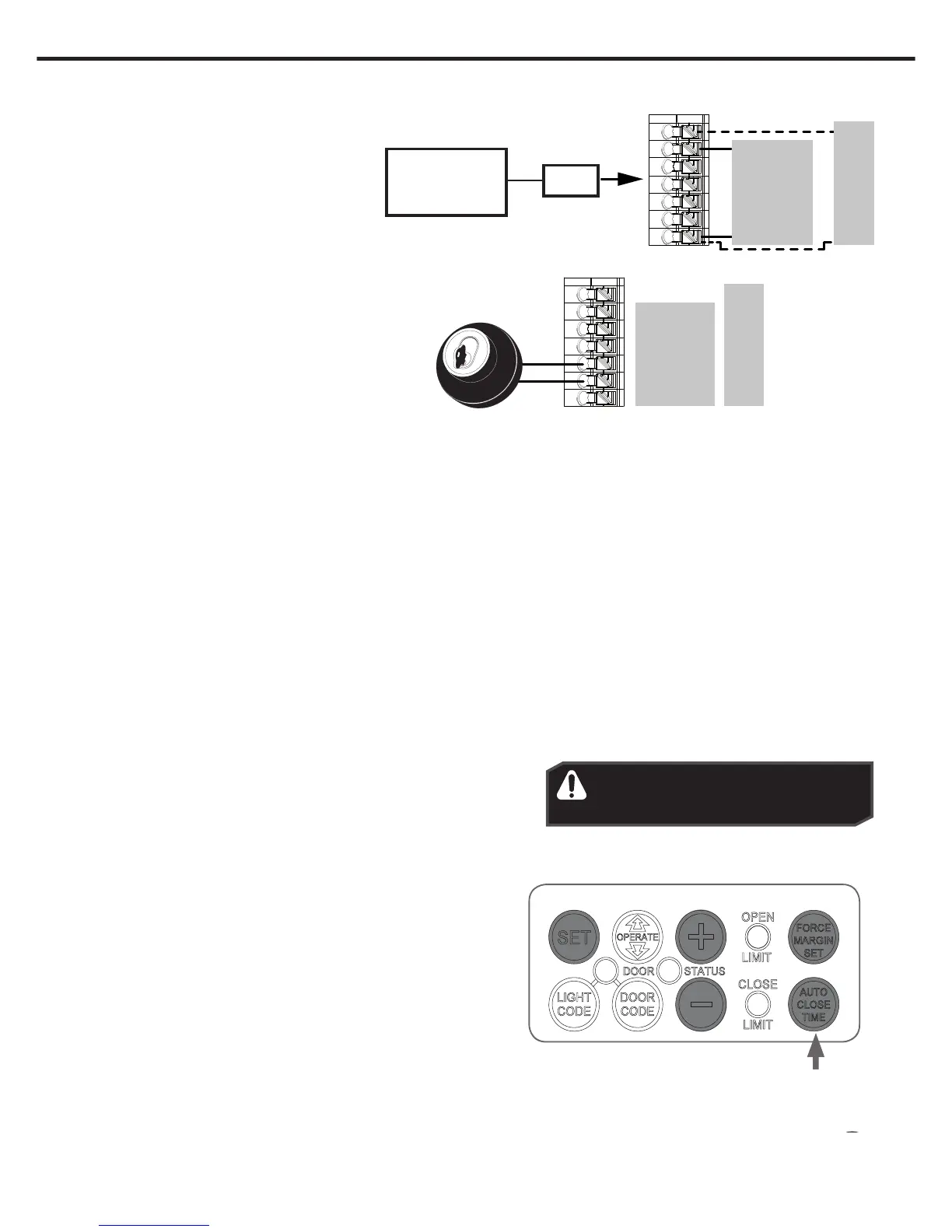
External device,
Alarm, Door or
Gate opener.
V+
SB1
0V
SB2
0V
OSC
AUX
30V PWR
PE
PE (OV)
GND
OSC
AUX
Remote Aerial
Some sites cause poor radio reception. Particularly problematic areas are those where there is a large amount of metal, like a
steel garage, or an underground car park with large masses of steel reinforced concrete. These issues, and others, can create
reception issues.
Poor radio reception will be noticed by a reduction in the operating range of the transmitters.
You can evaluate whether fitting an external aerial will benefit as follows;
i. Test the maximum operating range of the transmitter with the garage door closed; then
ii. Test the maximum operating range of the transmitter with the garage door open.
If the range improves when the door is open you can install a remote aerial kit to improve reception.
Mount the aerial to a suitable location on the outside of the garage.
Similar to a television aerial, the better the mounting position the better the reception will be. Where possible, mount the
aerial as high as possible, away from masses of metal and in line of sight position, to where you normally use your transmitter.
Keyswitch Connection
The GDO-6 has the input to connect bell
switch or keyswitch to open or close the door.
13. Auto-Close
Safety Beams
A Safety Beam Kit may be fitted to this opener. When this option is
fitted, the operation of this device is such that if an object (i.e car,
child etc) blocks the Infra-Red beam, then the garage door opener
will not close the door automatically. If the Safety Beam is fitted but
not operating correctly, then the door once opened automatically,
will not close automatically.
WARNING! It is compulsory to have
Safety Beams installed when using
Auto-Close mode.
Auto Close Option
Auto-Close mode is a function that automatically closes the door a
preset time after the Safety Beams recognise that a vehicle has left
the garage. The Auto-Close timer only starts after the Safety Beam’s
path is broken. If the safety beam path is not broken, the door will
remain open until the path is broken. If the opener incurs a physical
obstruction (i.e. not from the Safety Beams) while closing the door,
it will re-open and not Auto-Close until the Safety Beam’s path is
broken again.
To enable the Auto-Close function:
a. Hold down the AUTO CLOSE TIME button.
b. While holding in the AUTO CLOSE TIME button, press
the PLUS (+) button - each press will add one second to
the Auto-Close delay.
c. To decrease the delay time Hold down the AUTO CLOSE
TIME button and press the MINUS (-) button - each
press will deduct one second from the Auto-Close delay.
d. Press the Operate button or transmitter to open the door.
When the door is fully opened the Open Limit LED will
flash to indicate that Auto-Close mode is operational.
e. Break the Safety Beam’s path momentarily to initialise
Auto-Close. When the door reaches the fully opened
position, the door will pause for the set Auto-Close time
and then close.
GDO-6V4
GDO-6V4
GDO-6V3
GDO-6V3
Relay


 To Next Page