12
14. Coding a Transmitter
Storing the Transmitter Code
The opener can only operated from remote control transmitters that have
been programmed into its memory. Up to 64 codes can be stored in the
memory.
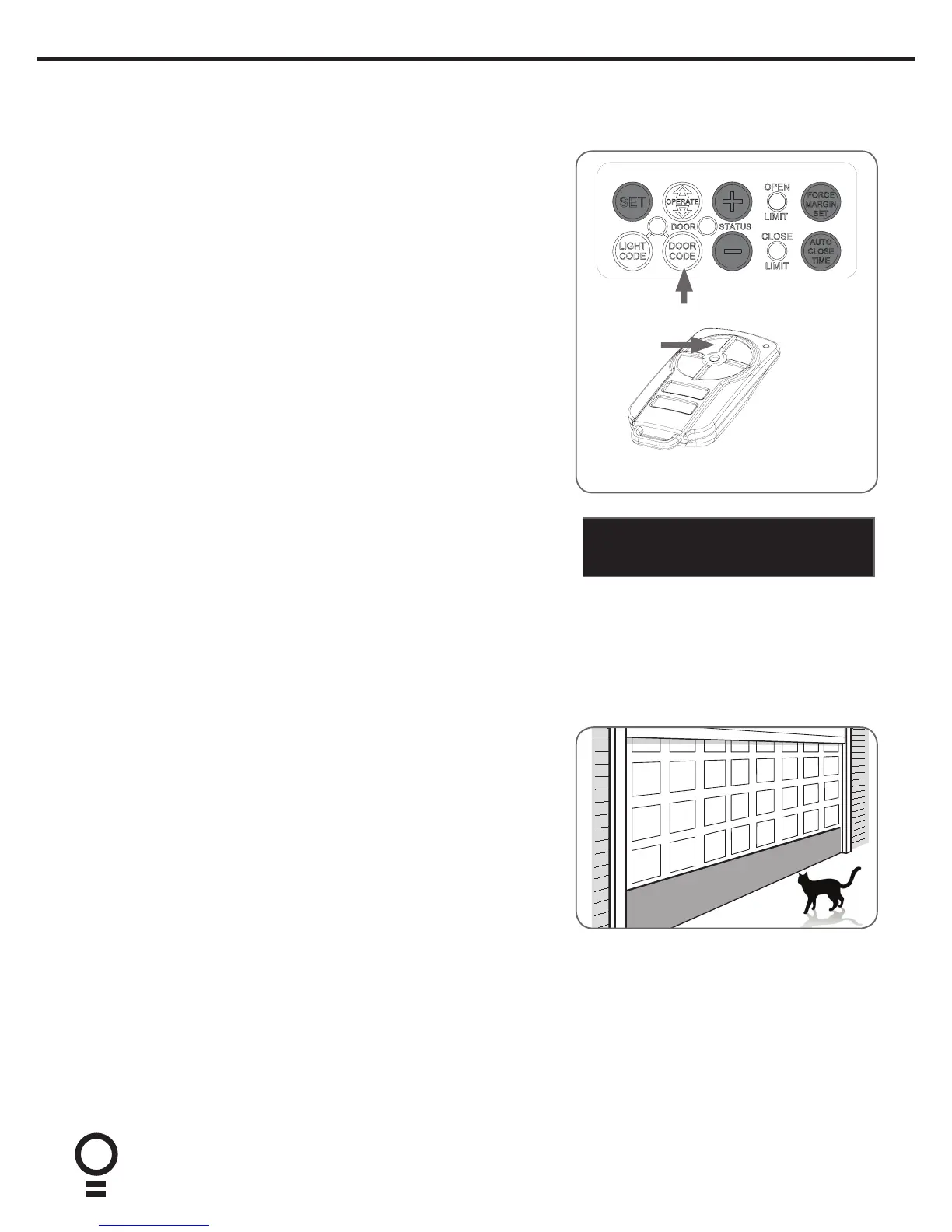
a. Press and hold the DOOR CODE button.
b. Press Button 1 on the transmitter for two seconds. Release and pause for
two seconds. Press the Button 1 again for two seconds.
c. Release the DOOR CODE button. The transmitter button is now coded,
press to test.
Coding a Transmitter Button to Enable Vacation Mode
The opener can be programmed into a “Vacation Mode” where the opener
will not respond to any transmitter except the button of the transmitter that
was programmed for vacation mode.
d. Briefly press the DOOR CODE button once, then press it again and hold
(will beep two times on second press).
e. Press one of the four (4) buttons on the transmitter for two (2) seconds,
pause for two (2) seconds, then press the same button again for two (2)
seconds.
f. Release DOOR CODE button.
g. Press and hold the transmitter button for six (6) seconds to set Vacation
Mode. The door code LED will stay lit while Vacation Mode is active.
h. To reset Vacation Mode, press the same button for two seconds.
Coding a Transmitter to enable AUX Output
Briefly press the DOOR CODE button two (2) times, then press it again and
hold (the opener will beep three (3) times on the third press.
a. Press one of the four buttons on the transmitter for two (2) seconds,
pause for two (2) seconds, then press the same button again for two (2)
seconds.
b. Release the DOOR CODE button.
c. Press the transmitter button to test.
Setting the Transmitter to Operate PET (Pedestrian) Mode
The PET mode position (see Setting the Limits) must set prior to coding a
transmitter.
a. Briefly press the DOOR CODE button three (3) times, then press it again
and hold (the opener will beep four times on the fourth press.
b. Choose a transmitter button not already coded into the receiver. Press
and hold this button for two (2) seconds, pause for two (2) seconds, then
press the same button again for two (2) seconds and release.
c. Release the DOOR CODE button.
d. Press the transmitter button to test.
Coding a Transmitter to the Courtesy Light
The transmitter can be programmed to operate the courtesy light on the
opener independently of the door moving.
a. Press and hold the LIGHT CODE button.
b. Press one of the four buttons on the transmitter for two (2) seconds, pause
for two (2) seconds, then press the same button again for two (2) seconds.
c. Release the LIGHT CODE button.
d. Press the transmitter button to test.
Button 1
IMPORTANT NOTE: Only TrioCode
TM
128
Technology Transmitters are compatible
with these GDO-6 products.


 To Next Page