10. Setting the Travel Limits
Initial Preparation:
a. Move the door to the half way position.
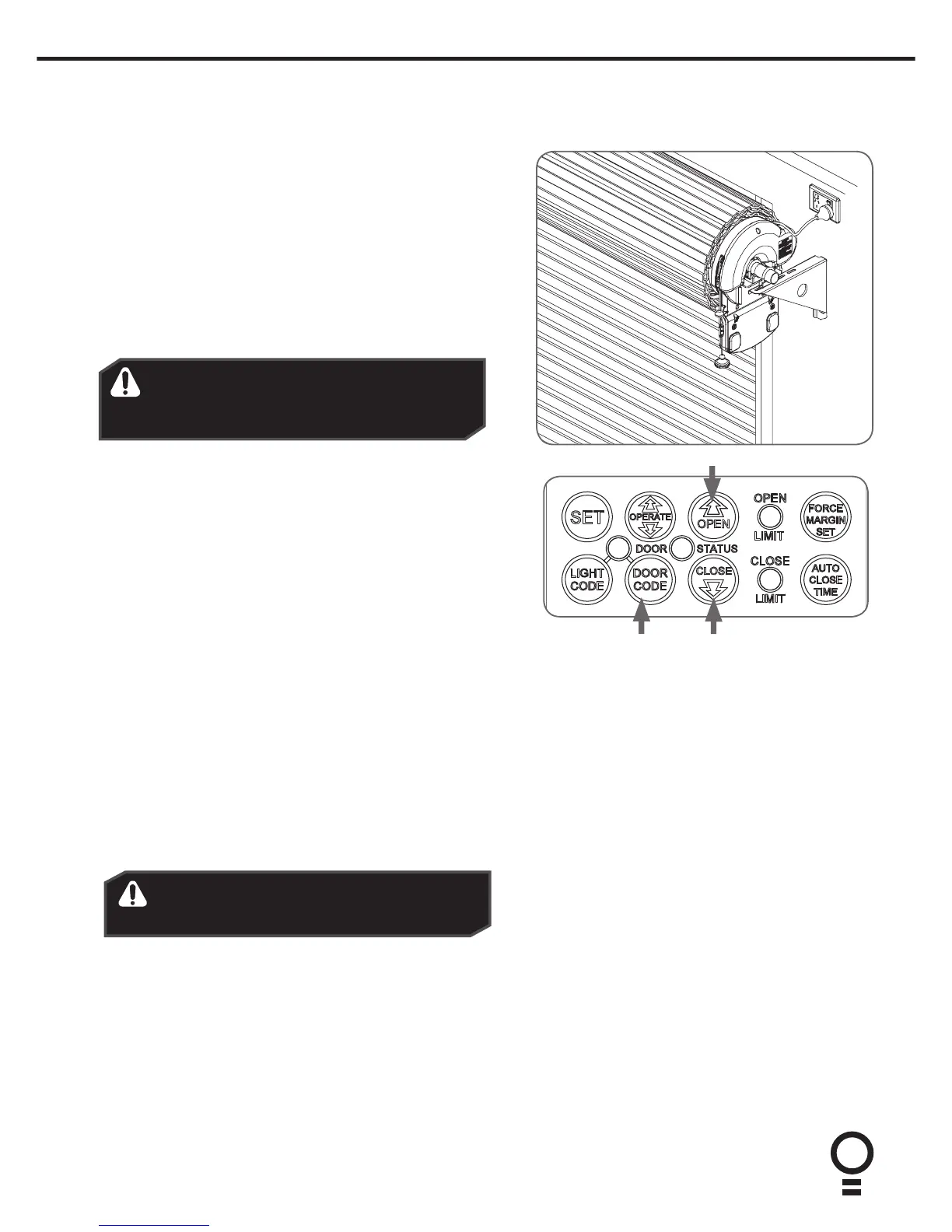
b. Engage the opener by pulling down on the manual release
string until a click sounds.
c. Remove the clear button cover from the unit.
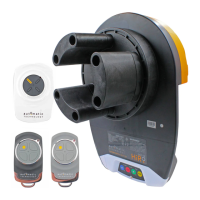
d. Switch power on to the opener. The red CLOSE LIMIT LED will
be flashing.
e. Press and hold the CLOSE button - the door should start
closing.
NOTE: If the door opens, release the CLOSE button and press
the OPERATE button once to change the motor’s direction.
Pull string
down to
engage
opener
Set the Limit Positions:
The Limit Positions can vary due to site conditions, such as uneven
ground. When setting the Close limits, ensure the position is when
the door makes first contact with the ground. Alternatively for the
Open limits the position should be at the height of the garage
opening.
a. Press and hold CLOSE button until the door reaches your
desired close limit position. The rubber strip at the bottom of
the door should form a good seal with the ground.
b. Release the CLOSE button when the door is near the desired
closed position. Single presses of the CLOSE button will inch
the door closer to the ground.
c. If the door overshoots press the OPEN button to move the
door in the open direction.
d. When the door is at the desired close position, press the SET
button, the OPEN LIMIT LED will now flash.
e. Press and hold the OPEN button until the door reaches your
desired open limit position. Single presses of the OPEN button
will inch the door open.
f. If the door overshoots press the CLOSE button to move the
door in the close direction.
g. When the door is at the desired open position, press the SET
button.
WARNING! In setting the close limit position, do
not force the door into the floor with excessive
force, as this can interfere with the ease of
operation of the manual release mechanism.
h. The door will now automatically close and open to calculate
the safety obstruction settings.
Resetting the Door Limit Positions
Limit positions can be deleted by:
a. Press and hold CLOSE button for six (6) seconds until the
CLOSE LIMIT LED flashes quickly.
b. Release the CLOSE button.
NOTE: If no action is taken within 30 seconds, the opener will
return to normal operating mode and restore the original settings.
c. Follow steps a - f in Set the Limits Poisitions to set new limit
positions.
WARNING! The door will automatically close,
open and close again after the next step. Ensure
that nothing is in the door’s path.
Setting the PET Mode position
When activated, PET mode drives the door to a preset
position from the close position, therefore allowing a
pet or parcel to go under the door.
a. Drive and stop the door at the deisred PET mode open
position by pressing the transmitter button coded for
Open/Stop/Close operation.
b. Press and hold the OPEN button on the opener for six
(6) seconds until the OPEN and CLOSE LED’s are lit to
record the new PET position.
c. Release the OPEN button.
Reset all Factory Defaults
a. Turn power to the opener off.
b. Press and hold the SET Button.
c. Turn power on while holding the SETbutton. Continue
to hold until all LED’s are off.
d. This will NOT erase transmitter codes stored in
memory.


 To Next Page