EasyManua.ls Logo

AT&T 4981 - User Manual

AT&T 4981
5 pages
Print Icon
To Next Page IconTo Next Page
Loading...
What Do The All-Fi Booster Lights Mean?
All-Fi Booster (4981)
What Do The Lights Mean?
Complete guide to the information the LED
lights on your AT&T All-Fi
TM
Booster provide.
© 2023 AT&T Intellectual Property. AT&T and globe logo are registered trademarks and service marks of AT&T Intellectual Property and/or AT&T affiliated companies.
Question and Answer IconNeed help?

Do you have a question about the AT&T 4981 and is the answer not in the manual?

Summary

AT&T All-Fi Booster (4981) Indicator Lights

Booster Power and Connection Status

Explains LED indicators for power, connection, startup, and pairing modes.

Booster Troubleshooting and Update Lights

Details LED meanings for connectivity issues, software updates, and placement.

Booster Reset and Factory Settings Lights

Covers LED indications for booster reboots and factory resets via the reset button.

WPS Pairing and Connectivity Lights

Explains LED indicators related to WPS pairing status and Wi-Fi device connections.

Summary

AT&T All-Fi Booster (4981) Indicator Lights

Booster Power and Connection Status

Explains LED indicators for power, connection, startup, and pairing modes.

Booster Troubleshooting and Update Lights

Details LED meanings for connectivity issues, software updates, and placement.

Booster Reset and Factory Settings Lights

Covers LED indications for booster reboots and factory resets via the reset button.

WPS Pairing and Connectivity Lights

Explains LED indicators related to WPS pairing status and Wi-Fi device connections.

Overview

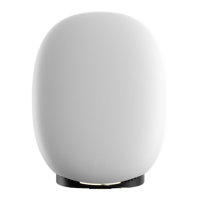
The AT&T All-Fi Booster (model 4981) is a device designed to extend and enhance your Wi-Fi coverage, ensuring a robust and reliable internet connection throughout your home or office. It acts as a Wi-Fi extender, working in conjunction with your AT&T All-Fi Hub to create a seamless mesh network.

Function Description:

The primary function of the All-Fi Booster is to expand your existing Wi-Fi network, eliminating dead zones and providing a stronger signal in areas where coverage might be weak. It achieves this by wirelessly connecting to your AT&T All-Fi Hub and retransmitting the Wi-Fi signal. The device is designed for easy setup and integration into your AT&T internet service. It supports both wired and wireless connections, offering flexibility in how devices can connect to the extended network. The booster also features a WPS (Wi-Fi Protected Setup) button for quick and secure pairing with compatible Wi-Fi devices.

Important Technical Specifications:

While specific technical specifications like Wi-Fi standards (e.g., Wi-Fi 6, Wi-Fi 6E), antenna configuration, or processor details are not explicitly listed in the provided pages, the device's connectivity options are highlighted. It includes two Ethernet ports on the back: one 1G Ethernet Port LED and one 2.5G Ethernet Port LED, indicating support for high-speed wired connections. The electrical rating is 12V-1.5A. The model number is WFEXT4971-XX, and the specific model shown is Air 4971. It has an FCC ID of en29nb4971 and a manufacturing date of 11/21/22. The device is manufactured by AirTies in Thailand.

Usage Features:

The All-Fi Booster provides clear visual feedback through its Notification Light on the front and various LEDs on the back, including the WPS Button LED, Power Jack LED, Reset Button, 1G Ethernet Port LED, and 2.5G Ethernet Port LED. These lights communicate the device's status, connection quality, and operational modes.

  • Off (Notification Light): Indicates no power or that the booster has rebooted. Users should check the power connection and ensure the back power LED is green.
  • Solid White (Notification Light): Signifies a successful connection to AT&T internet service, indicating the booster is operational.
  • Pulse White (fast) (Notification Light): The booster is starting up or attempting to connect to the hub's Wi-Fi. Users should wait during this phase.
  • Pulse Green (slow) (Notification Light): The booster is powered up and ready for pairing.
  • Solid Red (Notification Light): Indicates a pairing failure. This could be due to a 3rd party router, or the Extended Wi-Fi Service not being active. The recommended action is to reset the booster using the red reset button on the back and then connect it to the All-Fi Hub with an Ethernet cable for pairing. If the issue persists, contact ATT.com/support.
  • Pulse Red (slow) (Notification Light): Suggests connection issues, possibly due to a loose, disconnected, or damaged Ethernet cable, or the booster being too far from the All-Fi Hub.
  • Pulse Amber (fast) (Notification Light): The booster is undergoing a software update. Users should not unplug the device during this process and wait for the light to turn solid white.
  • Pulsing Red/Green (fast) (Notification Light): The booster is configured and connected, but its placement might not be optimal for performance. Moving it closer to the All-Fi Hub or another booster is advised.
  • Pulse Red (fast) (Notification Light): The red reset button was pressed for less than 10 seconds, indicating a reboot will occur once the button is released.
  • Pulse Green (fast) (Notification Light): The red reset button was held for more than 10 seconds, initiating a factory reset once the button is released.

WPS LED (back of hub) Indicators:

The WPS LED on the back of the hub provides specific feedback related to Wi-Fi Protected Setup (WPS) pairing:

  • White/WPS Off (WPS light): The booster is functioning correctly. Pressing the back WPS button initiates pairing, and the Service LED on the front of the All-Fi Booster should be observed.
  • Pulse Green (WPS light): Indicates that action is required on the Wi-Fi device attempting to connect. Alternatively, an Ethernet cable can be used to connect the booster's back Ethernet port to the hub's Ethernet port.
  • Solid Green (WPS light): WPS pairing has been successful.
  • Pulse Red (WPS light): The All-Fi Booster detected multiple Wi-Fi devices trying to connect via WPS. Users should wait before attempting again.
  • Solid Red (WPS light): An attempt to connect Wi-Fi devices using WPS has failed. Users should press the WPS button to try again.

Maintenance Features:

The device incorporates a reset button on the back, which serves two main maintenance functions:

  • Reboot: A short press (less than 10 seconds) of the reset button will cause the booster to reboot.
  • Factory Reset: Holding the reset button for more than 10 seconds will initiate a factory reset, restoring the device to its default settings. This can be useful for troubleshooting persistent issues or reconfiguring the device.

The AT&T All-Fi Booster (4981) is designed to be a user-friendly and effective solution for extending Wi-Fi coverage, with clear visual indicators to guide users through setup, operation, and troubleshooting. Its robust connectivity options and straightforward reset features contribute to its ease of use and maintenance.
AT&T 4981 Specifications

General IconGeneral
BrandAT&T
Model4981
CategoryExtender
LanguageEnglish

Related product manuals