DIVA Quick Start, version 1.0.1
selector is visible just beside the next event drop-down menu (see Figure 39). This selector
permits to define how many time the events’ loop will be repeat.
This is a quick way to loop different language evacuation messages for example.
Figure 39: Event Circular Times selector
More details information could be found about the way to use events in the DIVA USER
MANUAL.
6.5 Front Panel Control and software real-time monitoring
The MIC/LINE input as well as the PSS have no front panel controls. There are only software
controls. In this section only one part of them will be explain. On both the microphone and
the PSS, PEQ and Filtering can be applied. On the MIC/LINE input, a compressor/limiter can
be set.
6.5.1 Microphone
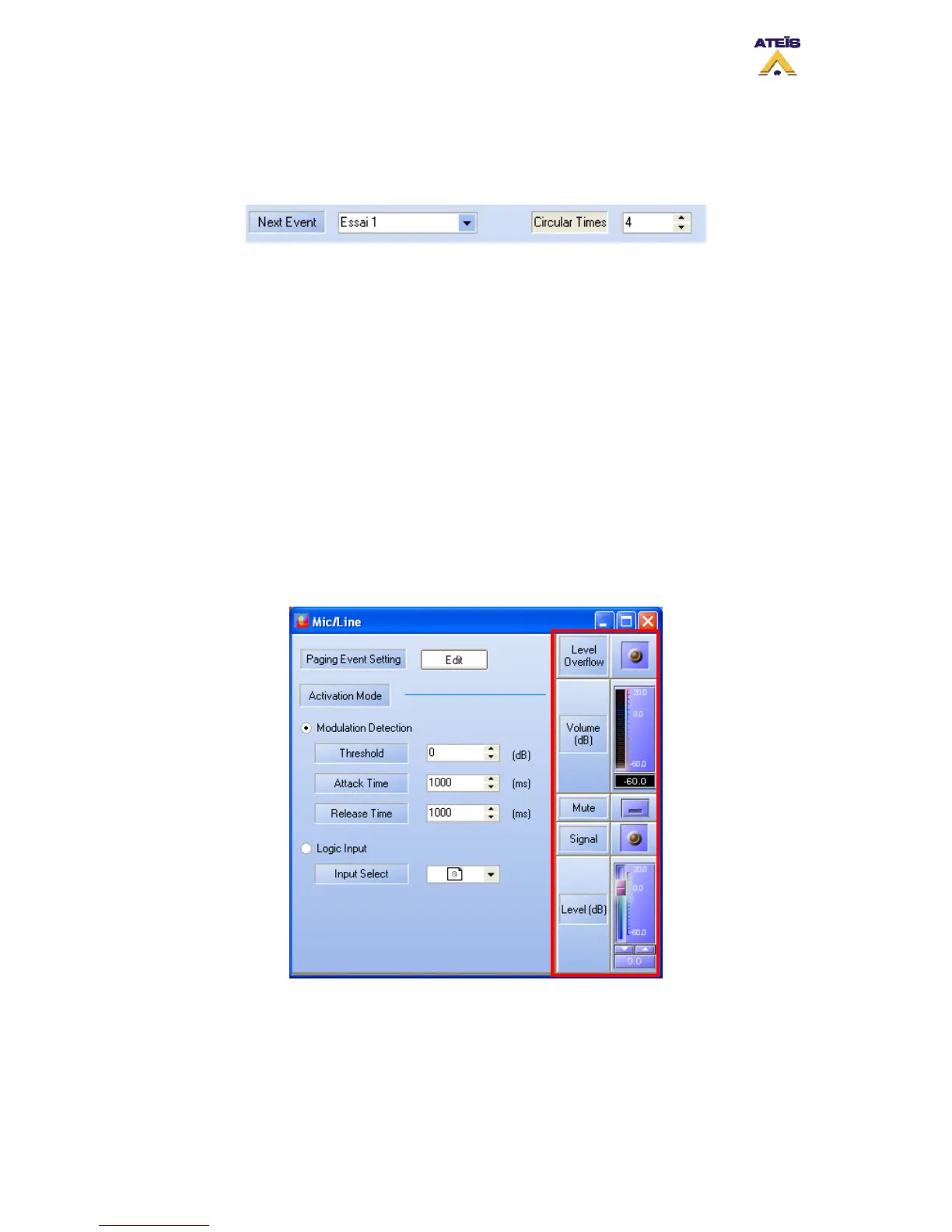
At the right of the “MIC/LINE” page, there is one level controls, a volume and a level
overflow indicator. See red framed on Figure 40.
You can adjust the microphone level with the slide bar.
Figure 40: MIC/LINE control and Indicator
6.5.2 PSS
The PSS window offers two controls, one for the integrated microphone gain and one for the
PSS’s speaker gain, as well as three indicators, volume, microphone level overflow and
speaker overflow. See red frame on Figure 41.
Ateïs International
Ch. du Dévent, 1024 Ecublens, Switzerland.
Phone : +41 21 881 25 10
32



 To Next Page