External variable
There are two ways
to know the device status:
•
one is to trigger command string manually(ask manually),
•
another way is: the IT5 asks the device automatically (once 4 s
automatically), then wait device reply.
● Ask manually
Step 1
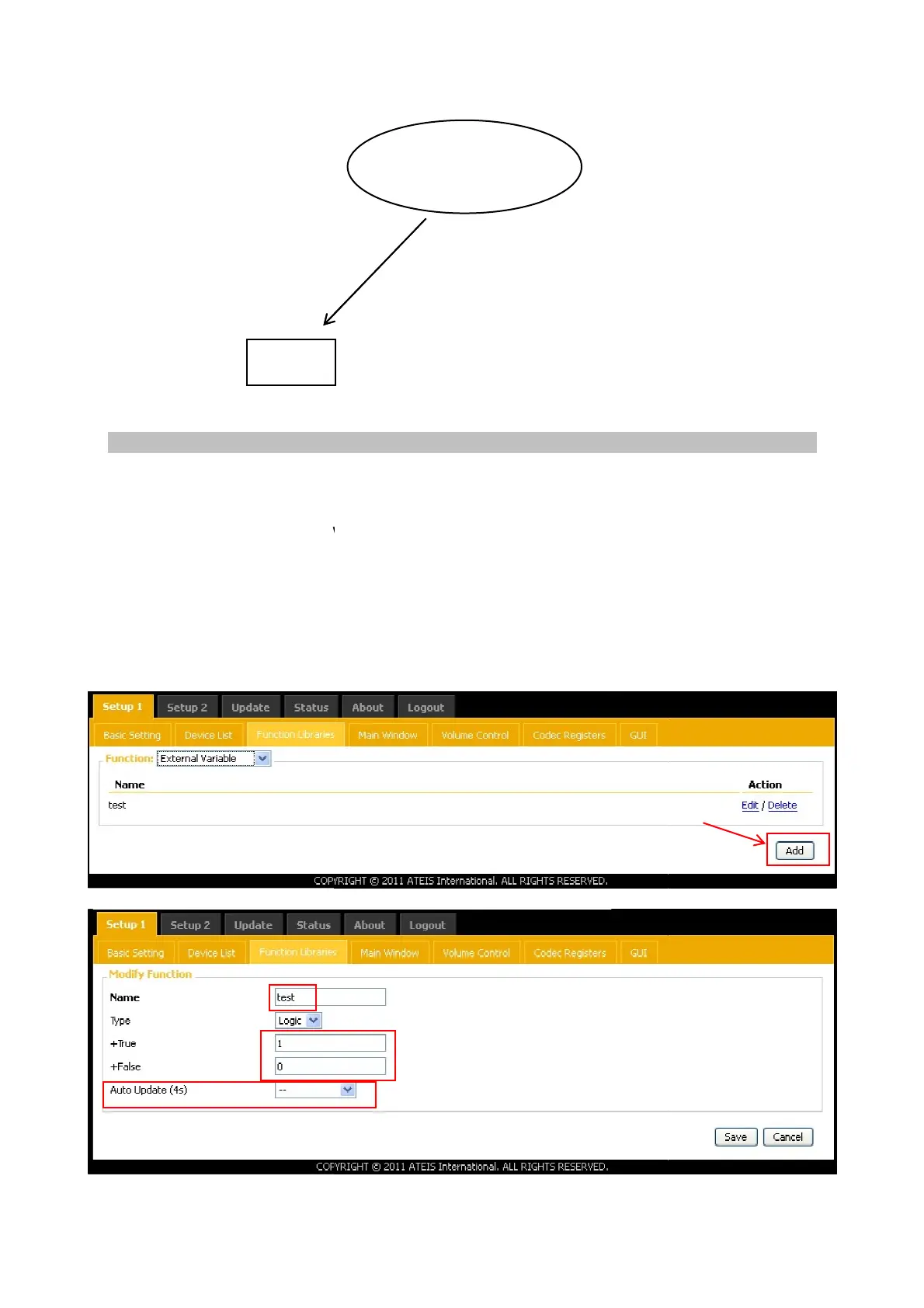
Add external variable: that is the other side device reply the string to IT5. For
example I set 1 and 0.
to know the device status:
one is to trigger command string manually(ask manually),
another way is: the IT5 asks the device automatically (once 4 s
automatically), then wait device reply.
Add external variable: that is the other side device reply the string to IT5. For
For example: AMP
on/off
device send string (3rd party
control for example) to IT5 via
ethernet, than IT5 show the AMP
on/off status on its screen.
Variable name
Reply string
4 seconds to ask the device status,
the device will reply string
another way is: the IT5 asks the device automatically (once 4 s
econds)(ask
Add external variable: that is the other side device reply the string to IT5. For
4 seconds to ask the device status,



 To Next Page