INSTALLATION
POWER CONNECTION:
The power connection can be done by :
• an external 24V power supply.
• the Power over Ethernet technology which allows to pass electrical power safely,
along with data, on Ethernet cabling. You will need a Power over Ethernet switch.
If you have several devices on the same POE switch, check if the switch will be
able to deliver enough power to each unit. With a properly sized switch, you can
reach 100m distance with POE.
Control
Depending on your needs, there are several ways of configuring and controlling the PPM-
IT5. Embedded web server enables you to modify the settings of the PPM-IT5.
TERRA-SERVER, our intuitive and powerful audio distribution software, handles the
announcement, the music, the zoning, the paging, the scheduler & the priorities.
Configuration
Each Terracom unit comes loaded with a default configuration. Follow steps 1 to 8 for
connecting to the embedded web server that enables you to modify the settings.
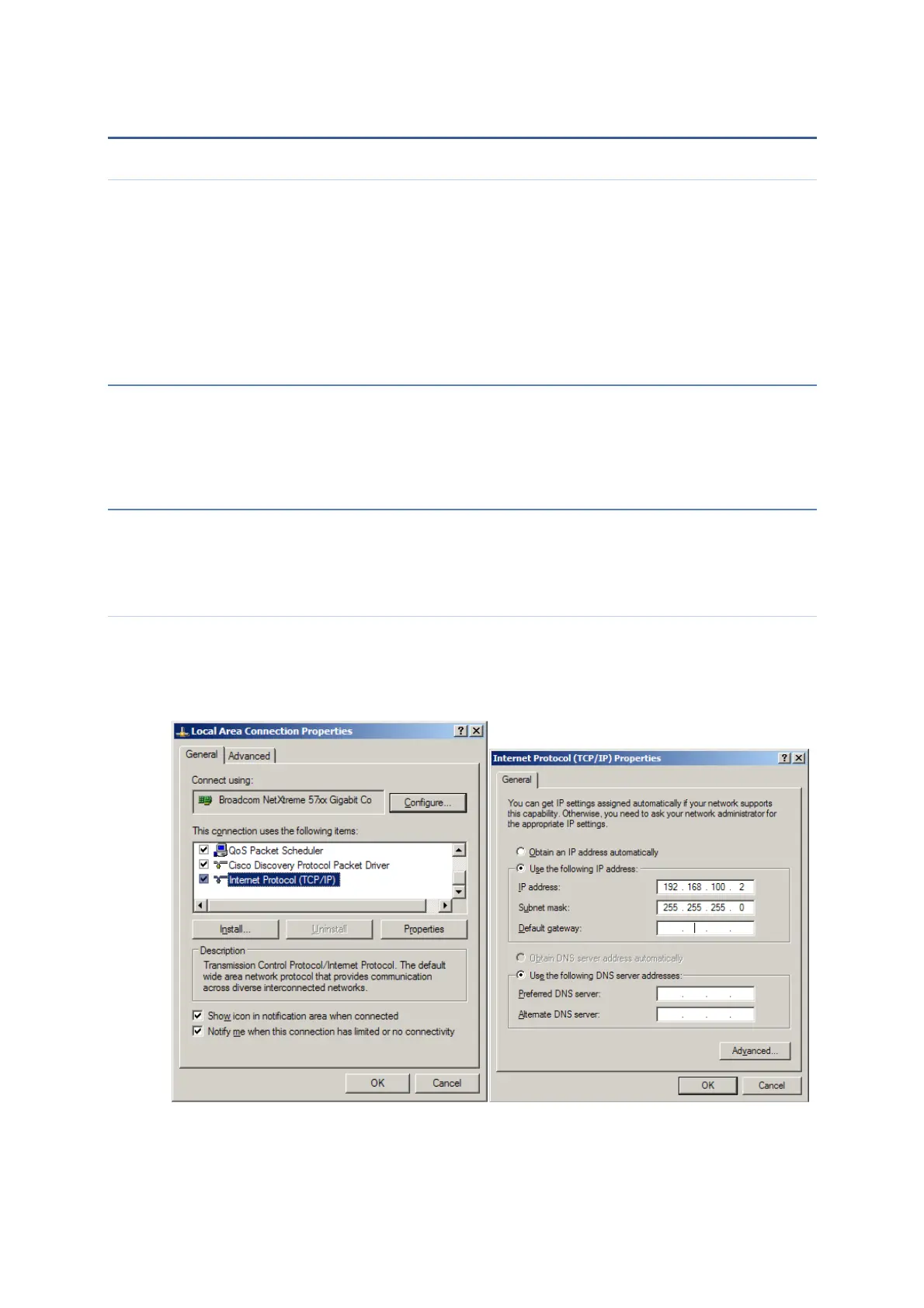
Assign IP address to PC
Each Terracom device is shipped from the factory with a default IP address of
192.168.100.1
Then, your PC must have an IP address like 192.168.100.x (x is a value between 2 &
254).
If your device is not coming with the default IP address, please refer to the chapter:
“How to knows its IP address”



 To Next Page