➊
➋
➌
F
fo
D
E
8
T
T
a
O
P
c
E
p
T
a
32
7 - Adjusting the Comfort
and Economy settings
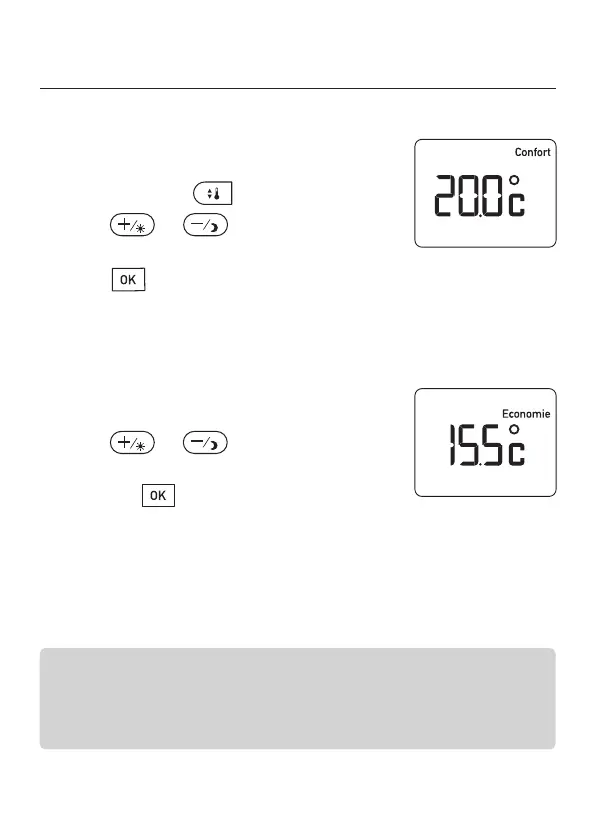
7.1 - Adjusting the Comfort settings
Default setting = 19°C.
From Automatic mode:
➊ Briefly press the button.
➋ Press or , choice of tempera-
ture (5 to 30°C), in increments of 0.5°C.
➌ Press to switch to the Economy setting.
7.2 - Adjusting the Economy settings
Default setting = 15.5°C.
➊ After validating the Comfort temperature.
➋ Press or to choose the
Economy temperature (4.5°C to 19°C)
➌
Press the bu
tton to adjust the Frost
Protection setting.
The Economy settings depend on the value of the Comfort
settings.
Range of settings for Economy:
between -11°C and -0.5°C compared to the Comfort settings.
2705157_rev3_not_TAP_ATERNO_SMART 17/12/2019 12:32 Page 32


 To Next Page