9
Y
c
w
F
b
T
1
E
T
e
p
V
to
T
-
-
34
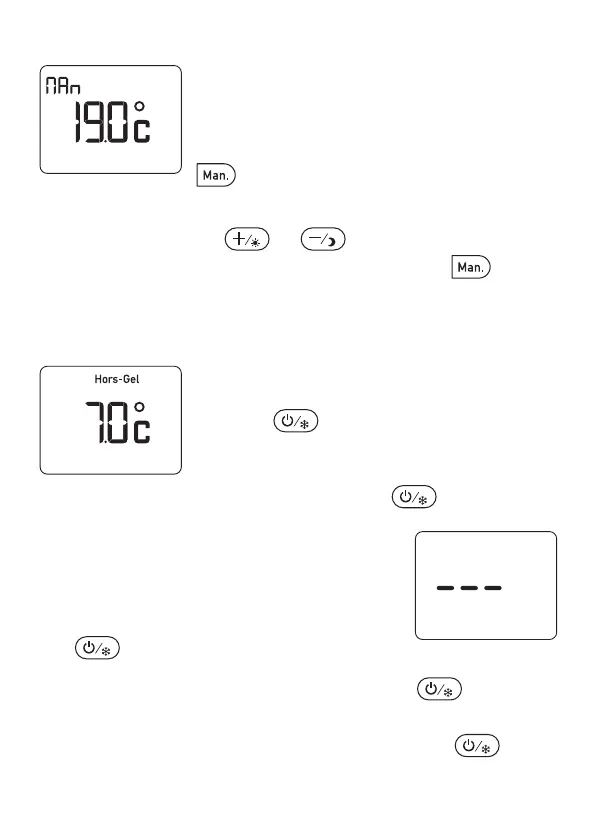
8.2 - Simple thermostat mode
Default setting:
Simple thermostat setting = 19°C.
From Automatic mode, you can switch to
simple thermostat mode by pressing the
button.
The unit displays only the temperature setting.
From this mode, press or to set the temperature
(5 to 30°C). To return to Automatic mode, press the button
again.
8.3 - Frost Protection mode
To avoid the risk of the installation freezing
during a prolonged absence.
Press the button for approximately
5 seconds to switch to Frost Protection mode.
To return to Automatic mode or to simple
thermostat mode, press again.
8.4 - Shutdown mode
To stop the heating outside of the
heating season. From the Automatic
mode or Simple thermostat mode, press
the button,
From the Frost Protection mode, press the button
twice. The unit shows 3 dashes. To return to
Au
tomatic
mode or to Simple thermostat mode, press the
button again.
2705157_rev3_not_TAP_ATERNO_SMART 17/12/2019 12:32 Page 34


 To Next Page