16
Use
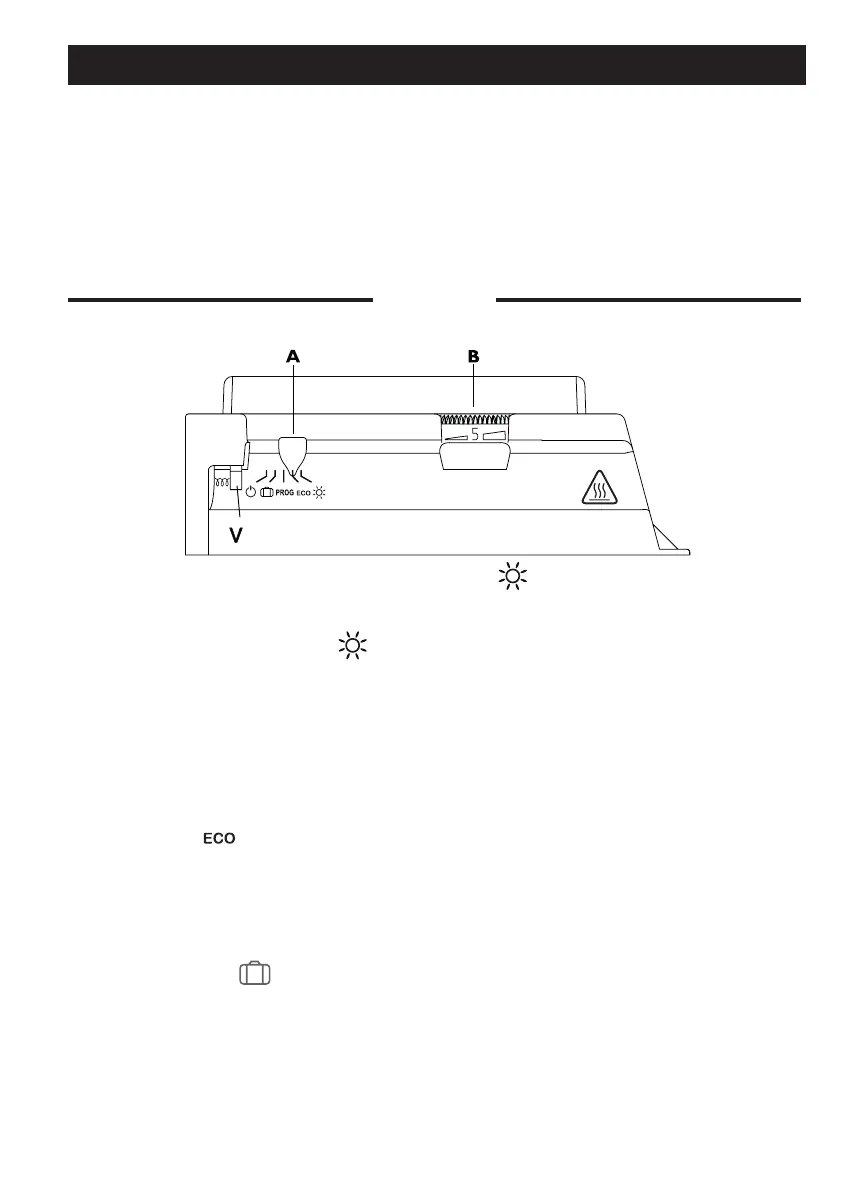
Control box
Voyant de chauffe
Setting the comfort temperature
This is the temperature desired when the room is occupied.
Set cursor A to position .
Adjust knob B to 5. The heating indicator V will illuminate if the tem-
perature is below the desired temperature.If you are not happy with
the setting, re-adjust it and proceed again.
Setting the Eco temperature
This involves a reduction in degrees compared to the Comfort temperature. We recom-
mend that you use this mode for periods of absence of more than 2 hours or overnight.
Set switch A to . The device is now in Eco mode (Comfort temperature minus approx. 3°C
to 4°C).
This light indicates periods during which the resistance is heating;
The heating light V
Locking the controls
Frost free
This mode keeps the temperature at about 7°C in the room when the house is unoccupied
for a long period (usually more than 24 hours).
Set the cursor A to .
To retain the performance of the device, it is necessary about twice a
year to carry out dust removal using a vacuum cleaner or a brush at
the air inlets and outlets. Every ve years, have the inside of the device
checked by a professional electrician. The outside of the device can be
cleaned with a damp cloth.
Never use abrasive products or solvents
.
MAINTENANCE
I
t is possible to lock or limit the range of use of thumb-wheel
B
and lock selector switch cursor
A
to prevent the inadvertent manipulation of the device (by children, etc).







 To Next Page