22
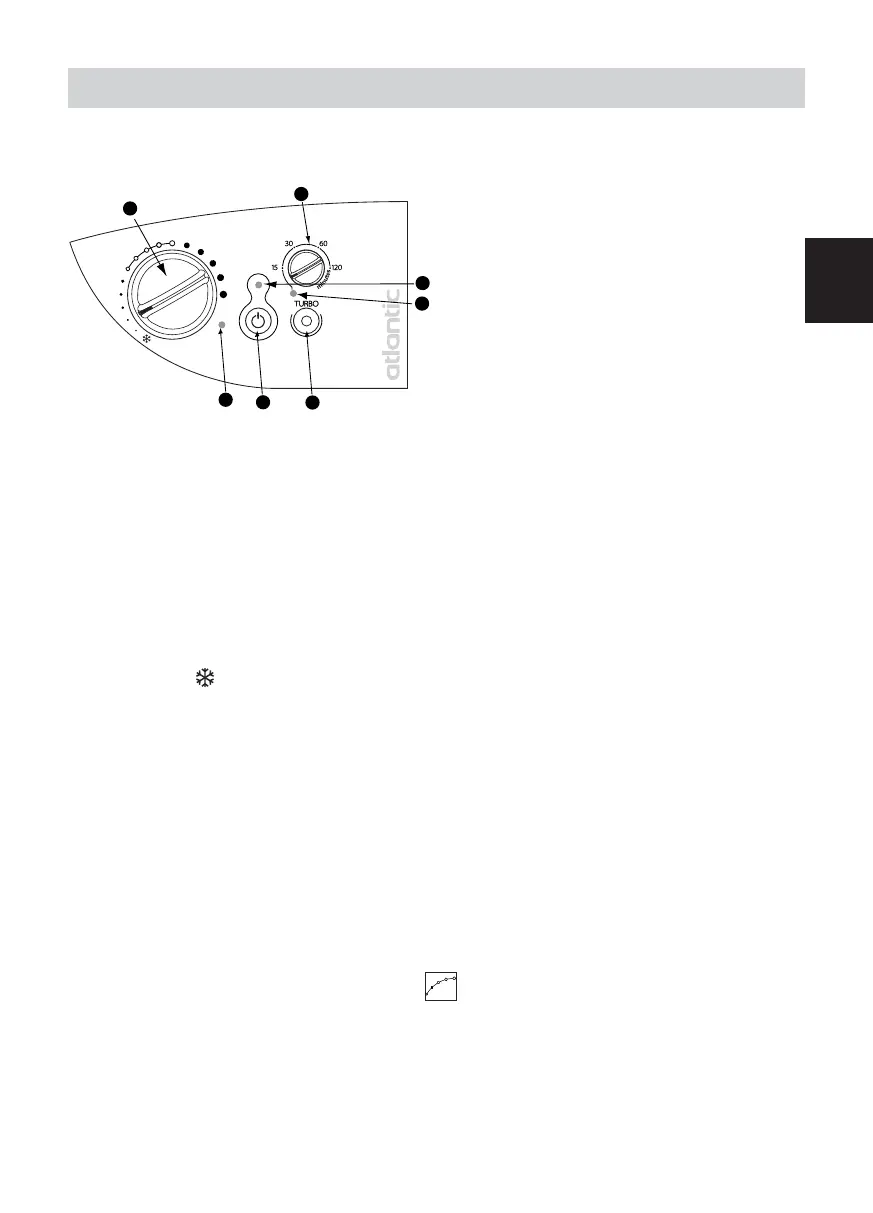
Description of the control panel
Temperature setting knob with Hors Gel
position and ability to restrict the range.
Time adjustment knob TURBO
1/4h, 1/2h, 1h, 2h.
Power On indicator
TURBO indicator
TURBO control
Heating ON/OFF switch
Heating indicator
1
3
4
6
5
7
2
USING THE DEVICE
GB
Use on electricity for versions:
- All electric with or without f a n.
-MixedwithfaninSUMMERposition.
Setting the CONFORT temperature
It is the temperature desired when the room is occupied.
a) Set the switch to
to the ON position, the
indicator lights.
b)Align the toothed screw
with the marking : the indicator light illuminates if the tempe-
rature is less than desired.
Wait a few hours for the temperature to stabilise.
If the temperature setting does not suit you, adjust it using the adjusting screw
. Proceed step-
by-step using the notches (
one notch a t a time
).
The thermostat’s cycle takes several minutes. It is possible that the heating indicator may not react
instantaneously, but instead only on the next thermostat cycle.
Winter use with the boiler lit
Heating your room
- Increase or decrease the flow through the supply valve C, depending on the desired temperature
(
in the case of a the rmostatic valve
).
Use of Turbo mode
- Press switch
, indicator light
illuminates.
- Set knob
to .
- Set Turbo mode’s duration by turning knob
.
- Press the same knob
to start the Turbo. The “Turbo ON”
light illuminates.
The fan operates for the selected period.











 To Next Page