32
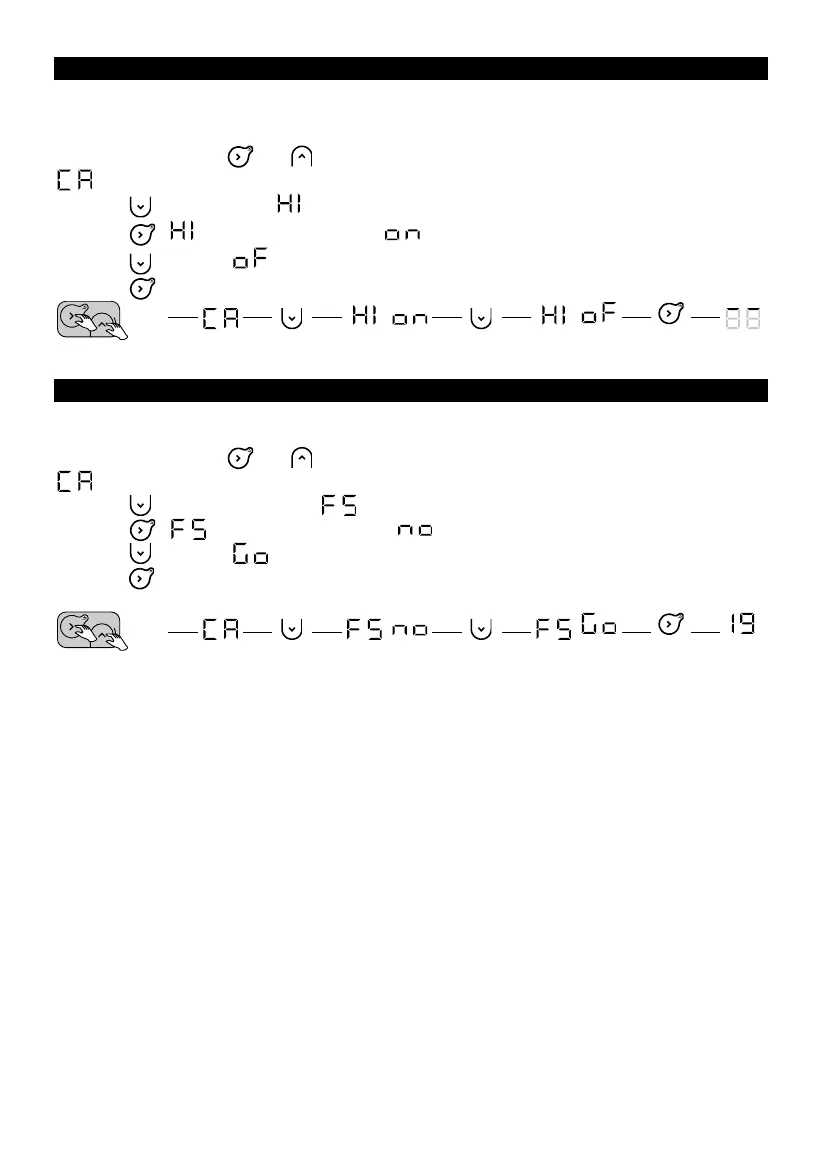
HEATING STANDBY INDICATOR
There is an automatic inactivity timeout on the control panel display after a few seconds, with the
exception of the heating indicator, which is lit when the resistor power supply is on. It is possible
to configure the panel so that the indicator goes out when the panel display is switched off.
1. Press and hold the and buttons at the same time for more than 3 seconds to display
.
2. Press twice to display (Heating Indicator).
3. Press , will flash alternately with .
4. Press to display .
5. Press to exit.
FACTORY SETTINGS
It is possible to reset the appliance, erasing all the settings made (programs, calibration, maximum
temperature, heating indicator). This function is particularly useful in case of programming errors.
1. Press and hold the and buttons at the same time for more than 3 seconds to display
.
2. Press three times to display (Factory Settings).
3. Press , will flash alternately with .
4. Press to display .
5. Press to confirm. All the indicators will light up. The appliance will then return to Comfort
mode at 19 °C.










 To Next Page