19
PARAMETER SETTINGS CONTINUED...
FOOT SWITCHES
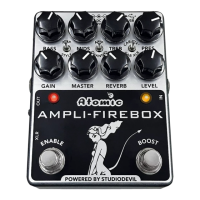
BOOST- This switch can be assigned to turn certain functions of the AMPLIFIRE-
BOX on and off when pressed. These assignments must be made in the editor
application. At the top of the editor, click FOOTSWITCHES and all of the assignable
functions will be displayed. All of the functions have three possible assignments:
1 Not Assigned - That functions button will be black That function will not be
changed when the BOOST foot switch is ON.
2 Assigned - That functions button will be a solid color This function will be
turned ON when the BOOST foot switch is ON
3 Inverted - That functions button will be outlined with a color This function will
be turned OFF when the BOOST foot switch is ON
Simply keep clicking on the function button to toggle between the three different
assignments.
For example, with the proper assignments you could turn ON the Compressor and
the Reverb and turn OFF the EQ by simply turning ON the BOOST foot switch.
ENABLE – This switch has two modes. The default is BYPASS mode. This simply
allows you to activate or bypass the pedal. When the LED above the switch is
red the pedal is on. Pressing the switch will put the pedal in bypass and the LED
will go out.
Holding down the switch for 3 seconds will put the pedal in A/B mode. The LED
above the switch will turn yellow and blink to let you know you are in A/B mode
on channel A. Pressing the switch again will turn the blinking LED red and select
channel B. Pressing the switch will toggle between channel A/B. From the Factory
preset A is a clean amp and preset B is an overdriven amp. This is just like switchig
between your clean channel and your overdrive channel on a standard guitar amp.
While on channel A and B you can use the toggle switches to select any of the
loaded 9 presets. You can tweak the knobs and Amplifire-Box will save the
different knob settings for channel A and B. (Be aware that the physical knobs will
remain in the position that you last set them, so they will not accurately represent
the actual settings. If you use the editor you will see the knob settings you
selected for channel A and B.)
Holding down the switch for 3 seconds will put the pedal back in BYPASS mode.


 To Next Page