10
1 Getting Ready
<2> Trigger setting for each pad
<3> Hi-hat control pedal adjustment
1 In the home screen, press [
].
2 Select the [SYSTEM] tab, and then press
[TRIGGER].
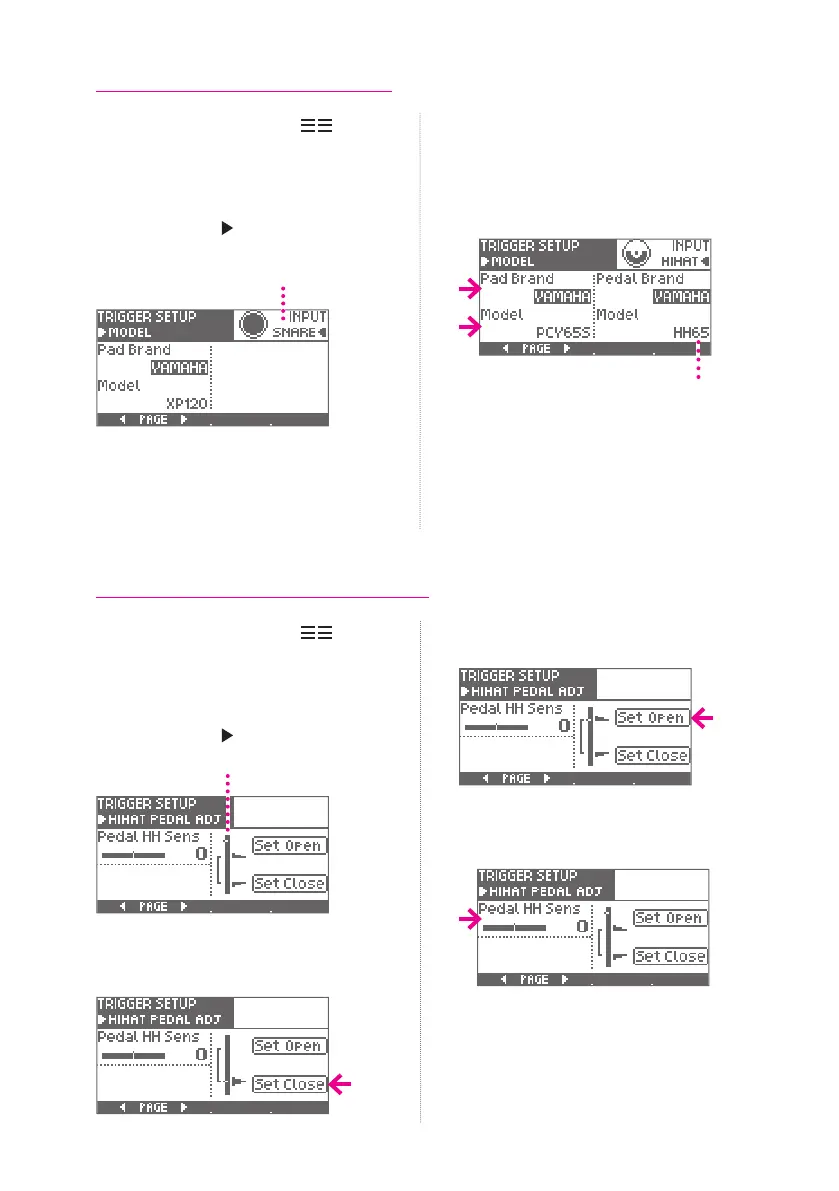
3 Press the [PAGE ] to access the MODEL
page.
Pad being congured
4 Strike the pad that you want to congure.
5 Press [Pad Brand] to select the
manufacturer, and press [Model] to select
the model name of the pad.
* When making settings for the hi-hat pad, you’ll
also specify the model name of the hi-hat pedal.
Model name of the hi-hat pedal
6 Repeat steps 4—5 in the same way to
congure for all pads.
7 Press the [OK] button to conrm the
setting.
If you decide not to change the setting,
press the [CANCEL] button.
1 In the home screen, press [
].
2 Select the [SYSTEM] tab, and then press
[TRIGGER].
3 Press the [PAGE ] several times to
access the HIHAT PEDAL ADJ page.
Meter
4 Advance the hi-hat pedal to the closed
position, and press [Set Close].
5 Remove your foot from the hi-hat pedal,
and press [Set Open].
6 Press [Pedal HH Sens] and adjust the
foot-close and foot-splash volume.
7 Press the [OK] button to conrm the
setting.
If you decide not to change the setting,
press the [CANCEL] button.


 To Next Page