4
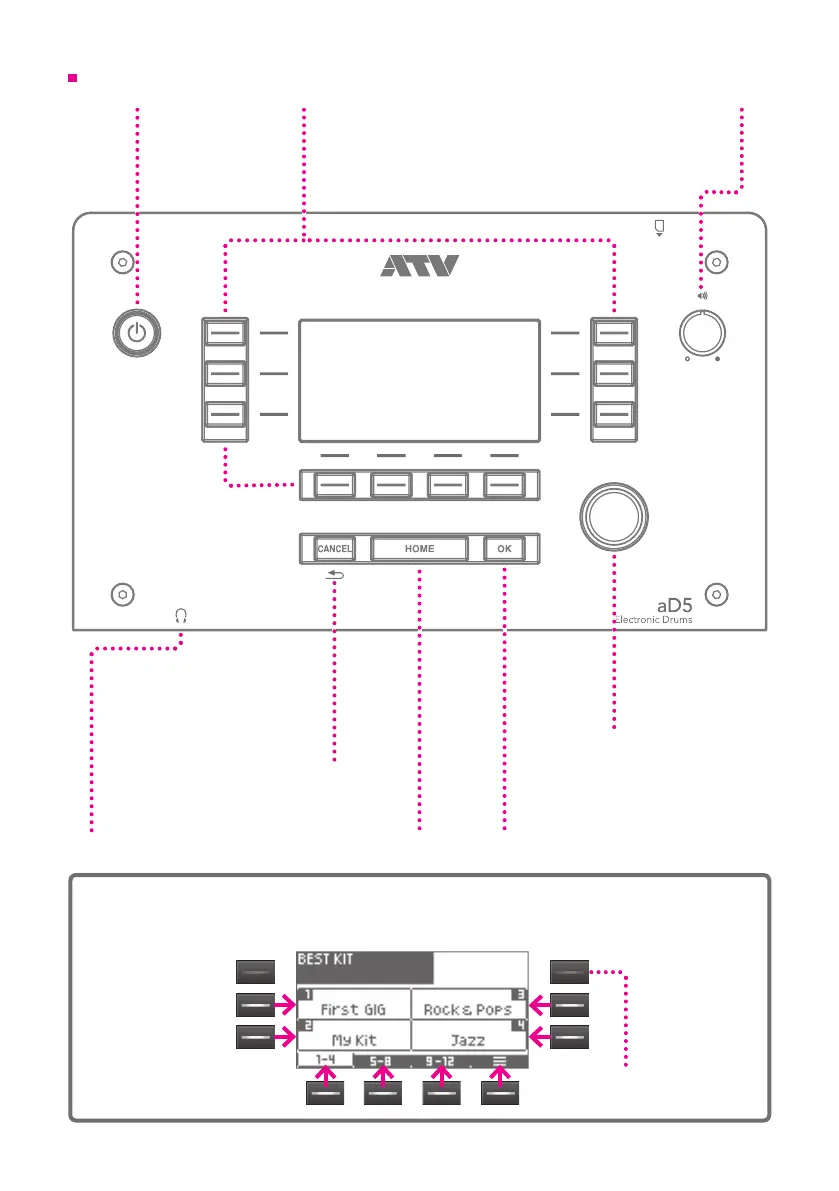
Power button
Long-press this
button to turn the
power on/o.
Top panel
Value knob
Used to change
various settings.
PHONES
Connect your
headphones here.
About the function buttons
Use the function buttons to select the corresponding items or functions in the screen.
Function button
The function of each button is shown in
the screen. These buttons are also used
to select items in the screen. Available
buttons are lit.
[OK] button
Conrms a change made to a
setting. This button is also used in
a conrmation screen.
[CANCEL] button
Cancels a change made to
a setting, returning to the
previous screen. This button
is also used in a conrmation
screen.
[HOME] button
Returns to the initial
screen (home screen).
Volume
Adjusts the volume of
the headphones and the
OUTPUT.
Buttons for
which there is no
corresponding item
are unlit.


 To Next Page