9
1 Getting Ready
Trigger settings
You’ll need to make trigger settings when using the aD5 for the rst time or after you’ve changed
the types of pads. This allows the data from the pad sensors to be processed correctly so that the
aD5’s performance capabilities can be fully utilized.
You must set the following three items.
<1> Crosstalk cancel
setting (p. 9)
This prevents the “crosstalk” that can occur when the impact of striking a pad
reaches another pad, unintentionally triggering it.
Complete this setting simply by striking each pad as instructed by the crosstalk
cancel wizard.
<2> Trigger setting for
each pad (p. 10)
These settings specify the response of each of your pads to ensure that the sound
accurately reects the output of the pad sensor.
Simply select the model name of each pad, and the typical response is specied.
<3> Hi-hat control pedal
adjustment (p. 10)
Make adjustments so that the hi-hat control pedal operates correctly.
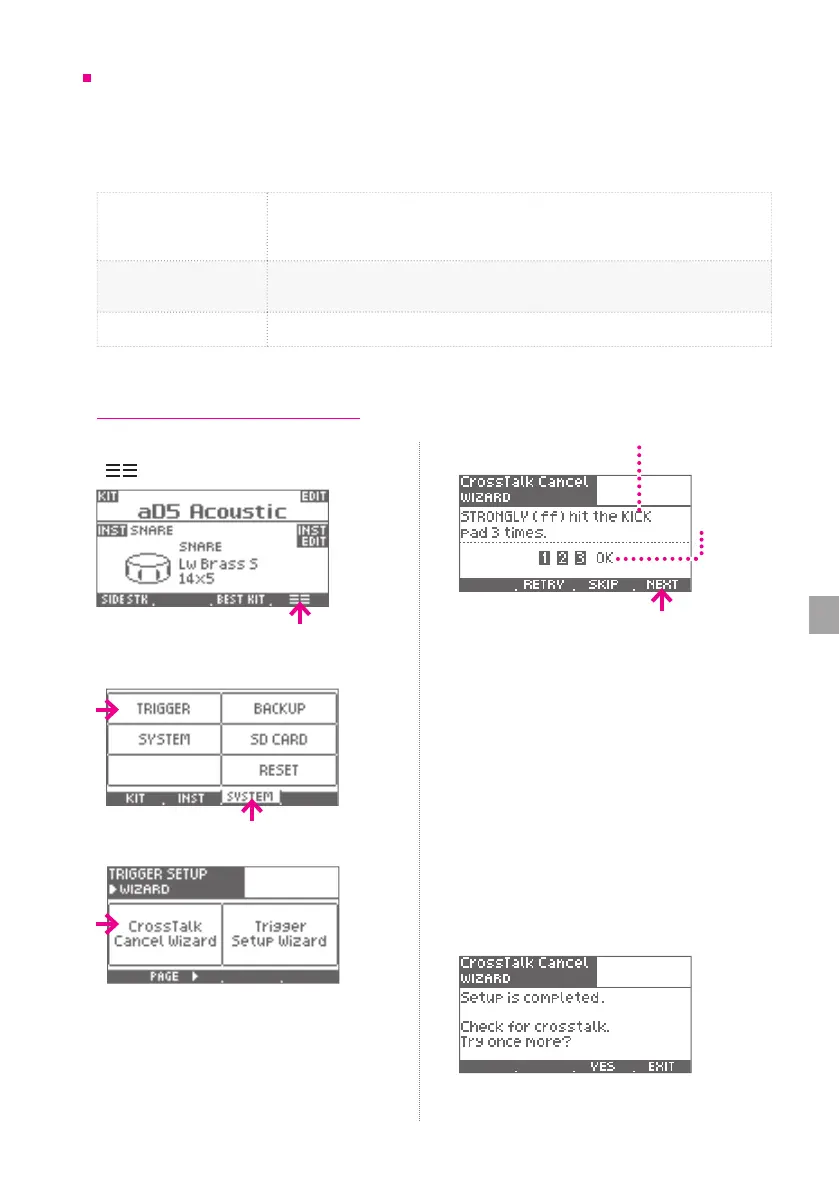
1 Press the [HOME] button, and then press
[
].
2 Select the [SYSTEM] tab, and then press
[TRIGGER].
3 Press [Crosstalk Cancel Wizard].
4 As directed in the screen, strongly hit the
specied pad three times.
Specied pad
OK
indication
* If you press [RETRY], the previous strikes are
discarded.
5 When the screen indicates “OK” press
[NEXT] to proceed.
6 Repeat steps 4—5 in the same way.
The aD5 calculates the state of crosstalk for
all of the connected pads.
* We recommend that you play a rimshot when
striking the snare pad.
* If the specied pad is not connected, press [SKIP].
7 When the following screen appears,
play the pads to verify that there is no
crosstalk, and then press [EXIT].
* If there is crosstalk, press [YES] and repeat the
wizard once again.
<1> Crosstalk cancel setting


 To Next Page