IMEO2 - User manual 09
Chapter 2
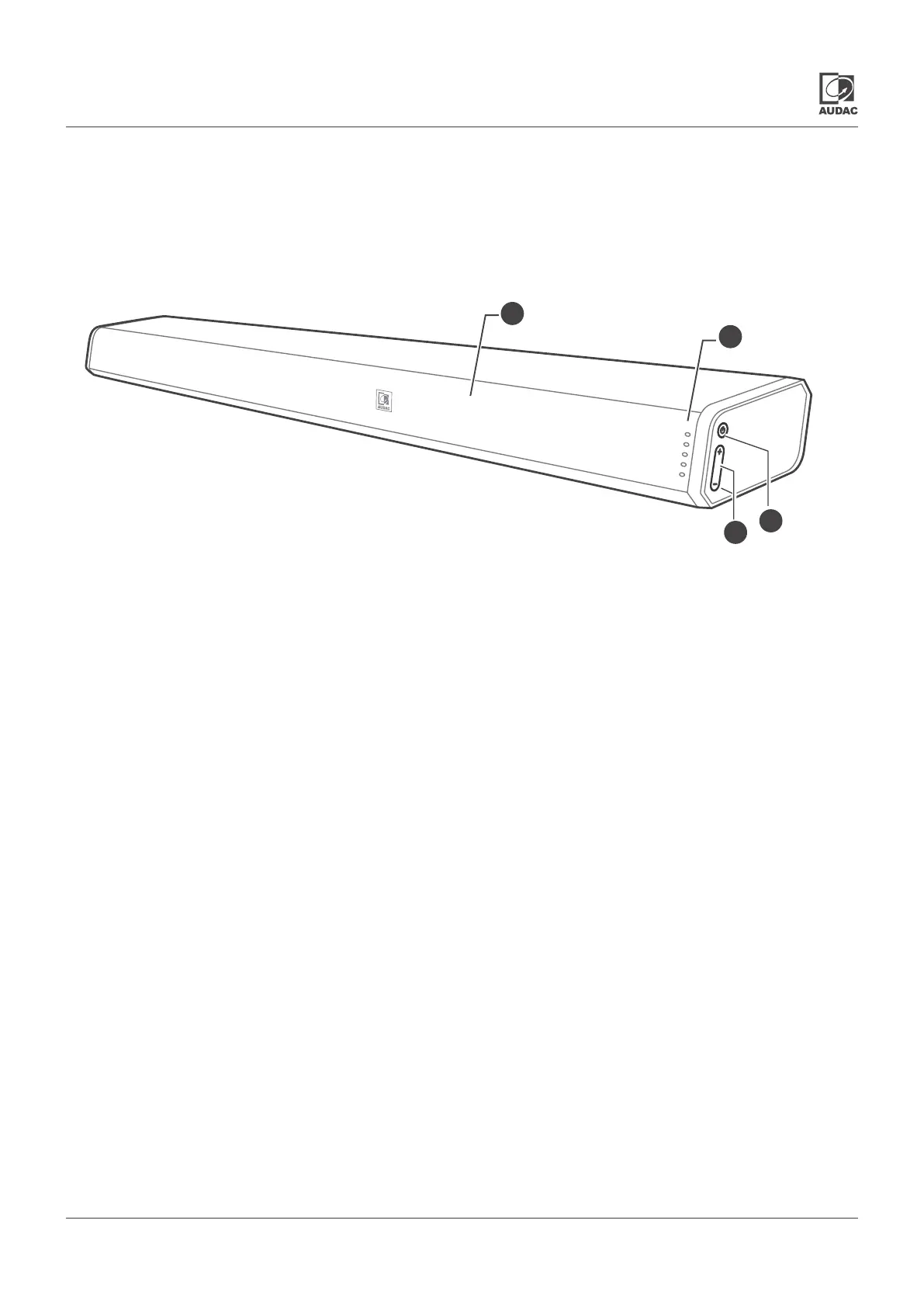
Overview IMEO2: Front
1) Status indicator LED’s:
These LED’s indicate the current operation status of the
IMEO2.Various color LED’s indicate following statuses:
• Red: Standby mode
• Green: (Blinking) USB / (Illuminated) AUX (3.5 mm jack input)
• Blue: Bluetooth mode
• Orange:(Illuminated) Optical / (Blinking) Coaxial mode
• White: HDMI ARC mode
3) Power button:
The power button allows to switch on and off the unit.
Press to switch the sound bar on. Press and hold to switch
the sound bar off. Repeatedly press (short term) to switch
between the various operation modes
(USB / AUX / BLUETOOTH / OPTICAL / COAXIAL / HDMI
ARC).
2) Remote control (IR) sensor:
The remote control (IR) sensor is located behind the front grill
of the IMEO2. This sensor requires a line-of-sight connection
with the remote control. Make sure this sensor is not covered
or blocked.
4) +/- buttons:
The + / - buttons allow to increase or decrease the volume
level.
1
2
3
4



 To Next Page