Chapter 2
Front & rear panel
Front panel overview
1
2
3
4
5
Front panel description
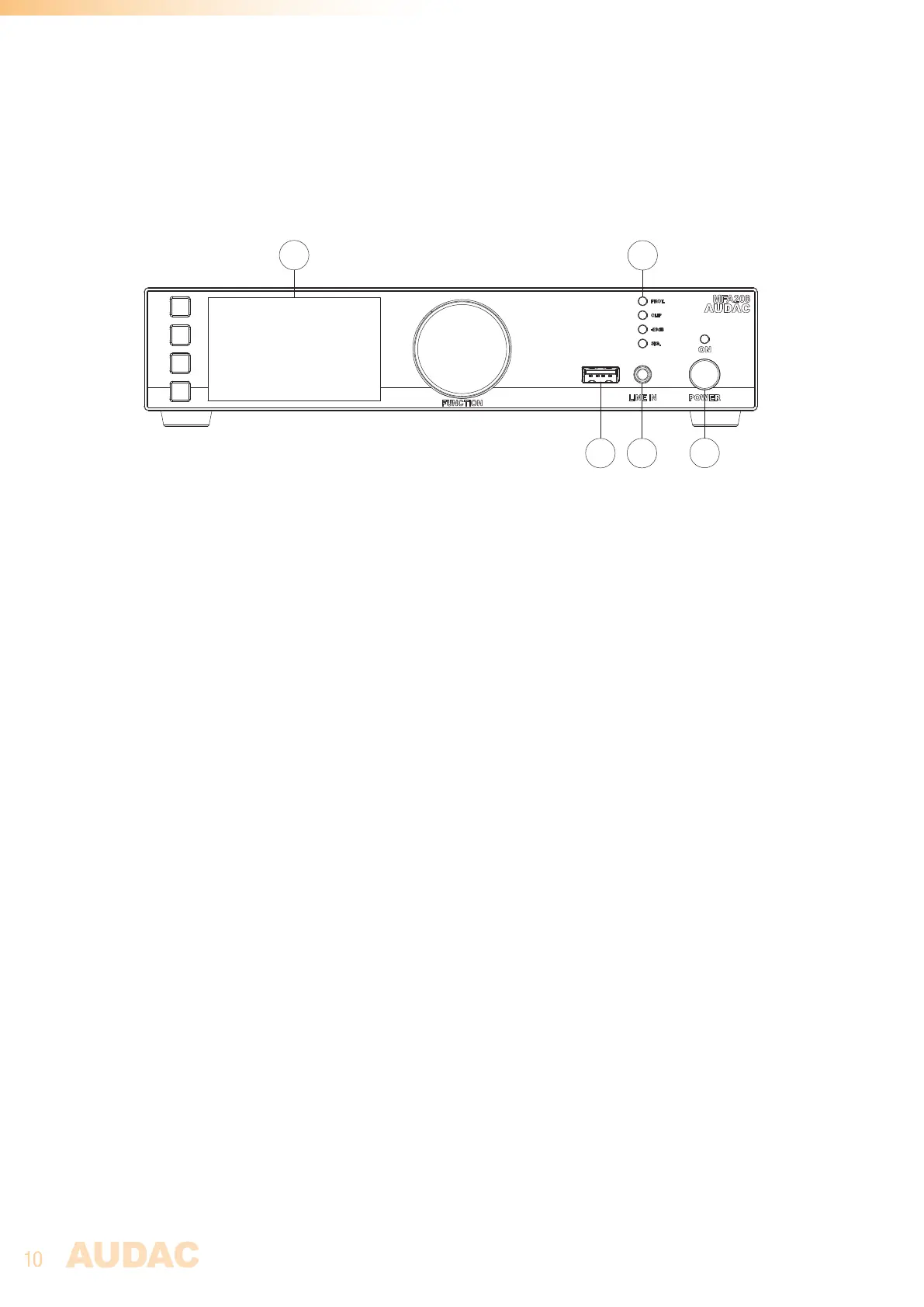
1) Display with tactile push buttons and rotary selection dial:
A clear system overview and intuitive user experience is offered using the 2.8” graphical LCD display accompanied
with four tactile selection buttons (left side) and a rotary selection dial (right side). The color display offers a clear
overview of the system’s current operation mode with intuitive and user-friendly menu navigation.
The functionality of the four push buttons depends on the current operation mode and position in the menu structure.
In the main menu, the upper one allows access to the module functions, while the second and third gives you
access to volume settings (amplifier and line out). The lower one redirects you to the settings menu. This will be
further explained in chapter 3.
In other menu’s, corresponding icons are shown on the left side of the display. Parameter adjustment and browsing
are made easy using the rotary function dial. This multifunctional dial allows easy one-hand operation throughout
the entire menu structure. Browsing through the menu is done by rotating it while actions are made by pressing it.
2) USB slot:
The USB slot is internally connected with the module slot and can be used for data storage, media playback or any
other supported functions (if supported by the module). Additionally, the USB connection can be used for firmware
updates to the system.
3) 3.5 mm jack input:
The 3.5 mm jack input is an unbalanced stereo line input whereto any (portable) device such as laptop, smartphone
or tablet with 3.5 mm jack audio output can be connected. This input is combined with the line input on the rear
amplifier side (RCA), meaning the rear side input is disabled when the front 3.5 mm jack is connected.
4) Indicator LED (VU):
The (VU) indicator leds indicate the output level and status of the amplifier (Signal / -20 dB / Clip / Protect).
5) Power button:
Allows to switch the system between ON and Standby. The indicator LED illuminates in orange color when in
standby and illuminates in blue when switched on. When powering on, it takes about 10 seconds before the
amplifier is switched on and fully operational.



 To Next Page