15
©2023 by AUDEMO-SYSTEMS®, Schatzbogen 62, 81829 München V3
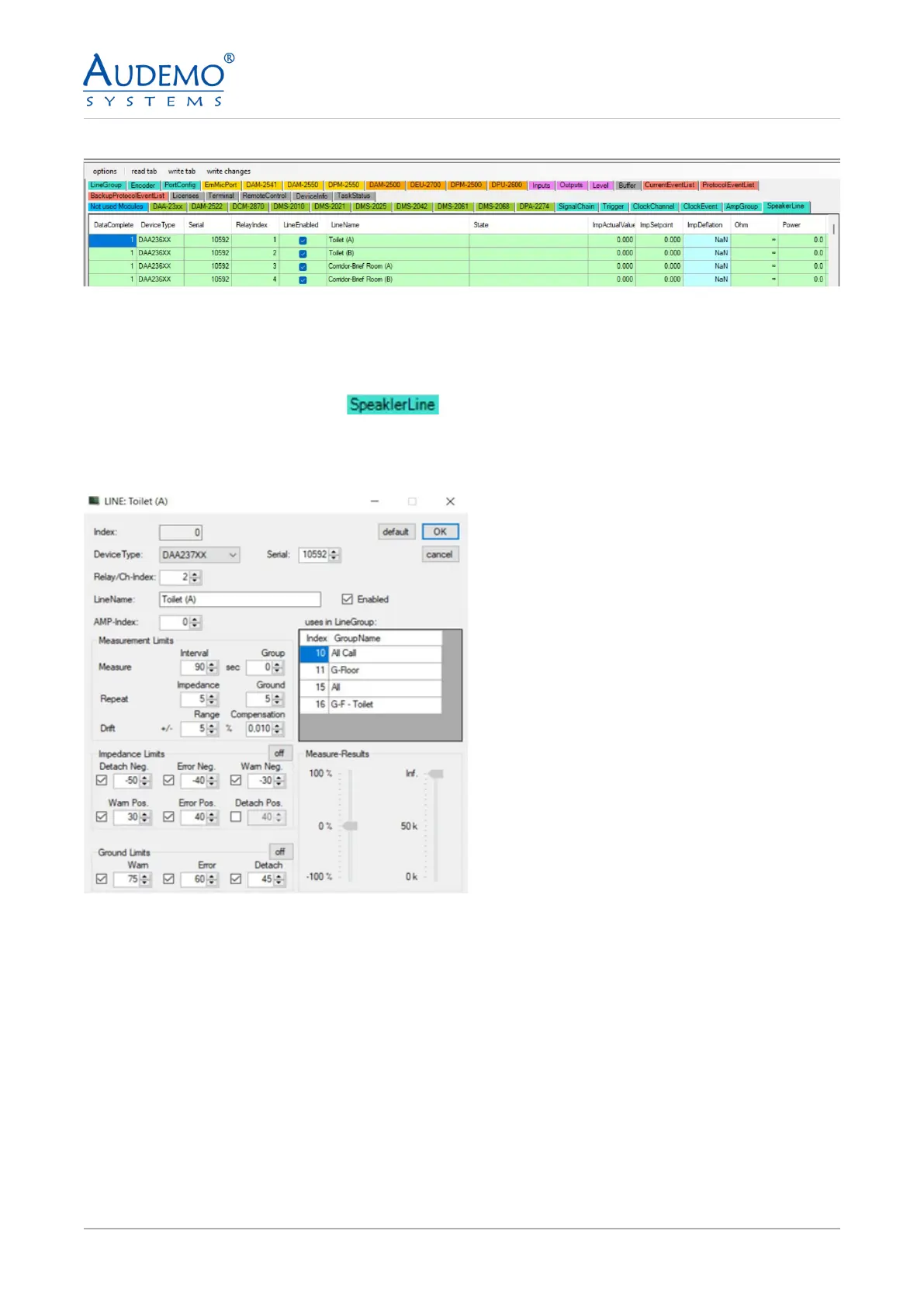
Example image: After setting up several speaker lines
Note: Repeat the process as described in point 6.5 until you have set up all your speaker lines.
6.6) DAA-237XX
• Click on the TAB Speaker Line -
• Double click on the rst free row in the main window.
• The following window appears:
• Look for your device under Device Type. In this case DAA-237XX
• Enter a serial number if it was not recognized by the system.
• For Relay/Ch-Index, enter the position on the relay to which this line is connected
• Give the line a unique name for “Line Name”.
• Enter the index number of your amplier under AMP index
• Check “Enabled” to activate the line you have congured.
• Note: The “uses in LineGroup” display does not show any line groups when speaker lines are set up for
the rst time. This only lls up when you have created line groups, see point 7.
• Click OK to apply your settings.


 To Next Page