7
©2023 by AUDEMO-SYSTEMS®, Schatzbogen 62, 81829 München V3
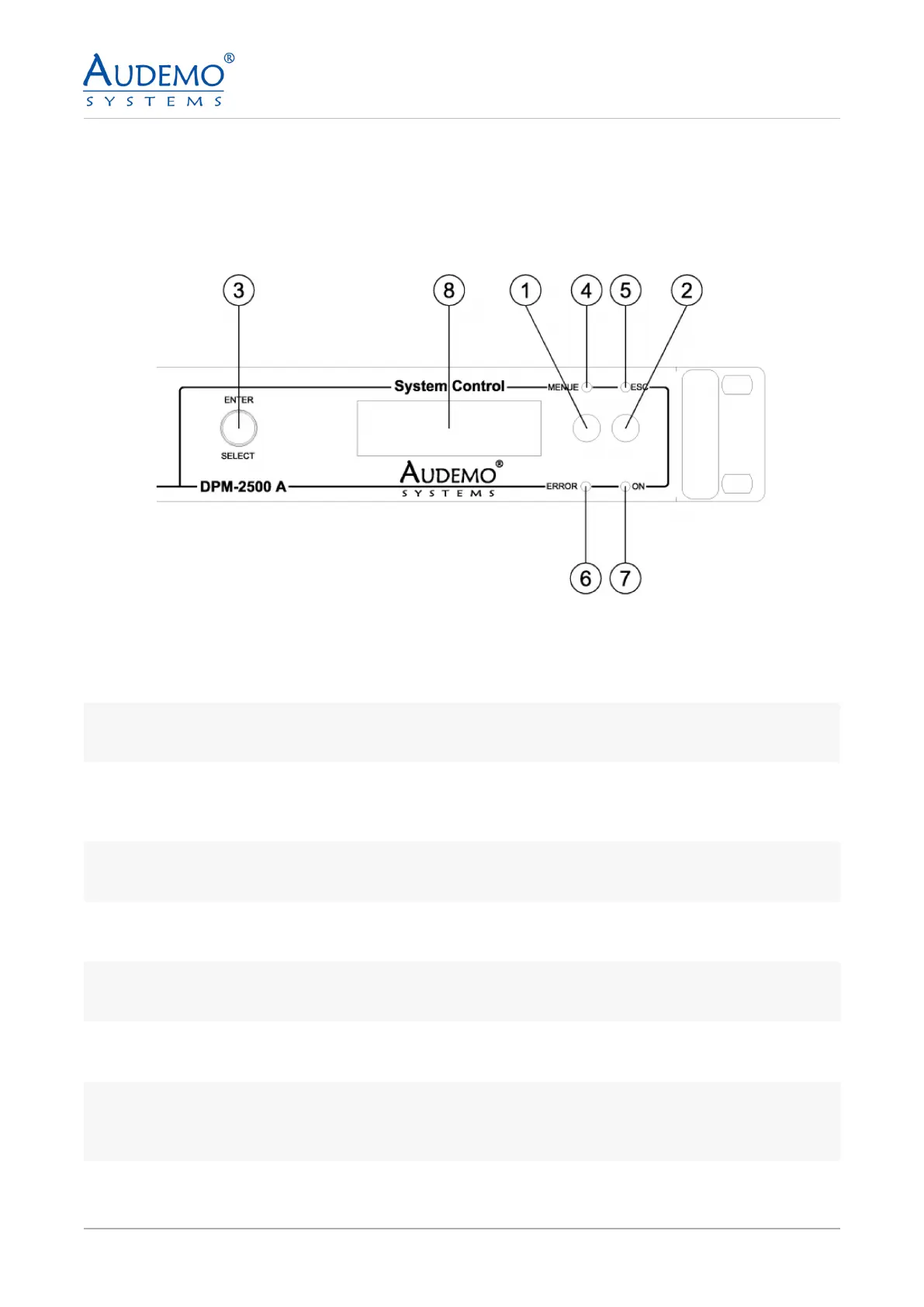
Front Panel:
4. Operational Controls
1
Function Key MENU
Push the key to enter the next submenu.
2
Function Key ESC
Push the key to leave the submenu to the next higher operating level.
3
SELECT-Turning Encoder with ENTER-Key Function
Rotate the encoder to change the menu items. The menu driven handling is indicated on the integrated
LCD-display. Push the encoder to conrmed a menu item (ENTER).
4
MENU LED
The green LED MENUE is illuminated on selection of a submenu.
5
ESC LED
The green LED ESC is illuminated on the possibility to leave a submenu to the next (higher) operating level.
6
ERROR LED
The yellow LED ERROR is illuminated on each failure of the unit.
7
ON LED
The green LED ON is illuminated on standby of the unit.
8
LCD-Display
Display with changing colour in order to indicate an error status of the unit. The display is illuminated yel-
low if any failure occurs.


 To Next Page