29 30
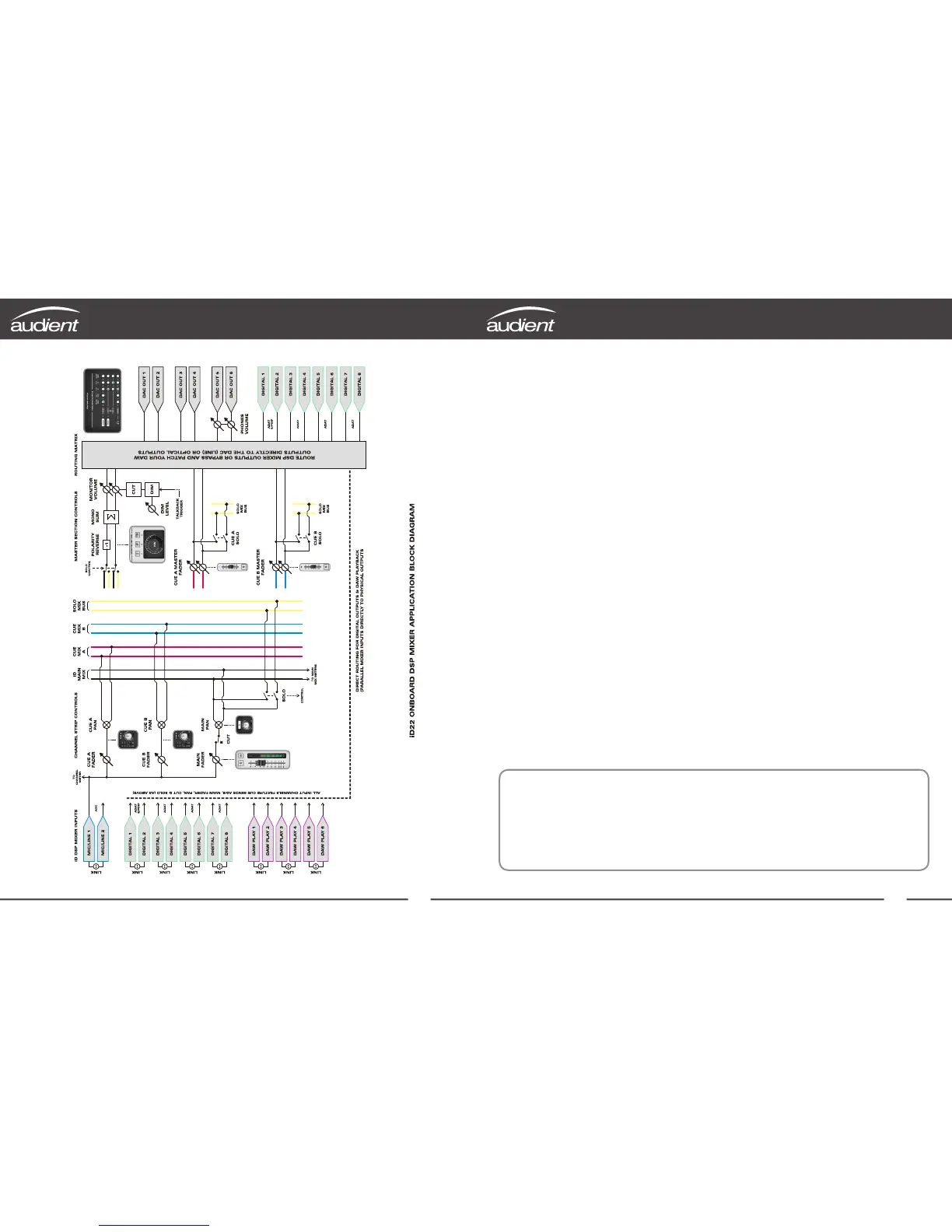
DSP Mixer Block Diagram Keyboard Shortcuts
Keyboard Shortcut Index
To allow you to find all shortcuts for the
mixer application in one place without
having to go through each page of this
manual please refer to this table:
Location Shortcut Description
Faders Alt (⌥) + Click Resets fader to unity gain (0 dB)
Pans Alt (⌥) + Click Resets pan pots to central position
Solos Command (⌘) + Click Clears all solos if clicking on a solo’d channel
Overrides all other solos (for solo exclusive)
if clicking on an unsolo’d channel
Meters Alt (⌥) + Click Clicking on peak hold indicator will clear all clip
indicators
System Panel Command (⌘) + S Save mixer configuration
Command (⌘) + O Load mixer configuration
View Modes Command (⌘) + 1 View Mic/Line Inputs
Command (⌘) + 2 View Optical (Digital) Inputs
Command (⌘) + 3 View DAW Mix Inputs
Command (⌘) + 4 View System Panel
Please check the iD22 page online at www.audient.com/iD22
for the latest mixer application updates.
More shortcuts may be added without notification.



 To Next Page