Page | 4
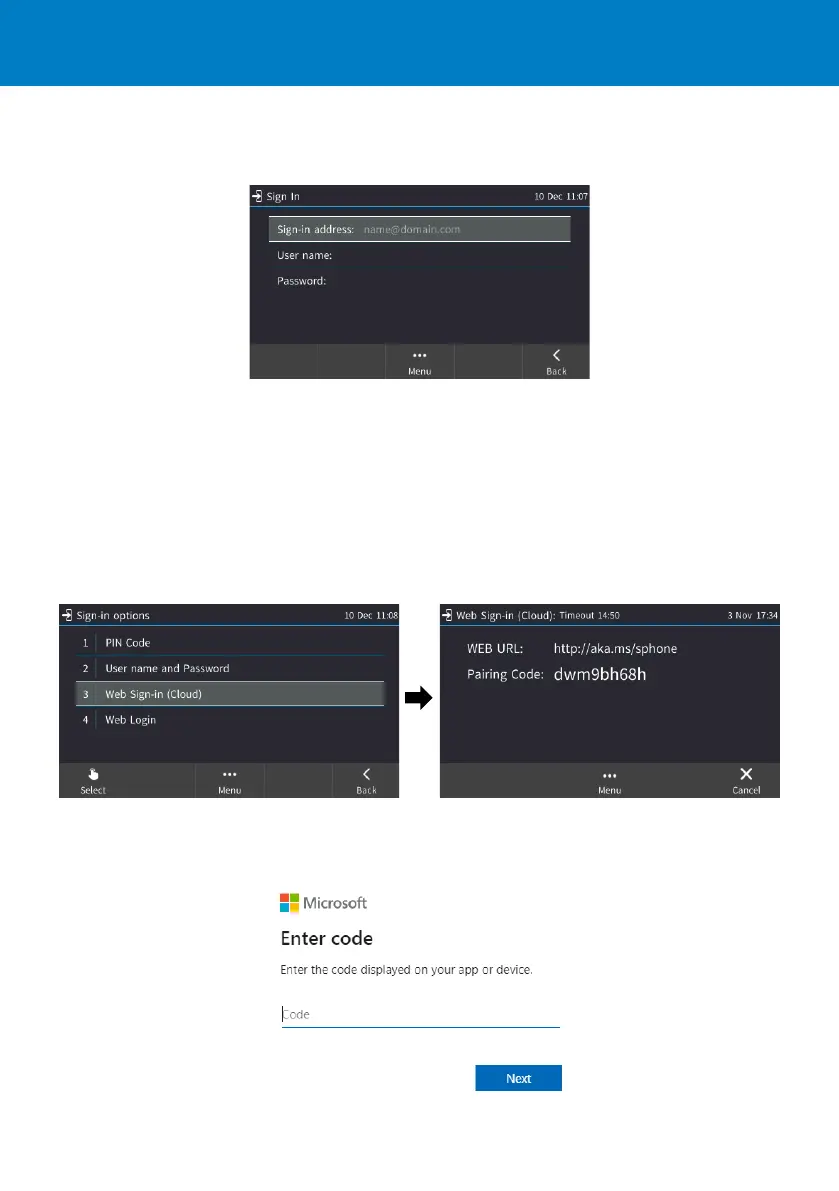
To sign in with a username and password:
1. In the Offline idle screen, touch Sign In, and then touch the User name and Password option.
2. Enter the ‘Sign-in address’ (SIP address), (e.g., john.doe@enterprise.com) and ‘User name’, (e.g.,
johnd@enterprise.com), and then enter the password. Get it from the network administrator (it’s the
same as the Windows credentials).
3. Touch the Select softkey.
To sign in with Web Sign-in (Cloud) (applies only to Microsoft Cloud PBX users):
1. In the Offline idle screen, touch Sign In, and then select the Web Sign-in (Cloud) option.
2. Using your web browser, navigate to the URL (Microsoft's Cloud PBX login page) shown in the Web
Sign-in (Cloud) screen (above).
3. Enter the pairing code, and then click Next:











 To Next Page