8
EN
Aura Allure with Xena Click & Tan
Disconnect and reconnect the Handle
from the Gun Body
•
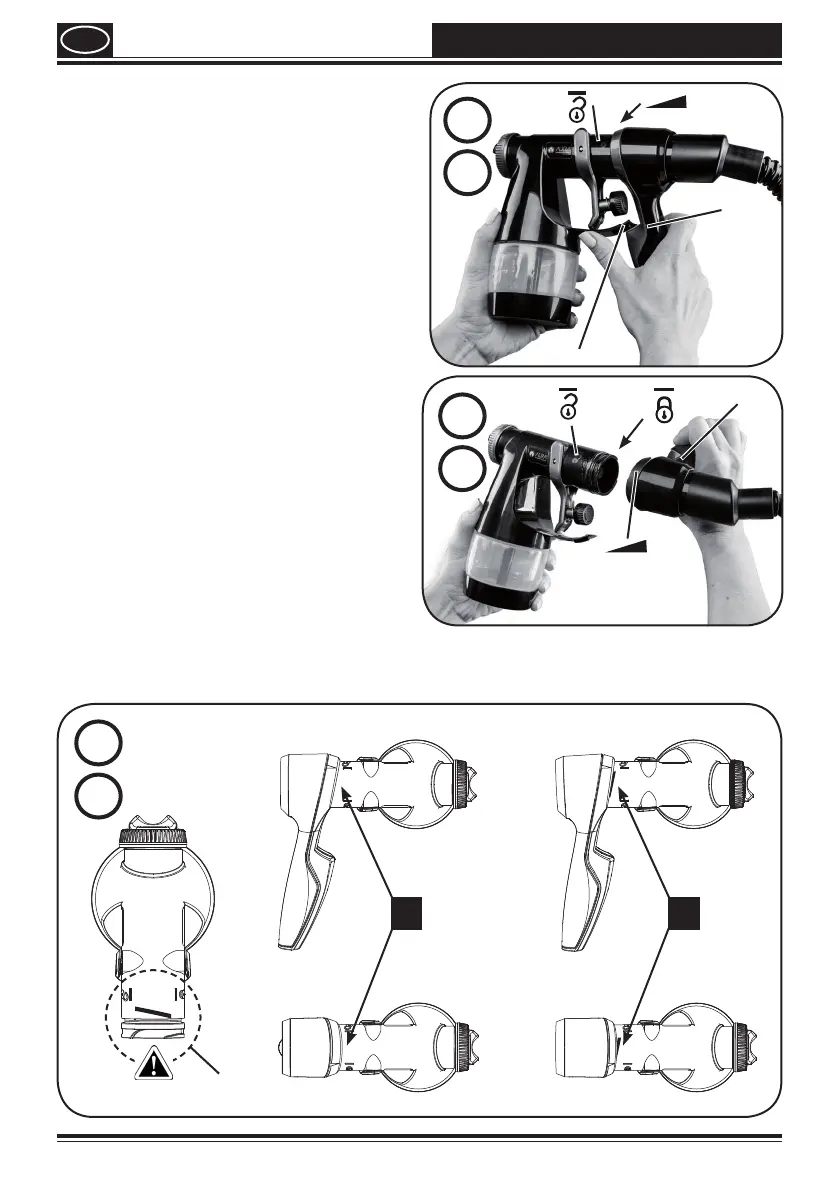
Disconnect Handle from Gun Body
(Fig. 7, a). While holding the Gun Body,
push the bridge (1) upwards, rotate the
handle (2) sideways until the arrow on
the Handle (3) aligns with the un-lock
symbol (4) on the Gun Body. Gently pull
the 2 pieces apart, the Gun Body is now
disconnected from the Handle.
•
Reconnect Handle to Gun Body
(Fig.7,b). Align the un-lock symbol (4) on
the Gun Body with the arrow symbol (3)
on the Handle, press both parts together
rmly until you feel a stop, then rotate
the Handle downwards until the arrow
symbol (3) on the Handle (2) aligns with
the lock symbol (5) on the Gun Body. At
this point a ‘click’ will be heard, the Gun
Body is now connected to the Handle.
Ensure they are connected rmly before
you begin spraying. The red/black label
on the gun body (Fig.7,c 1) should not be
visible if connected correctly (2).
7
2
3
4
b
5
7
1
2
3
4
a
For more help on using your new Click and Tan Sprayer, see our video page at
www.alluresprayers.com
X
1
3
2
7
c


 To Next Page