6
8
1
2
4
5
10
11
12
13
14
15
16
17
21
6
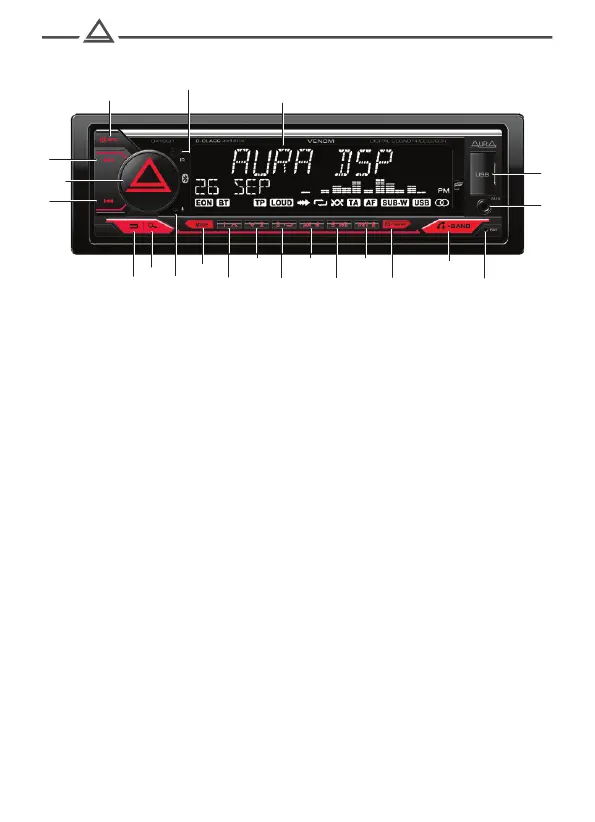
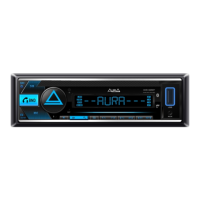
1. Turning on / off the device / Source choice
2. IR receiver
3. LCD display
4. USB slice
5. Next track / rewinding / setting up radio
6. Volume adjustment / switching / confirmation of choice
7. Previous track / rewinding back / Radio setting
8. Return
9. Search
10. Microphone
11. Muffle of sound (mute)
12. Pre -tuning button 1 / Next folder
13. Pre -setting button 2 / previous folder
14. Pre -configuration button 3 / repetition mode
15. Pre -configuration button 4 / random playback mode
16. Pre -setting button 5 / pause
17. Pre -tuning button 6 / scanning mode of tracks
18. Type of information on the display
19. Reception / Call completion / Voice Assistant / Switching
Radio ranges (FM1/2, FM3 (VHF), AM1/2)
20. Resetting to the factory settings (Reset)
21. AUX input
Controls
3
7
18
19
20
9



 To Next Page