5ENGLISH
OPERATION
CONTINUED NEXT PAGE
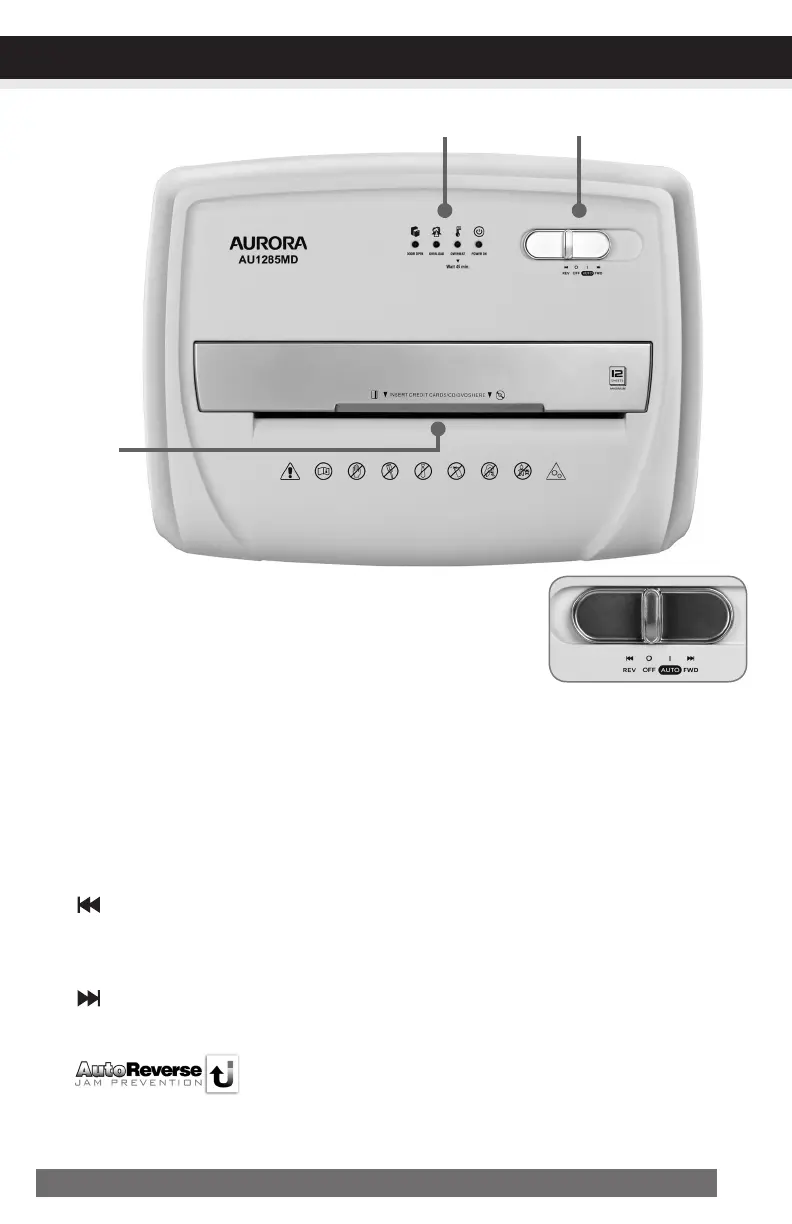
FIGURE2
ControlSwitch
Using the switch located on the unit, select one of the following settings
by sliding the switch either left or right. (FIGURE 2)
IAUTO/ON: This setting allows the shredder to be automatically started by inserting paper
into the feed slot. Always feed the paper in as straight as possible. When the paper has passed
through, the shredder will automatically stop.
READY:The green LED light indicates the shredder in “On” and ready for use.
OOFF:This setting turns off all features of the shredder. For safety reasons, we recommend that
you leave the shredder in the “ off ” position whenever the shredder is unattended or not in use.
Reverse: In the unlikely event of a paper jam, the reverse setting can be used to help clear the
cutters of paper that did not pass through. Never attempt to clear a jam by using the reverse
function until you have emptied the wastebasket.
Forward: The forward setting can also be used to help clear the cutters in the event of a
Paper jam. This allows to manually activate the shredder into cutting mode.
AutoReverseTechnology
When the shredder detects over-capacity shredding, the motor will immedi-
ately stop and reject paper before actual shredding begins.


 To Next Page