7ENGLISH
•DoorOpen: The Red LED light indicates the shredder basket is not pushed in properly.
Shredders with pull-out wastebaskets feature a safety power cut off upon bin removal. Make sure the
pull-out wastebasket is properly set back into place and the green “Power On” indicator is lit.
•BinFull:
When the "Basket is Full", the RED light will indicate it needs to be emptied. While lit, the shredder
will be inoperable until the wastebasket is cleared.
OPERATION
FIGURE3
Shredder
Oil
DO NOT USE
AEROSOL PRODUCTS!
MAINTENANCE
Warning:Failuretoproperlymaintainyourshredderwillvoidthewarranty.
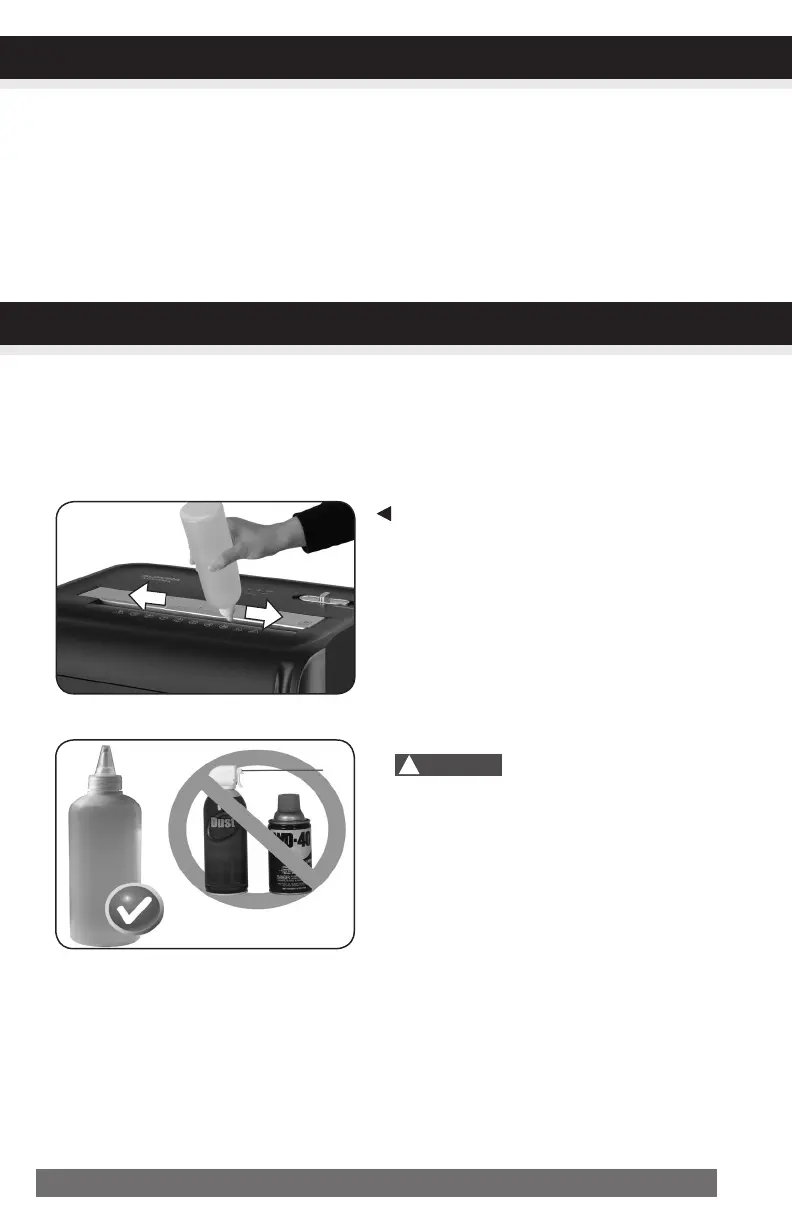
Oil the shredder blades every month with basic vegetable, cooking oil or shredder oil. Follow oiling
procedure below (FIGURE 3). It helps to keep the shredder blades operating well over many years of use.
Oilingprocedure:
1. Turn off shredder.
2. Apply shredder oil across paper entry.
3. Turn shredder in reverse mode for 3~5 seconds.
Note:lubricatingoilisNOTincluded.
• Donotsprayorkeepanyaerosolproducts
inoraroundshredder.
• DONOTUSECANNEDAIRONSHREDDER.
CLEANING:
• ALWAYS UNPLUG THE SHREDDER BEFORE CLEANING!
• Only clean the shredder by carefully wiping the unit with a dry soft cloth or towel.
• Do not clean or immerse shredder in water. Having the unit wet may result in damage or malfunction to
the electrical components. If the shredder happens to get wet, be sure to completely dry the unit immedi-
ately with a cloth or towel.
• Never use anything flammable to clean the shredder. This may result in serious injury or damage to the product.
!
Caution:


 To Next Page