29
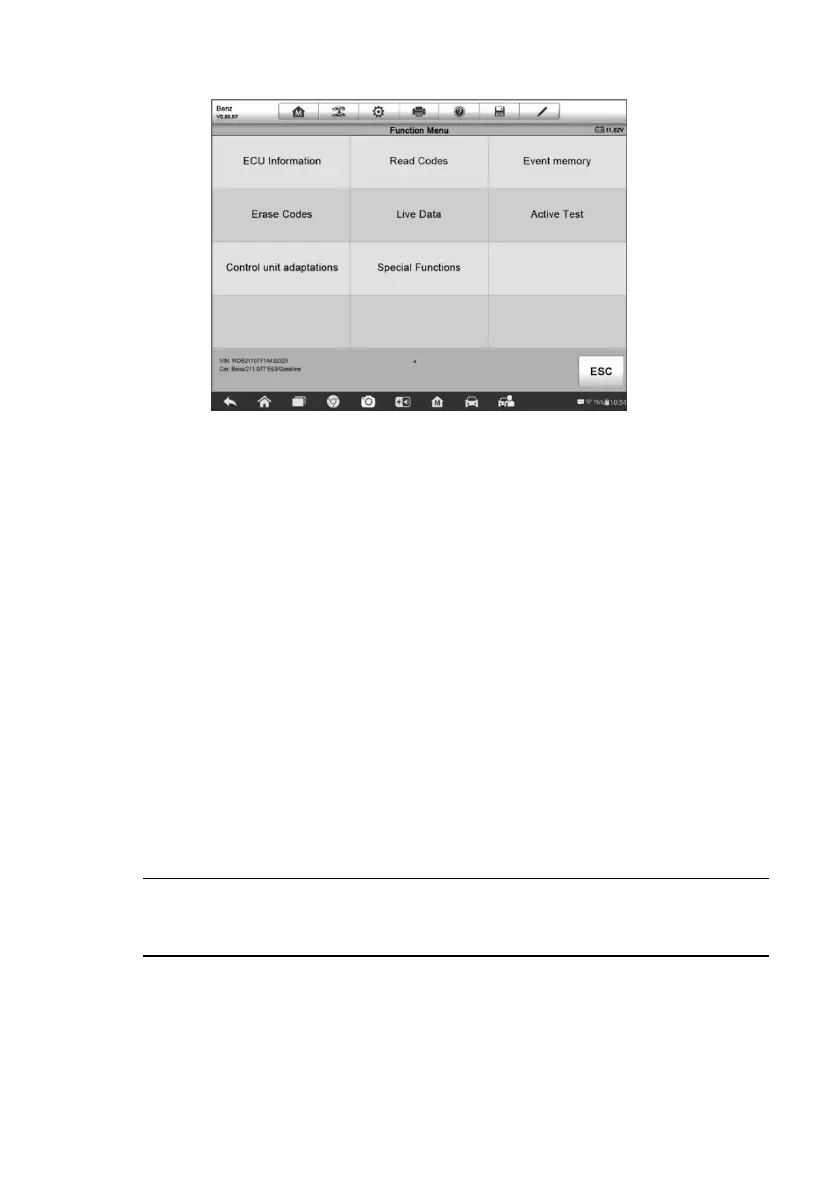
Figure 4-7 Sample Function Menu Screen
The Function Menu options vary slightly for different vehicles. The function
menu may include:
ECU Information – provides the retrieved ECU information in detail. An
information screen opens upon selection.
Read Codes – displays detailed information of DTC records retrieved
from the vehicle control module.
Erase Codes – erases DTC records and other data from the test vehicle’s
ECU.
Live Data – retrieves and displays live data and parameters from the
vehicle’s ECU.
Active Test – provides specific subsystem and component tests. This
selection may appear as Actuators, Actuator Test, or Function Tests,
etc., and the tests options vary depending on the manufacturer and model.
NOTE: Toolbar functions such as saving and printing of test results can be
performed throughout diagnostic testing. Data logging and access to help
information are also available.
To perform a diagnostic function
1. Establish communication with the test vehicle.
2. Identify the test vehicle by selecting from the menu options.













 To Next Page