77
Chapter 7 MaxiFix Operations
The MaxiFix application launches the on-line troubleshooter database, which not only
provides you virtually all common diagnostic trouble code (DTC) database for most
vehicles, but also serves as a forum allowing you to network with other MaxiCOM users,
and gives you access to a vast database of repair and diagnostic tips along with proven
filed fixes.
While the MaxiFix database keeps growing with daily troubleshooting resources and the
advisory reports from the MaxiCOM users from all over the world.
Information in the MaxiFix database is organized into a series of diagnostic tips that are
designed to quickly lead you to the root cause of a particular problem on the test vehicle.
7.1 Navigation
You need to register the device to your online account before launching the
MaxiFix platform, see Product Registration on page 100 for details.
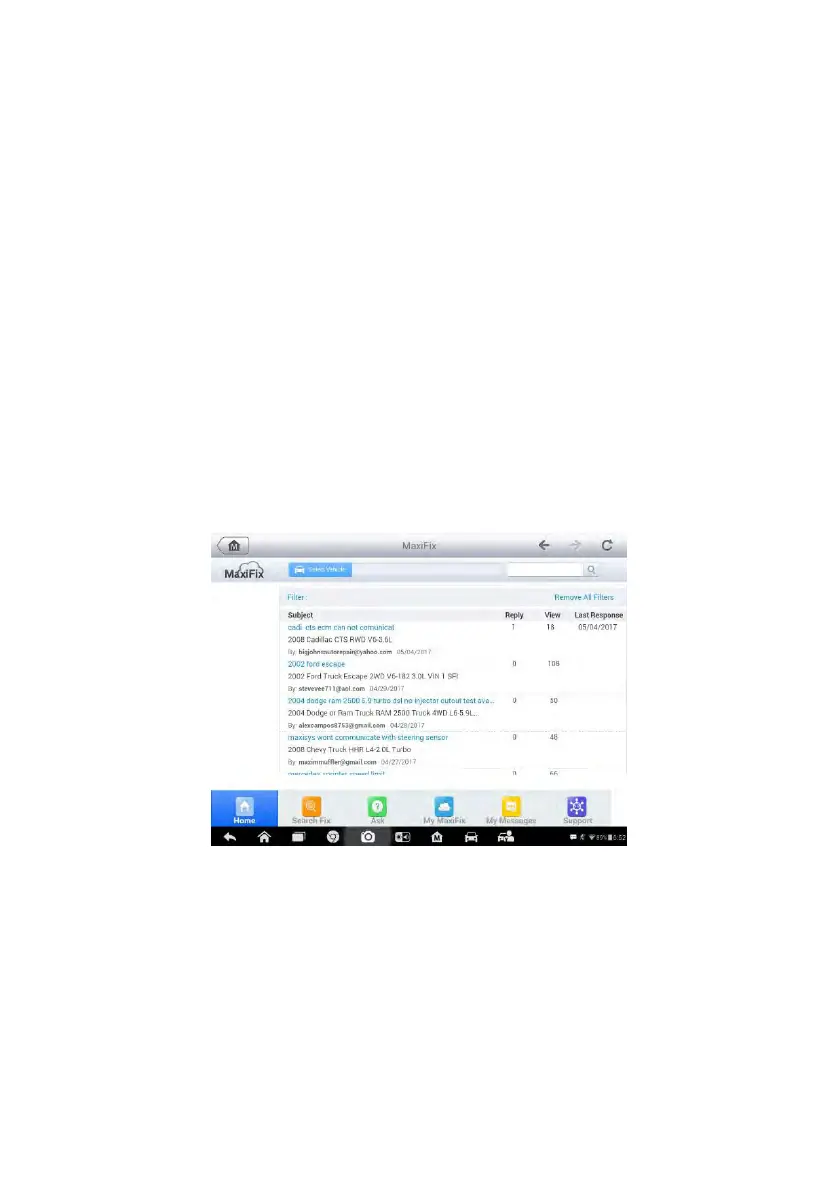
Figure 7-1 Sample MaxiFix Home Page
The MaxiFix screen layout consists of three main areas:
1. The Header – the tool bar across the top of the screen which allows you
to select vehicles and perform searches.
2. The Main Screen – located at the center of the screen displaying content
based on the vehicle attributes and keywords specified. The tabs on the
main screen vary in accordance with the section selected on the













 To Next Page