28
3. Functional Button – in this case, only an ESC (or sometimes a Back)
button is available; tap it to exit after viewing.
Read Codes
This function retrieves and displays the DTCs from the vehicle’s control
system. The Read Codes screen varies for each vehicle being tested. On
some vehicles, freeze frame data can also be retrieved for viewing. The
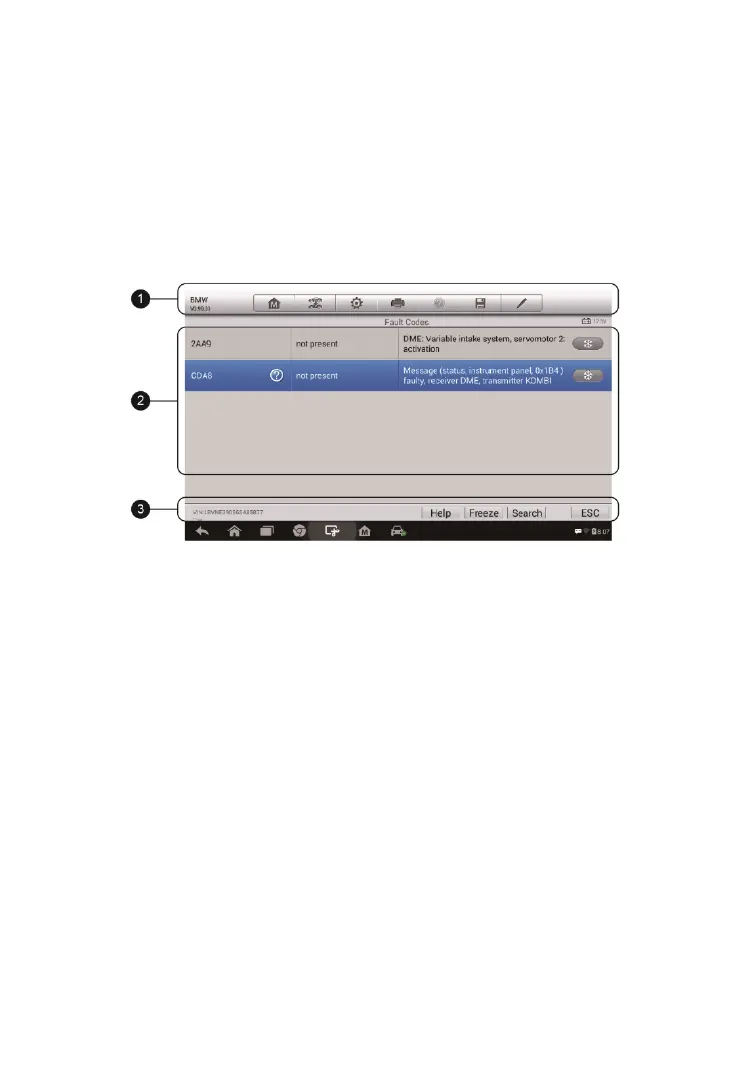
sample Read Codes screen displays as below:
1. Diagnostics Toolbar Buttons – see Table 4-2 Diagnostics Toolbar Buttons
on page 20 for detailed descriptions of the operations for each button.
2. Main Section
Code Column – displays the retrieved codes from the vehicle.
Status Column – indicates the status of the retrieved codes.
Description Column – detailed descriptions for the retrieved codes.
Snowflake Icon – only displays when freeze frame data is available
for viewing; selecting this icon will display a data screen, which looks
very similar to the Read Codes screen, therefore same operation
method may be applied.
3. Functional Button
Help – tap this to view the information of the fault code, including
fault description, condition for fault identification, driver information,
etc.
Freeze frame – tap this to view the freeze frame.
Figure 4-13 Sample Read Codes Screen


 To Next Page