86
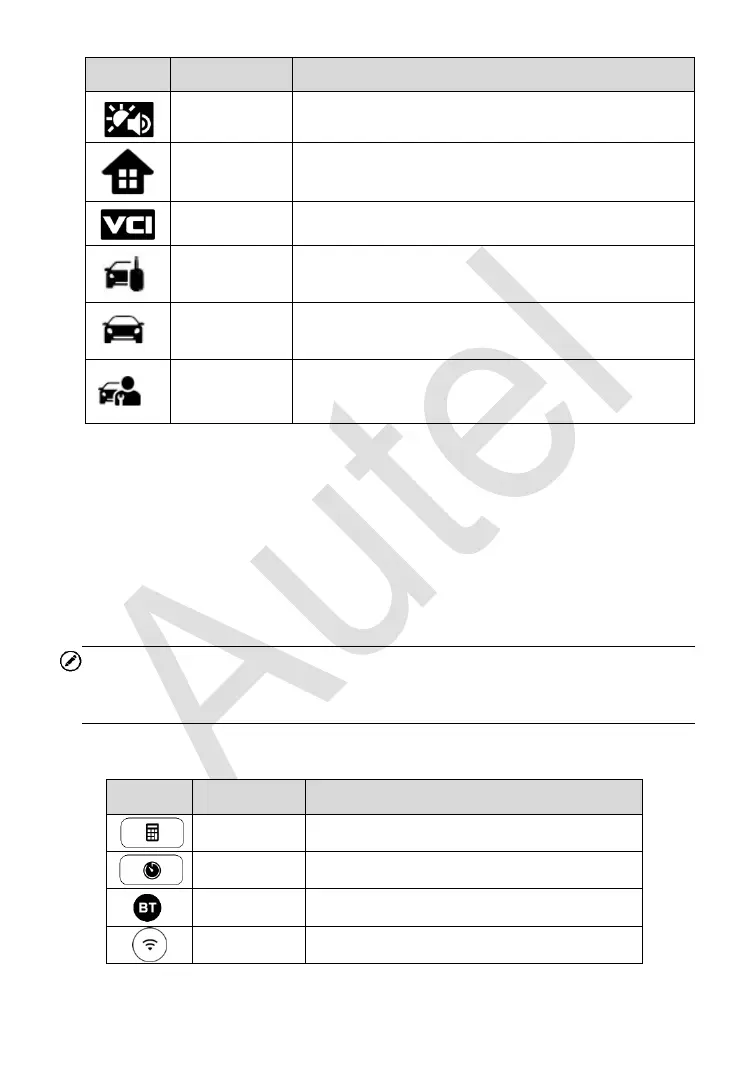
Adjust the brightness and volume of the tool.
Returns to MaxiIM Job Menu.
Returns to VCI Manager screen.
Returns to the IMMO screen.
Returns to the Diagnostic screen.
Returns to the Service screen.
System Status Icons
As the Display Tablet is working with the Android operating system, you may
refer to Android documents for more information.
By up sliding the bottom right corner, a Shortcuts Panel will be displayed, on
which you are allowed to set various system settings of the tablet. Operations
of each button on the panel are described in the table below:
NOTE
The shortcuts buttons will be highlighted when enabled and dimmed when
disabled.
Table 3-3 Shortcuts Panel Buttons
Launches calculator when pressed.
Launches clock when pressed.
Launches Bluetooth when pressed.
Enables/disables Wi-Fi when pressed.














 To Next Page