9
MaxiTPMS TS609 Display Tablet
Functional Description
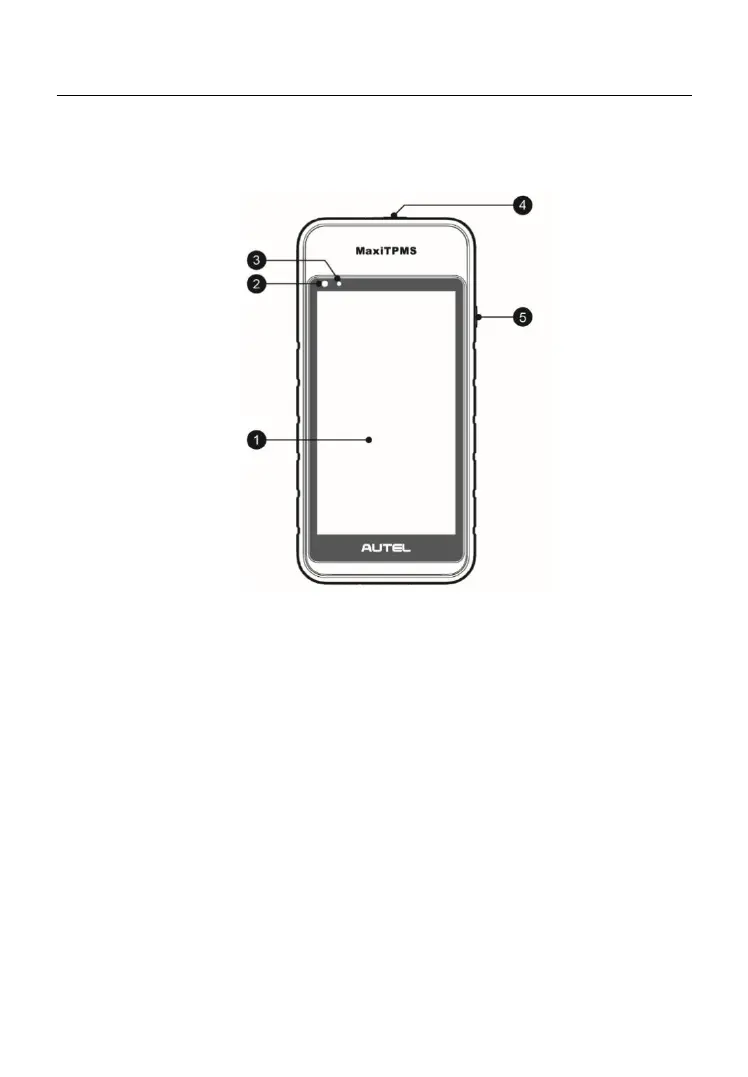
Figure 2- 1 Display Tablet Front View
1. 5.5” LCD Capacitive Touchscreen
2. Ambient Light Sensor – detects ambient brightness.
3. Power LED – indicates battery level & charging or system status.
4. TPMS Service Symbol – indicates the position of the embedded TPMS
antenna.
5. Lock/Power Button – long press button to turn tablet off and on. Quick
press button to lock screen.
The power LED displays green, yellow or red depending on the charging
status and operating state:
A. Green
Illuminates green when the Display Tablet is fully charged.
B. Yellow











 To Next Page