OM-261 661 Page 10
SECTION 5 − REPLACING THE LENS COVERS
5-1. Replacing Outside Lens Cover
Never use the auto-darkening lens without the inside and outside lens covers properly
installed. Welding spatter will damage the auto-darkening lens and void the warranty
Place helmet on a flat surface. Grasp the front lens holder with one hand while pushing the inside re-
taining clips of the lens holder outward. Do one side at a time, gently pulling the front lens holder away
from the helmet as each tab is released from its retaining clip. Once released, the outside cover lens
can be replaced.
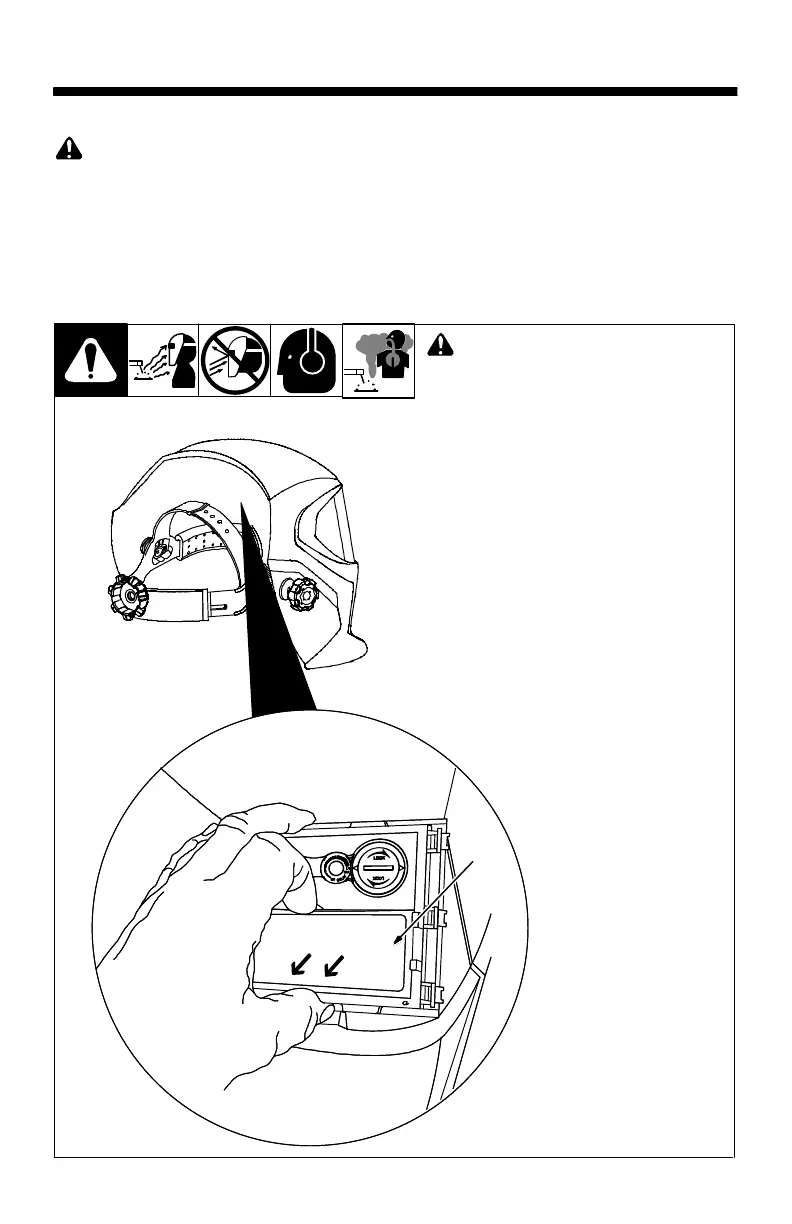
5-2. Replacing Inside Lens Cover
! Never use the auto-darkening lens
without the inside and outside lens
covers properly installed. Welding
spatter will damage the auto-dark
ening lens and void the warranty.
1 inside Lens Cover
Remove the auto-darkening lens assembly
by following the procedure in Section 5-1
With the auto-darkening lens removed
from the helmet, remove the inside cove
lens by prying the lens up at the thumbnai
opening located at the top center of the cov
er lens.
Replace the lens by gently bowing it in the
center and inserting it, one end a time, into
the retaining clips located on the outside o
the auto-darkening lens assembly.
Be sure the cover lens is seated prop
erly (flat) to prevent fogging.
1



 To Next Page