OM-261 661 Page 11
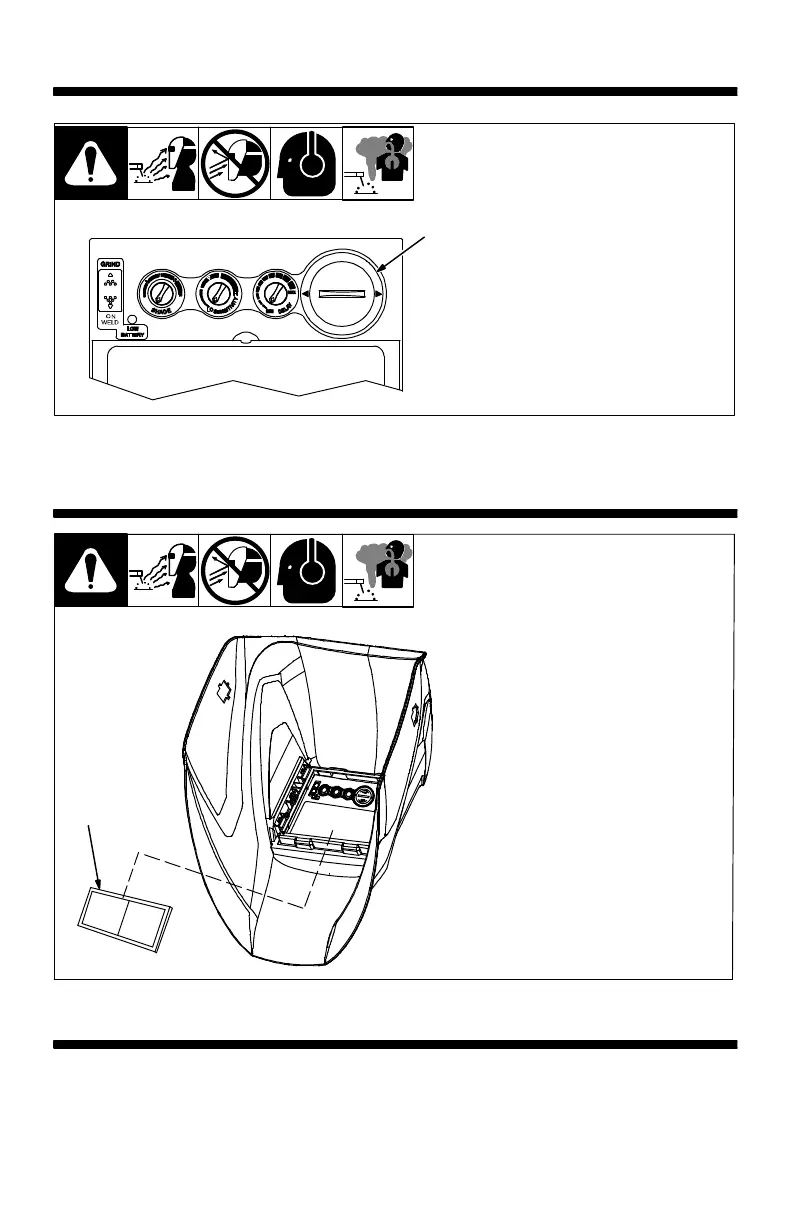
SECTION 6 − REPLACING THE BATTERY
1 Battery Cover
Remove battery by turning battery
cover counterclockwise.
Replace with CR2450 lithium battery.
Be sure Positive (+) side of the
battery faces up (toward inside of
helmet).
1
SECTION 7 − INSTALLING OPTIONAL MAGNIFYING LENS
1 Optional Magnifying Lens
Release lower lens retainer clip.
Starting at the bottom, slide magni-
fying lens into the helmet retaining
brackets. Align the magnifying lens
with the auto-darkening lens as-
sembly.
Reverse procedure to remove
magnifying lens.
To prevent lens fogging, install
flat side of magnifying lens to-
ward auto-darkening lens.
1
SECTION 8 − MAINTENANCE
NOTICE − Never use solvents or abrasive cleaning detergents. Do not immerse the lens assembly
in water.
The helmet requires little maintenance. However, for best performance clean after each use. Using
a soft cloth dampened with a mild soap and water solution, wipe the cover lenses clean. Allow to air
dry. Occasionally, the filter lens and sensors should be cleaned by gently wiping with a soft, dry cloth.



 To Next Page