EasyManua.ls Logo

AUTODA AD2017D - User Manual

AUTODA AD2017D
59 pages
Print Icon
To Next Page IconTo Next Page
Loading...
0
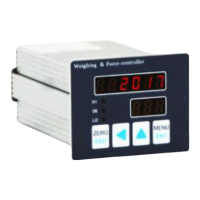
AD2017D weighing instrument
instruction manual
Question and Answer IconNeed help?

Do you have a question about the AUTODA AD2017D and is the answer not in the manual?

Summary

1 Overview

1.1 Safety and Handling Precautions

Safety and handling guidelines for the weighing instrument, covering unpacking, installation, wiring, use, and maintenance.

1.2 Functions and Features Overview

Overview of the weighing instrument's core capabilities, including signal conversion, output types, and control functions.

2 Technical Specifications

2.1 Detailed Technical Parameters

Detailed technical specifications of the weighing instrument, including display, accuracy, input/output ranges, and environmental conditions.

2.2 Mounting and Dimensions

Provides the physical dimensions and mounting hole specifications for installing the weighing instrument.

3 Terminal Wiring and Panel Description

3.1 Terminal Definitions and Wiring Diagrams

Details terminal definitions for controller ports and provides wiring diagrams for sensor and I/O connections.

3.2 Control Panel Operation

Explains the functions of indicator lamps, keystrokes, and shortcut operations on the weighing instrument's control panel.

4 Calibration Procedures

4.1 Calibration with Sensor Weights

Step-by-step guide for calibrating the weighing instrument using calibration weights.

4.2 Calibration without Weights

Procedure for calibrating the weighing instrument when calibration weights are not available.

5 Menu Details and Parameters

5.1 Primary Menu Navigation

Details the structure and navigation of the primary menu on the weighing instrument.

5.2 Sub-Menu Parameter Categories

Overview of parameter categories within the sub-menu, including basic, functional, analog, port, and communication parameters.

5.3 Parameter Modification Examples

Illustrates how to modify various parameters, such as the division value, using the instrument's interface.

6 Serial Communication

6.1 MODBUS Communication Protocol

Explains the MODBUS-RTU communication protocol, including function codes, data frames, and debugging examples.

6.2 Continuous Data Output Format

Describes the format for continuous real-time data output from the weighing instrument.

7 Notes and Troubleshooting

7.1 Note 1: Communication Data Types

Clarifies the data types used for communication, distinguishing between 2-byte integer and 4-byte long integer formats.

7.2 Note 2: Limit Judgment Function

Detailed explanation of different limit judgment functions and their operational modes.

7.3 Note 4: Restore Factory Settings

Instructions for restoring the weighing instrument to its default factory settings.

7.4 Note 5: Fault Alarms and Troubleshooting

Provides information on fault alarms, error codes, and troubleshooting steps for the weighing instrument.

7.5 Note 6: Shortcut Key Functions

Explains the shortcut functions available through the digital adjustment key.

Summary

1 Overview

1.1 Safety and Handling Precautions

Safety and handling guidelines for the weighing instrument, covering unpacking, installation, wiring, use, and maintenance.

1.2 Functions and Features Overview

Overview of the weighing instrument's core capabilities, including signal conversion, output types, and control functions.

2 Technical Specifications

2.1 Detailed Technical Parameters

Detailed technical specifications of the weighing instrument, including display, accuracy, input/output ranges, and environmental conditions.

2.2 Mounting and Dimensions

Provides the physical dimensions and mounting hole specifications for installing the weighing instrument.

3 Terminal Wiring and Panel Description

3.1 Terminal Definitions and Wiring Diagrams

Details terminal definitions for controller ports and provides wiring diagrams for sensor and I/O connections.

3.2 Control Panel Operation

Explains the functions of indicator lamps, keystrokes, and shortcut operations on the weighing instrument's control panel.

4 Calibration Procedures

4.1 Calibration with Sensor Weights

Step-by-step guide for calibrating the weighing instrument using calibration weights.

4.2 Calibration without Weights

Procedure for calibrating the weighing instrument when calibration weights are not available.

5 Menu Details and Parameters

5.1 Primary Menu Navigation

Details the structure and navigation of the primary menu on the weighing instrument.

5.2 Sub-Menu Parameter Categories

Overview of parameter categories within the sub-menu, including basic, functional, analog, port, and communication parameters.

5.3 Parameter Modification Examples

Illustrates how to modify various parameters, such as the division value, using the instrument's interface.

6 Serial Communication

6.1 MODBUS Communication Protocol

Explains the MODBUS-RTU communication protocol, including function codes, data frames, and debugging examples.

6.2 Continuous Data Output Format

Describes the format for continuous real-time data output from the weighing instrument.

7 Notes and Troubleshooting

7.1 Note 1: Communication Data Types

Clarifies the data types used for communication, distinguishing between 2-byte integer and 4-byte long integer formats.

7.2 Note 2: Limit Judgment Function

Detailed explanation of different limit judgment functions and their operational modes.

7.3 Note 4: Restore Factory Settings

Instructions for restoring the weighing instrument to its default factory settings.

7.4 Note 5: Fault Alarms and Troubleshooting

Provides information on fault alarms, error codes, and troubleshooting steps for the weighing instrument.

7.5 Note 6: Shortcut Key Functions

Explains the shortcut functions available through the digital adjustment key.

AUTODA AD2017D Specifications

General IconGeneral
BrandAUTODA
ModelAD2017D
CategoryMeasuring Instruments
LanguageEnglish