AutoDAB Connect User Guide
5
ATTENTION
1. For AutoDAB Connect to work with the active antenna, the antenna
power must be set to ON; for AutoDAB Connect to work with a
passive antenna, the antenna power must be set to OFF.
2. Anytime you need to disconnect/connect the antenna you’re your
AutoDAB Connect, please unplug your AutoDAB Connect from the
cigarette lighter first to avoid possible damage to the antenna.
3. Damage resulted from incorrect installation of the antenna is not
covered by the warranty.
4. Consult a professional installer if you have any issues or concerns
with the installation.
6. Minimize coiling loops of excessive power cable and antenna cable, and do not
secure them on AutoDAB Connect. Please refer to section on Installation dos and
don’ts
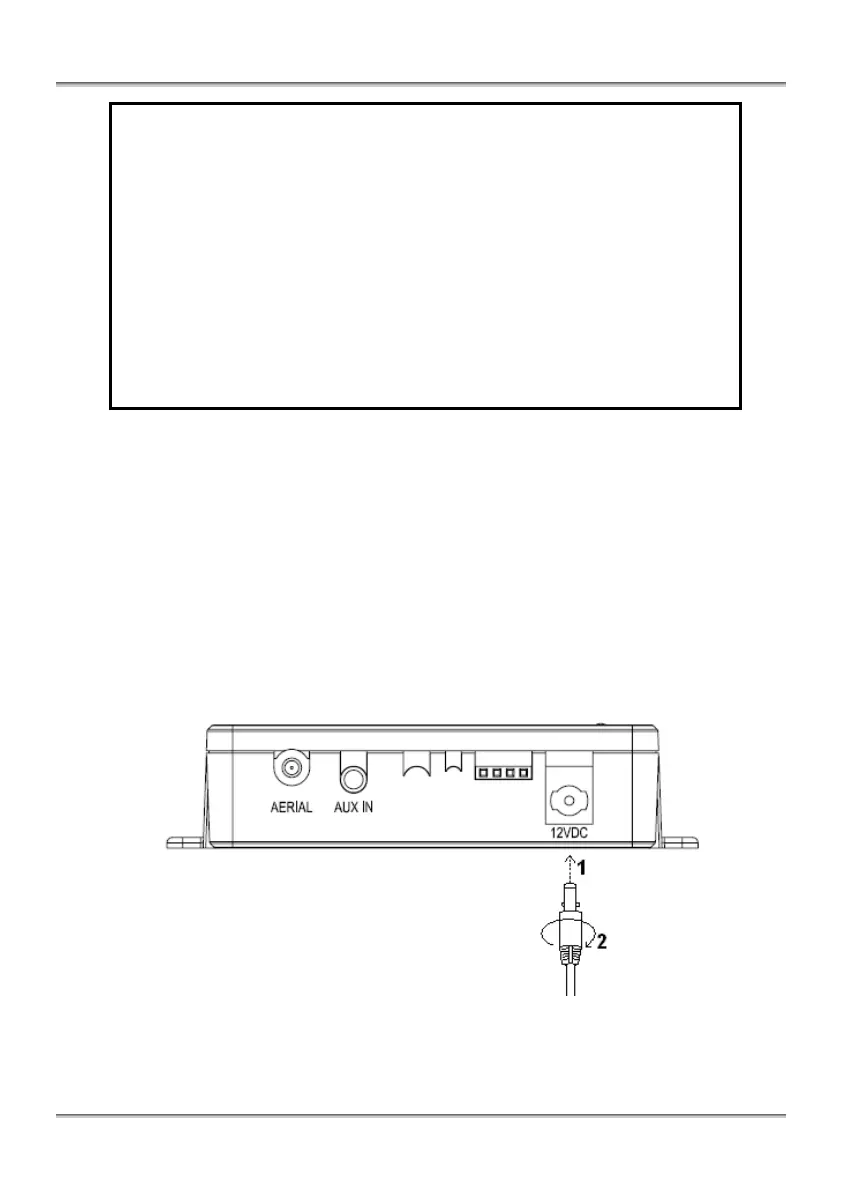
7. Plug one end of the power cable to AutoDAB Connect and the cigarette-lighter plug
into car’s cigarette lighter. There is a lock mechanism on the plug of Power Cable to
AutoDAB Connect. First, plug the power cable into the 12V DC jack (1), and then
you need to turn the power plug 90 degree clockwise (2) as illustrated below. This
is to ensure that the power cable will be firmly connected to the AutoDAB Connect
at all times.
8. Start using AutoDAB Connect with the remote control, please refer to the sections
on OPERATION CONTROLS and STARTING UP THE SYSTEM.


 To Next Page